
CubicFun 771L519
CubicFun LED St. Basil's Cathedral 3D Puzzle Instruction Manual
Model: 771L519
Brand: CubicFun
Introduction
This manual provides detailed instructions for assembling and operating your CubicFun LED St. Basil's Cathedral 3D Puzzle. This 224-piece model kit allows you to construct a replica of the iconic St. Basil's Cathedral, complete with LED lighting. Please read all instructions carefully before beginning assembly.

Safety Information
WARNING: CHOKING HAZARD - Small Parts. Not for children under 3 years. Adult supervision is recommended during assembly, especially for younger users.
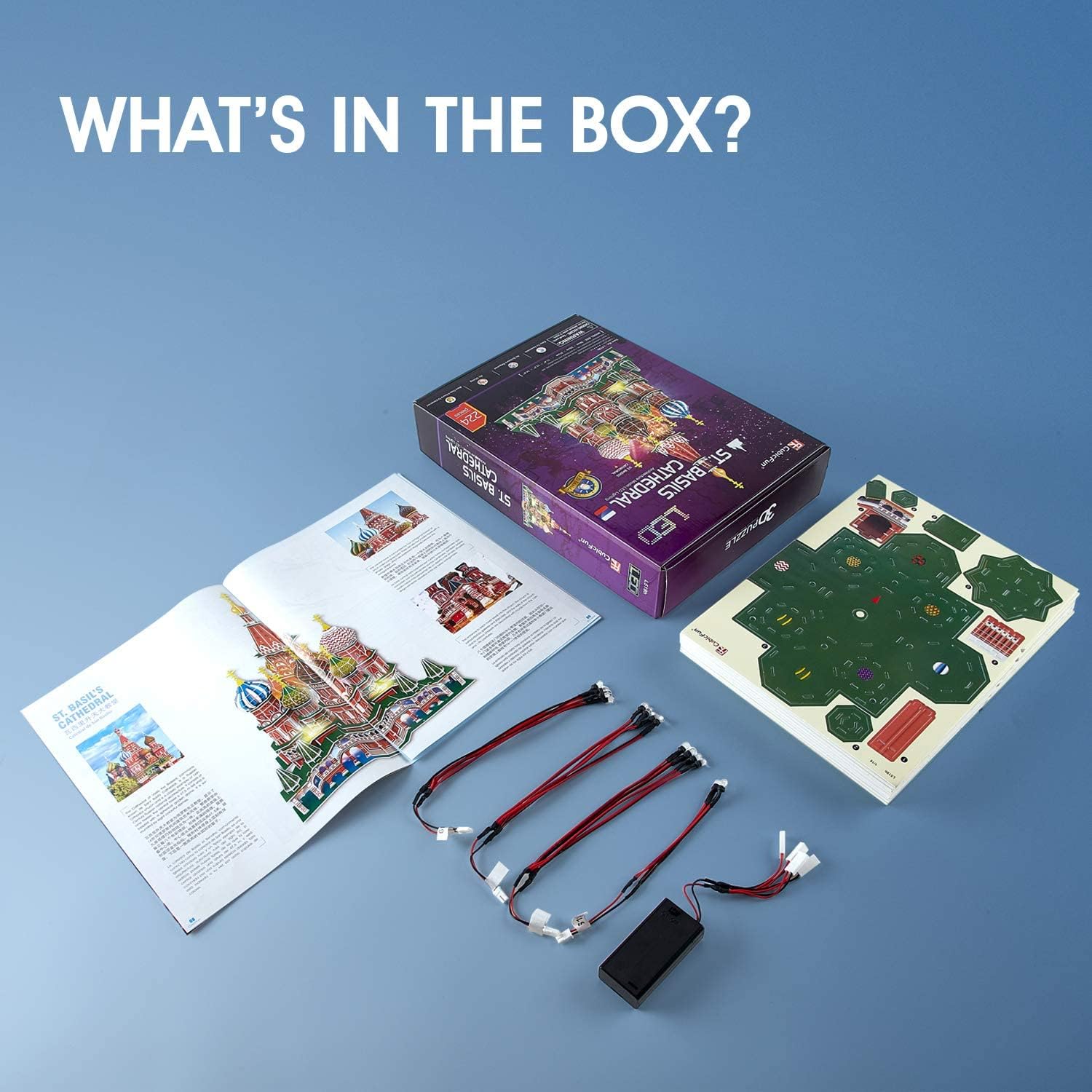
What's in the Box
Verify that all components are present before starting assembly.
- 224 3D Puzzle Pieces (pre-cut on foam boards)
- LED Light Set
- Illustrated Instruction Manual
- Punch-Out Tool (for removing pieces from sheets)
- Battery Box (AA batteries not included)
Assembly Instructions
Follow the numbered steps in the included illustrated instruction manual. No scissors or glue are required for assembly, as pieces are designed to interlock.
- Preparation: Carefully punch out all puzzle pieces from the foam sheets. Use the provided punch-out tool for smaller or more intricate parts. Organize pieces by number or section as indicated in the manual.
- Base Assembly: Begin by assembling the base structure of the cathedral. Ensure all tabs are securely inserted into their corresponding slots.
- Building Layers: Construct the main body of the cathedral layer by layer, following the numerical sequence in the manual. Pay close attention to the orientation of each piece.
- Dome and Tower Assembly: Assemble the various domes and towers separately before attaching them to the main structure. These often involve folding and interlocking multiple pieces to form the curved shapes.
- LED Light Integration: During specific steps, the manual will instruct you to integrate the LED light wires and bulbs. Ensure the bulbs are placed in the designated openings and wires are routed neatly to the battery box connection point.
- Final Touches: Attach any remaining decorative elements, such as crosses on the domes, to complete the model.


Video: This video demonstrates the assembly process of the CubicFun St. Basil's Cathedral 3D Puzzle, including how to connect pieces and integrate the LED lighting for a complete model.
Operating Instructions (LED Light)
- Battery Installation: Locate the battery box. Open the battery compartment and insert the required AA batteries (not included), ensuring correct polarity (+/-). Close the compartment securely.
- Connecting LED Lights: Connect the LED light set's plug to the battery box's socket.
- Activating Lights: Use the switch on the battery box to turn the LED lights ON or OFF.
For optimal performance, use fresh batteries. Remove batteries if the puzzle will not be used for an extended period.
Maintenance
- Cleaning: Gently dust the assembled model with a soft, dry cloth. Avoid using liquid cleaners or abrasive materials, as they may damage the printed surfaces.
- Storage: Store the model in a dry environment away from direct sunlight to prevent fading or warping of the cardboard pieces.
- Handling: Handle the assembled model with care to avoid dislodging pieces.
Troubleshooting
| Problem | Possible Cause | Solution |
|---|---|---|
| Pieces do not fit together easily. | Incorrect orientation or slight manufacturing variation. | Ensure the piece is oriented correctly according to the instructions. Gently apply pressure. If a piece is slightly tight, carefully widen the slot with the punch-out tool or a blunt object. Avoid forcing pieces. |
| LED lights are not working. | Batteries are dead, incorrectly installed, or the connection is loose. | Check battery polarity and ensure they are fresh. Verify that the LED light set is securely plugged into the battery box. Ensure the ON/OFF switch is in the 'ON' position. |
| Assembled model feels unstable. | Pieces are not fully interlocked or a section is misaligned. | Review the assembly steps for the affected section. Press firmly on all connections to ensure tabs are fully seated in their slots. |
Specifications
- Product Dimensions: 11.42 x 14.57 x 9.84 inches (29 x 37 x 25 cm)
- Item Weight: 8 ounces
- Model Number: 771L519
- Recommended Age: 8 years and up
- Pieces: 224
- Power Source: AA batteries (not included)
- Material: EPS Foam Board

Warranty and Support
For any missing parts, assembly difficulties, or product inquiries, please contact CubicFun customer support. Refer to the contact information provided on the product packaging or the official CubicFun website for assistance.
Related documents771L519

Ask a question about this manual
Ask about setup, troubleshooting, compatibility, parts, safety, or missing instructions. Manuals+ will review the question and use this page’s manual context to help answer it.