
Introduction
This user manual provides comprehensive instructions for the proper setup, operation, maintenance, and troubleshooting of your ESPRIT Chronograph White Dial Men's Watch, model ES000T31021-N. Please read this manual carefully to ensure optimal performance and longevity of your timepiece. Keep this manual for future reference.
Product Overview
Familiarize yourself with the various components of your ESPRIT Chronograph Watch.
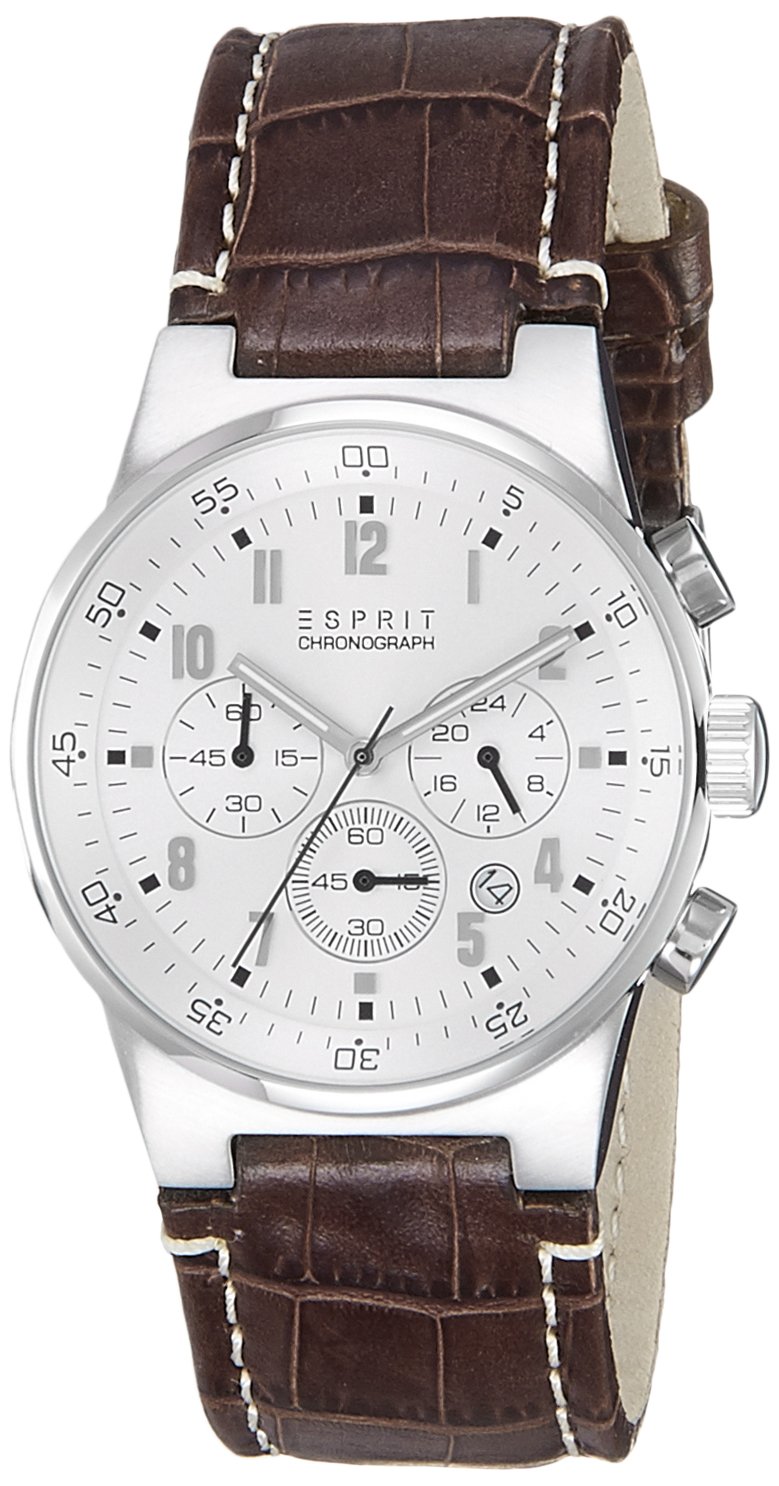
Figure 1: Front view of the ESPRIT Chronograph Watch. This image displays the watch face, including the white dial, main hour, minute, and second hands, three chronograph sub-dials, and the date window. The crown and two pushers are visible on the right side of the case. The brown leather strap with white stitching is also shown.

Figure 2: Side view of the ESPRIT Chronograph Watch. This image highlights the watch case profile, the main crown used for time and date adjustments, and the two pushers located above and below the crown, which control the chronograph functions.

Figure 3: Back view of the ESPRIT Chronograph Watch. This image shows the stainless steel case back, which is engraved with product information such as "ESPRIT," "STAINLESS STEEL," and "WATER RESISTANT 5 ATM / 50 METERS." The inner side of the brown leather strap and the buckle are also visible.
Key Components:
- Crown: Used for setting the time and date.
- Pushers (A & B): Used to operate the chronograph (stopwatch) function. Pusher A (top) typically starts/stops, Pusher B (bottom) resets.
- Main Dial: Displays the current time with hour, minute, and second hands.
- Chronograph Sub-dials:
- Small seconds hand (usually at 6 o'clock or 9 o'clock).
- Chronograph minute counter (e.g., 30-minute counter).
- 24-hour indicator (often linked to main time).
- Date Window: Displays the current date.
- Leather Strap: Brown leather with a buckle clasp for secure wearing.
Setup
1. Unboxing and Inspection:
Carefully remove the watch from its packaging. Inspect the watch for any visible damage or defects. Ensure all protective films are removed from the crystal and case back.

Figure 4: The ESPRIT watch box. The watch is typically packaged in a compact, light-colored box with the "ESPRIT" logo prominently displayed on the top surface.
2. Adjusting the Strap:
The brown leather strap features multiple holes for size adjustment. Select the hole that provides a comfortable and secure fit on your wrist. The watch should be snug enough not to slide freely but not so tight as to restrict circulation.

Figure 5: ESPRIT Chronograph Watch worn on a wrist. This image demonstrates how the watch appears when properly worn, showcasing its size and fit on an average adult wrist.
Operating Instructions
1. Setting the Time:
- Pull the crown out to the second click position (farthest from the case). The second hand will stop.
- Rotate the crown clockwise or counter-clockwise to set the hour and minute hands to the desired time.
- Once the time is set, push the crown back in to the normal position (against the case). The second hand will resume movement.
2. Setting the Date:
- Pull the crown out to the first click position.
- Rotate the crown clockwise or counter-clockwise to adjust the date.
- Once the date is set, push the crown back in to the normal position.
- Important: Avoid setting the date between 9:00 PM and 3:00 AM, as this can interfere with the automatic date change mechanism. If the date needs to be set during this period, first set the time outside this window, adjust the date, then reset the time.
3. Using the Chronograph (Stopwatch):
The chronograph function allows you to measure elapsed time.
- To start the chronograph, press Pusher A (top pusher). The chronograph second hand will begin to move.
- To stop the chronograph, press Pusher A again. The chronograph second hand and minute counter will stop, displaying the elapsed time.
- To reset the chronograph, press Pusher B (bottom pusher). All chronograph hands will return to their zero positions.
- To measure split times (intermediate times without stopping the main measurement):
- Press Pusher A to start.
- Press Pusher B to record a split time (the hands will stop, but timing continues internally).
- Press Pusher B again to catch up to the ongoing time.
- Press Pusher A to stop the chronograph.
- Press Pusher B to reset.
Care and Maintenance
- Cleaning: Wipe the watch case and crystal regularly with a soft, dry cloth to remove dust and fingerprints. For the leather strap, avoid excessive moisture and harsh chemicals.
- Water Resistance: This watch is water resistant to 5 ATM (50 meters). This means it is suitable for everyday use, accidental splashes, and short periods of recreational swimming. It is not suitable for diving, snorkeling, or high-pressure water activities. Always ensure the crown is fully pushed in before exposing the watch to water.
- Temperature Extremes: Avoid exposing your watch to extreme temperatures (hot or cold) or sudden temperature changes, as this can affect the movement and battery life.
- Chemicals: Keep the watch away from solvents, detergents, perfumes, and cosmetics, as these can damage the case, strap, or internal components.
- Magnetic Fields: Strong magnetic fields can affect the accuracy of quartz watches. Keep the watch away from strong magnets.
- Battery Replacement: When the watch stops or the second hand begins to jump in irregular intervals (low battery indicator), it is time for a battery replacement. It is highly recommended to have the battery replaced by a qualified watch technician to ensure proper sealing and water resistance.
- Storage: When not in use for extended periods, store the watch in a cool, dry place, away from direct sunlight.
Troubleshooting
| Problem | Possible Cause | Solution |
|---|---|---|
| Watch not running. | Battery depleted or crown is pulled out. | Push the crown fully in. If it still doesn't run, the battery may need replacement. Contact a qualified watch technician. |
| Chronograph hands do not reset to zero. | Misalignment or improper reset procedure. | Ensure the chronograph is stopped (Pusher A) before pressing Pusher B to reset. If misalignment persists, consult a watch technician for calibration. |
| Date does not change at midnight. | Time is set to AM instead of PM, or date was set during restricted hours. | Advance the time by 12 hours. Ensure the time is set correctly (AM/PM). Avoid setting the date between 9 PM and 3 AM. |
| Condensation inside the crystal. | Exposure to extreme temperature changes or compromised water resistance. | Immediately take the watch to a qualified watch technician to prevent internal damage. |
Specifications
| Model Number: | ES000T31021-N |
| Brand: | ESPRIT |
| Movement Type: | Quartz |
| Display Type: | Chronograph |
| Dial Color: | White |
| Case Shape: | Round |
| Band Material: | Leather |
| Band Color: | Brown |
| Water Resistance: | 5 ATM (50 meters) |
| Item Weight: | 180 g |
| Manufacturer: | MYWA |
Warranty and Support
Manufacturer's Warranty:
This ESPRIT watch is covered by a Manufacturer's Warranty. The terms and duration of the warranty are typically provided with the watch at the time of purchase. Please refer to the warranty card or documentation included in your watch packaging for specific details regarding coverage, exclusions, and how to make a claim.
Customer Support:
For any questions, technical assistance, or warranty claims, please contact ESPRIT customer support or an authorized service center. Contact information can usually be found on the official ESPRIT website or in the warranty documentation.
When contacting support, please have your watch model number (ES000T31021-N) and purchase details readily available.