Download PDFFree PDF. The Save button below keeps a bookmark and private notes in your account.
ESPRIT Chronograph Black Dial Men's Watch - ES000T31020-N User Manual
Model: ES000T31020-N
1. Introduction
This manual provides comprehensive instructions for the operation, maintenance, and care of your ESPRIT Chronograph Black Dial Men's Watch, model ES000T31020-N. Please read this manual thoroughly to ensure proper use and to maximize the lifespan of your timepiece.
2. Product Features
Dial Color: Black
Case Shape: Round
Band Color: Black
Band Material: Leather
Movement Type: Quartz
Display Type: Chronograph
Water Resistance Depth: 30 meters (3 ATM)
3. Components and Parts Identification
Familiarize yourself with the various parts of your ESPRIT Chronograph watch:
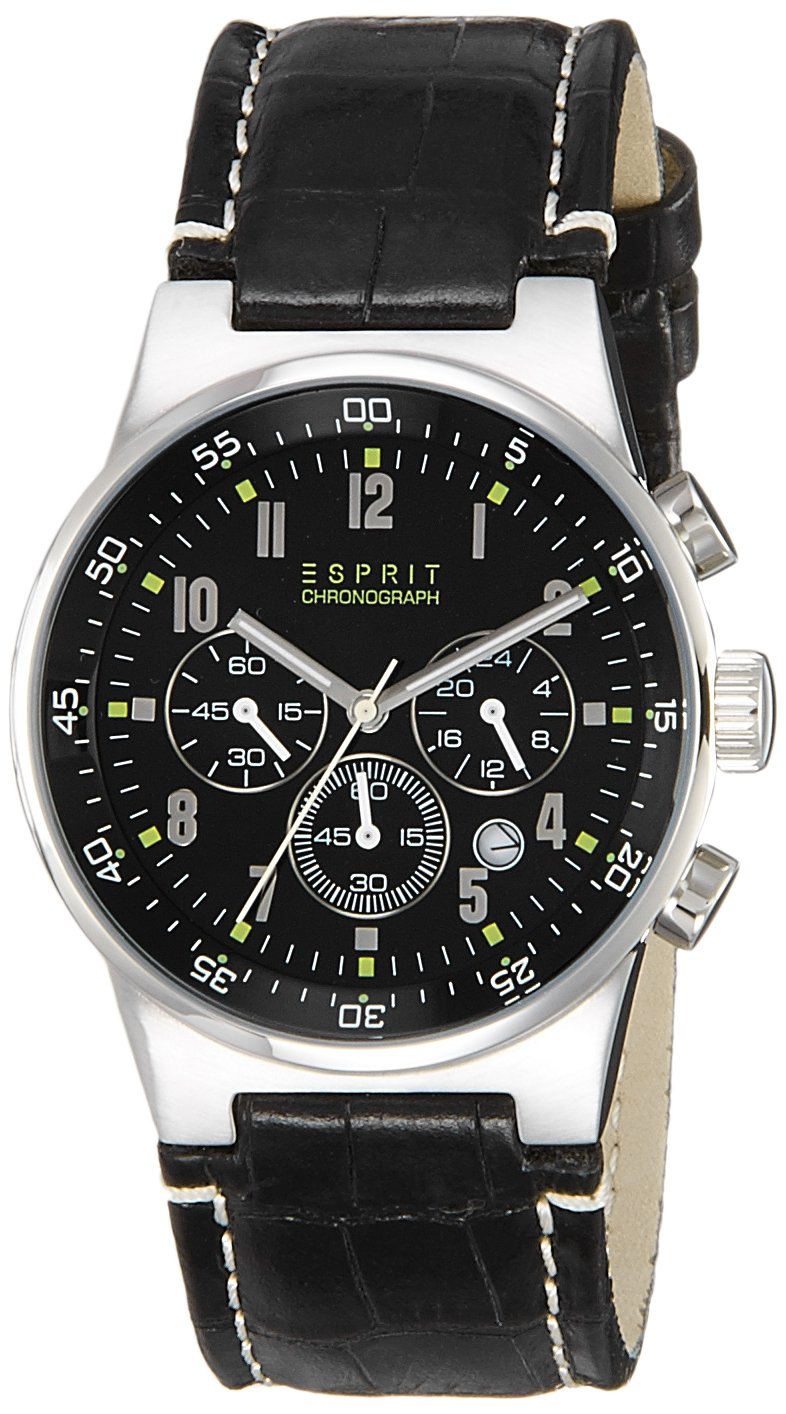
Figure 3.1: Front View of the Watch. This image displays the watch face, including the main hour, minute, and second hands, the chronograph subdials, and the date window. The black dial features luminous hour markers and hands for visibility.
Crown: Used for setting time and date. Located on the right side of the watch case.
Pushers (A & B): Buttons used to operate the chronograph functions. Located above and below the crown.
Hour, Minute, Second Hands: Main time display.
Chronograph Subdials: Typically measure elapsed time (e.g., 60-second, 60-minute, 24-hour).
Date Window: Displays the current date.
Watch Case: The main body of the watch, made of stainless steel.
Leather Strap: The black leather band with a buckle closure.
Figure 3.2: Side View with Crown and Pushers. This image highlights the crown and the two chronograph pushers on the right side of the watch case, essential for setting and operating the watch's functions.
Figure 3.3: Rear View of the Watch. This image shows the stainless steel case back, which typically includes engravings such as water resistance rating, material, and brand logo.
4. Setup and Initial Operation
4.1 Setting the Time
Pull the crown out to position 2 (the outermost position). The second hand will stop.
Turn the crown clockwise or counter-clockwise to set the hour and minute hands to the desired time.
Push the crown back into position 0 (normal position). The second hand will resume movement.
4.2 Setting the Date
Pull the crown out to position 1 (the first click).
Turn the crown clockwise to set the date. Avoid setting the date between 9 PM and 3 AM, as this may damage the movement.
Once the date is set, push the crown back into position 0.
5. Operating the Chronograph Function
Your watch features a chronograph (stopwatch) function for measuring elapsed time.
Starting the Chronograph: Press pusher A (top pusher) to start the chronograph. The chronograph second hand will begin to move.
Stopping the Chronograph: Press pusher A again to stop the chronograph. The elapsed time will be indicated by the chronograph hands on the subdials.
Resetting the Chronograph: After stopping, press pusher B (bottom pusher) to reset all chronograph hands to their zero positions.
Measuring Intermediate Times (Split Time): While the chronograph is running, press pusher B to measure an intermediate time. The chronograph hands will stop, allowing you to read the time. Press pusher B again to resume the chronograph measurement.
6. Maintenance and Care
Cleaning: Wipe the watch case and strap regularly with a soft, dry cloth. For the leather strap, avoid excessive moisture.
Water Resistance: This watch is water resistant up to 30 meters (3 ATM). This means it is suitable for everyday use and can withstand splashes or brief immersion in water. It is not suitable for swimming, showering, or diving. Do not operate the crown or pushers when the watch is wet.
Temperature: Avoid exposing the watch to extreme temperatures (hot or cold) or sudden temperature changes.
Magnetic Fields: Keep the watch away from strong magnetic fields, as they can affect the accuracy of the quartz movement.
Battery Replacement: The watch is powered by a quartz battery. When the battery runs low, the second hand may start to jump in 2-second intervals (End-of-Life indicator). It is recommended to have the battery replaced by a qualified watch technician to ensure proper sealing and function.
Strap Care: Leather straps can wear over time. Avoid prolonged exposure to direct sunlight, water, and chemicals to preserve their condition.
7. Troubleshooting
Problem
Possible Cause
Solution
Watch stops or runs inaccurately.
Low battery. Exposure to strong magnetic fields.
Replace battery. Move watch away from magnetic sources. If problem persists, consult a service center.
Date does not change at midnight.
AM/PM setting is incorrect.
Advance the time by 12 hours.
Chronograph hands do not reset to zero.
Requires calibration.
Consult the manufacturer's specific calibration instructions or a service center.
If you encounter issues not listed here or if solutions do not resolve the problem, please contact an authorized service center.
8. Specifications
Feature
Detail
Model Name
ES000T31020-N
Brand
ESPRIT
Movement Type
Quartz
Display Type
Chronograph
Dial Color
Black
Band Material
Leather
Band Color
Black
Water Resistance Depth
30 meters (3 ATM)
Item Weight
140 g
Manufacturer
MYWA
Date First Available
10 February 2016
9. Warranty and Support
Your ESPRIT Chronograph watch comes with a manufacturer's warranty. Please refer to the warranty card included with your purchase for specific terms and conditions, including coverage period and what is covered.
For technical support, service, or warranty claims, please contact an authorized ESPRIT service center. Keep your proof of purchase for warranty validation.
10. Safety Information
Do not attempt to open the watch case back yourself, as this may void the warranty and damage the internal components.
Keep the watch out of reach of small children to prevent accidental ingestion of small parts.
Avoid direct contact with solvents, detergents, perfumes, and cosmetic products, as they may damage the watch case, strap, or seals.
If the watch glass breaks, avoid touching the broken pieces and seek professional repair immediately.
Ask a question about this manual
Ask about setup, troubleshooting, compatibility, parts, safety, or missing instructions. Manuals+ will review the question and use this page’s manual context to help answer it.