
1. Introduction
Thank you for choosing the Central Tools 2000 Lumens HD Area Light. This manual provides essential information for the safe and efficient operation, maintenance, and troubleshooting of your new area light. Please read this manual thoroughly before using the product and retain it for future reference.
2. Safety Information
General Safety Warnings
- Always disconnect the power supply before performing any maintenance or cleaning.
- Do not operate the light if the power cord or plug is damaged.
- Keep the light away from flammable materials.
- Do not look directly into the light source when it is operating, as this may cause eye injury.
- Ensure the light is placed on a stable, level surface to prevent tipping.
- This product is designed for indoor and outdoor use, but avoid prolonged exposure to heavy rain or submersion in water.
California Proposition 65 Warning
WARNING: This product can expose you to chemicals which are known to the State of California to cause cancer and birth defects or other reproductive harm. For more information, go to www.P65Warnings.ca.gov.
3. Package Contents
Please check the package contents to ensure all items are present and undamaged:
- 1 x Central Tools 2000 Lumens HD Area Light
- 1 x User Manual
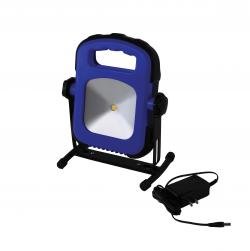
Image 3.1: Central Tools 2000 Lumens HD Area Light. This image shows the complete area light unit.
4. Setup
Unpacking
- Carefully remove the area light and all accessories from the packaging.
- Inspect the unit for any signs of damage during transit. If damaged, do not use and contact customer support.
- Retain the packaging for future storage or transport.
Power Connection
- Ensure the light's power switch is in the 'OFF' position.
- Plug the power cord into a standard 120V AC electrical outlet. Ensure the outlet is properly grounded.
- Verify that the power cord is not pinched or obstructed.
5. Operating Instructions
Turning On/Off
- Once connected to power, locate the power switch on the unit.
- Flip the switch to the 'ON' position to illuminate the light.
- To turn off the light, flip the switch back to the 'OFF' position.
Adjusting the Light Angle
The HD Area Light features an adjustable head to direct illumination where needed. Loosen the adjustment knobs on the sides of the light head, position the head to the desired angle, and then tighten the knobs securely to lock it in place.
6. Maintenance
Cleaning
- Before cleaning, ensure the light is unplugged and completely cool.
- Wipe the exterior surfaces with a soft, damp cloth. Do not use abrasive cleaners or solvents.
- Avoid spraying water directly onto the light.
Storage
When not in use, store the area light in a cool, dry place, away from direct sunlight and moisture. Coil the power cord neatly to prevent damage.
7. Troubleshooting
| Problem | Possible Cause | Solution |
|---|---|---|
| Light does not turn on. | No power supply. Power cord damaged. Switch is off. | Check power outlet and connection. Inspect cord for damage; do not use if damaged. Ensure switch is in 'ON' position. |
| Light flickers. | Loose connection. Voltage fluctuation. | Check power cord connection at both ends. Try a different power outlet. |
| Light head does not stay in position. | Adjustment knobs are loose. | Tighten the adjustment knobs firmly. |
8. Specifications
| Feature | Detail |
|---|---|
| Brand | Central Tools |
| Model | HD Area Light |
| Lumen Output | 2000 Lumens |
| Item Weight | 2 Pounds |
| UPC | 758353339147 |
| ASIN | B01BM1O1I2 |
| Power Source | Corded Electric (120V AC) |
9. Warranty Information
Central Tools warrants this product against defects in material and workmanship for a period of one (1) year from the original date of purchase. This warranty does not cover damage due to misuse, abuse, normal wear and tear, or unauthorized modifications. Proof of purchase is required for all warranty claims.
10. Customer Support
If you have any questions, require assistance, or need to make a warranty claim, please contact Central Tools customer support. Refer to the product packaging or the official Central Tools website for the most current contact information.