
1. Introduction
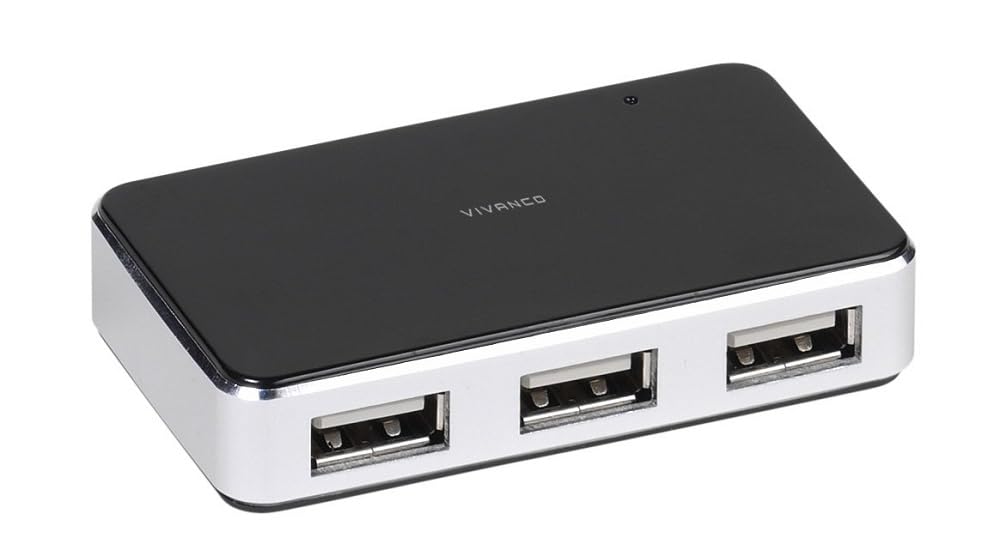
The Vivanco USB 2.0 4-Port Hub with Charger 2A is designed to expand the USB connectivity of your computer and provide power for high-consumption devices. Its stable metal casing ensures durability, and the included 5V, 2A power supply supports demanding peripherals like USB hard drives or charging smartphones.
Package Contents:
- Vivanco USB 2.0 4-Port Hub
- 5V, 2A Switched Power Supply (110V-230V, 50/60Hz)
- USB 2.0 Flexible Cable (approx. 1.5 m)
- Instruction Manual (this document)
2. Safety Information
Please observe the following safety guidelines to prevent damage to the device or injury:
- Do not expose the device to moisture, extreme temperatures, or direct sunlight.
- Do not attempt to open or modify the device. Refer all servicing to qualified personnel.
- Use only the provided power supply. Using an incompatible power supply may damage the hub and connected devices.
- Keep the device away from children.
- Ensure proper ventilation around the hub during operation.
3. Setup
Follow these steps to set up your Vivanco USB hub:
- Connect the Power Supply: Insert the small plug of the included 5V, 2A power supply into the power input port on the Vivanco USB hub. Plug the power adapter into a suitable electrical outlet.
- Connect to Computer: Connect one end of the supplied USB 2.0 cable to the upstream USB port on the Vivanco hub. Connect the other end of the USB cable to an available USB port on your computer.
- Power On: The blue functional LED on the hub will illuminate, indicating that the hub is powered and ready for use.
- Connect USB Devices: You can now connect up to four USB devices to the downstream USB ports on the hub.
4. Operating Instructions
The Vivanco USB hub operates automatically once connected. Here are some key operational aspects:
- Device Connection: Simply plug your USB devices into any of the four available USB 2.0 ports. The hub supports hot-swapping, meaning you can connect and disconnect devices while the computer is on.
- Data Transfer: The hub supports data transfer speeds up to 480 Mbit/s (USB 2.0 standard).
- Power Delivery: The included 2A power supply ensures sufficient power for high-consumption devices. Each port can supply up to 500 mA for charging smartphones or powering other peripherals.
- LED Indicator: The blue LED indicates that the hub is receiving power and is operational.
- System Compatibility: Compatible with Windows 2000, XP, Vista, 7, 8, 10, and macOS OS 8.6 or later. No special drivers are typically required for basic functionality.
5. Maintenance
To ensure the longevity and proper functioning of your Vivanco USB hub, follow these maintenance tips:
- Cleaning: Disconnect the hub from power and your computer before cleaning. Use a soft, dry cloth to wipe the exterior. Do not use liquid cleaners or abrasive materials.
- Storage: When not in use for extended periods, store the hub in a cool, dry place, away from dust and direct sunlight.
- Cable Care: Avoid bending or kinking the USB and power cables sharply. This can damage the internal wires.
6. Troubleshooting
If you encounter issues with your Vivanco USB hub, refer to the following table:
| Problem | Possible Cause / Solution |
|---|---|
| Hub is not recognized by the computer. |
|
| Connected devices are not working or are unstable. |
|
| Blue LED is not lit. |
|
7. Specifications
| Model Number | IT-USBHUB4PWR |
| Brand | VIVANCO |
| Interface | USB 2.0 |
| Total USB Ports | 4 |
| Data Transfer Speed | Up to 480 Mbit/s |
| Material | Metal Casing |
| Color | Blue |
| Power Supply | 5V, 2A Switched Power Supply (Input: 110V-230V, 50/60Hz) |
| Cable Length | USB 2.0 cable approx. 1.5 m |
| Dimensions (L x W x H) | 20.8 x 13.7 x 3.8 cm |
| Weight | 150 g |
| System Requirements | Windows 2000, XP, Vista, 7, 8, 10; macOS OS 8.6 or later |
8. Warranty and Support
VIVANCO products are designed for reliability and performance. For warranty information and technical support, please refer to the warranty card included with your purchase or visit the official VIVANCO website. Keep your proof of purchase for warranty claims.
Manufacturer: VIVANCO
Website: www.vivanco.com (Example link, actual link may vary)


