
Introduction
The DS18 PRO-CFX is a 2-way passive crossover designed to optimize the sound distribution in your car audio system. It effectively separates the audio signal into high and low frequencies, directing them to the appropriate speakers (tweeters and mid-range speakers) for enhanced clarity and performance. This manual provides essential information for proper installation, operation, and maintenance of your PRO-CFX passive crossovers.
Safety Information
- Always disconnect the vehicle's battery before beginning any installation to prevent electrical shorts and damage.
- Ensure all wiring connections are secure and properly insulated to avoid short circuits and potential fire hazards.
- Mount the crossover securely in a dry location, away from excessive heat, moisture, and moving parts.
- Do not exceed the recommended power handling of 300 Watts RMS to prevent damage to the crossover or connected speakers.
- If you are unsure about any installation steps, consult a qualified car audio professional.
Package Contents
Your DS18 PRO-CFX package includes:
- Two (2) DS18 PRO-CFX Passive Crossovers
- One (1) Instruction Manual
Product Features
- 2-Way Frequency Separation: Designed to separate high and low frequencies for dedicated tweeters and mid-range speakers.
- High Power Handling: Capable of handling up to 300 Watts RMS.
- Crossover Frequency: Fixed at 3.5 kHz.
- Cut-Off Slope: 12 dB/octave for precise frequency filtering.
- Durable Construction: Features a steel upper cover and a transparent plexi-glass lower cover, allowing visibility of internal components.
- Compact Design: Dimensions of 6.5 x 3.5 x 1.5 inches (160 x 88 x 38 mm) for versatile mounting options.
- Adjustable Tweeter Output: Selectable attenuation settings of 0dB, -3dB, or -6dB for tweeter output.
- KSV Coil Type: Utilizes KSV coil technology for reliable performance.
- Screw-On Terminals: Provides secure and easy wiring connections.

Image: Two DS18 PRO-CFX passive crossovers shown side-by-side, highlighting key features like 2-way crossover, 300W power handling, 3.5kHz frequency, and 12 dB/octave cut-off slope.

Image: Internal view of the DS18 PRO-CFX passive crossover, showing the coils, capacitors, and resistors through the clear plexi-glass bottom.
Specifications
| Brand | DS18 |
| Model Number | PRO-CFX |
| Speaker Type | Passive Crossover |
| Number of Audio Channels | 2.0 |
| Maximum Output Power | 300 Watts |
| Frequency Response | 3.5 KHz |
| Connectivity Technology | Wired |
| Audio Output Mode | Stereo |
| Mounting Type | Car Mount |
| Enclosure Material | Metal (steel), Plastic, Acrylic |
| Item Dimensions (D x W x H) | 1.5" x 6.3" x 3.5" (160 x 88 x 38 mm) |
| Item Weight | 1.5 Pounds |
| Compatible Devices | Car Audio System |
| Compatible Vehicle Type | Car |
Setup and Installation
Proper installation is crucial for optimal performance of your DS18 PRO-CFX passive crossovers. Follow these steps carefully:
- Disconnect Battery: Before starting any wiring, disconnect the negative terminal of your vehicle's battery.
- Mounting: Choose a secure, dry location for mounting the crossovers. Ensure it is away from direct sunlight, heat sources, and moisture. The compact size allows for flexible placement.
- Identify Terminals: The PRO-CFX crossover features clearly labeled screw-on terminals for input, woofer output, and tweeter output.
- IN+ / IN-: Audio input from your amplifier.
- W+ / W-: Output to your mid-range or woofer speakers.
- TW+ / TW-: Output to your tweeters.
- Connect Input: Connect the positive (+) and negative (-) speaker wires from your amplifier's output to the 'IN+' and 'IN-' terminals on the crossover.
- Connect Woofer/Mid-Range: Connect the positive (+) and negative (-) wires from the 'W+' and 'W-' terminals on the crossover to your mid-range or woofer speakers.
- Connect Tweeter: Connect the positive (+) and negative (-) wires from the 'TW+' and 'TW-' terminals on the crossover to your tweeters. Pay attention to the tweeter attenuation settings (0dB, -3dB, -6dB) as described in the Operating Instructions section.
- Secure Connections: Ensure all wires are stripped to the appropriate length and securely fastened within the screw-on terminals. Double-check for any loose strands that could cause a short circuit.
- Reconnect Battery: Once all connections are verified and secure, reconnect the negative terminal of your vehicle's battery.
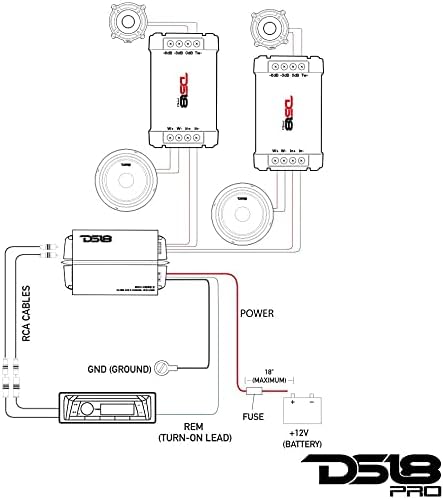
Image: Wiring diagram for the DS18 PRO-CFX passive crossover, showing connections from a head unit to an amplifier, then to the crossover, and finally to a woofer and tweeter.

Image: Close-up view of the input and woofer output terminals on the DS18 PRO-CFX passive crossover, labeled IN+, IN-, W+, W-.

Image: Close-up view of the tweeter output terminals on the DS18 PRO-CFX passive crossover, showing the TW- terminal and options for 0dB, -3dB, and -6dB attenuation.
Operating Instructions
The DS18 PRO-CFX passive crossover does not require active operation once installed. Its primary function is to passively filter audio frequencies. However, it offers an important adjustment for tweeter output:
Tweeter Attenuation Settings
The tweeter output terminals provide options to adjust the tweeter's volume relative to the mid-range speaker. This allows for fine-tuning the sound balance to match your specific speakers and listening preferences.
- 0dB: Full tweeter output. Use this setting if your tweeters require maximum power or if they sound balanced with your mid-range speakers at full output.
- -3dB: Reduces tweeter output by 3 decibels. This is a common setting to balance brighter tweeters or to achieve a more natural soundstage.
- -6dB: Reduces tweeter output by 6 decibels. Use this setting for very bright tweeters or if you prefer a less prominent high-frequency response.
To change the attenuation, simply move the tweeter's negative (-) wire to the desired terminal (0dB, -3dB, or -6dB). Experiment with these settings to find the best sound balance for your vehicle's audio environment.
Maintenance
The DS18 PRO-CFX passive crossover is designed for durability and requires minimal maintenance. Follow these guidelines to ensure its longevity:
- Keep Clean: Periodically inspect the crossover for dust or debris accumulation. Use a soft, dry cloth to gently wipe the exterior. Avoid using harsh chemicals or abrasive cleaners.
- Check Connections: Occasionally verify that all wiring connections are secure. Vibrations in a vehicle can sometimes loosen terminals over time.
- Avoid Moisture: Ensure the mounting location remains dry. Exposure to moisture can damage internal components.
- Temperature Control: While designed for automotive environments, avoid exposing the crossover to extreme temperatures for prolonged periods.
Troubleshooting
If you experience issues with your DS18 PRO-CFX passive crossovers, refer to the following common problems and solutions:
| Problem | Possible Cause | Solution |
|---|---|---|
| No sound from speakers connected to crossover. | Loose or incorrect wiring connections. No power to amplifier. Damaged speaker or crossover. | Check all wiring connections (input, woofer, tweeter) for proper polarity and tightness. Verify amplifier is powered on and functioning. Test speakers directly if possible. |
| Distorted sound. | Overpowering the crossover/speakers. Incorrect amplifier gain settings. Damaged speakers. | Reduce amplifier gain or volume. Ensure total system power does not exceed crossover's 300W rating. Check speakers for physical damage. |
| Tweeters are too loud or too quiet compared to mid-range. | Incorrect tweeter attenuation setting. | Adjust the tweeter attenuation setting (0dB, -3dB, -6dB) on the crossover to achieve desired balance. |
| Sound is unbalanced (e.g., only highs or only lows). | Incorrect wiring to woofer or tweeter terminals. | Verify that woofer wires are connected to 'W' terminals and tweeter wires to 'TW' terminals. Check for correct polarity. |
If these steps do not resolve the issue, contact DS18 customer support or a professional installer.
Warranty Information
The DS18 PRO-CFX passive crossover is covered by a 1-Year Limited Manufacturer Warranty from the date of purchase. This warranty covers defects in materials and workmanship under normal use. It does not cover damage resulting from improper installation, accident, misuse, abuse, neglect, unauthorized modification, or normal wear and tear. Please retain your proof of purchase for warranty claims.
Support
For technical assistance, troubleshooting beyond this manual, or warranty inquiries, please contact DS18 customer support through their official website or the retailer where the product was purchased. Have your product model number (PRO-CFX) and proof of purchase ready when contacting support.


