
1. Product Overview
The Alcaplast A2000 is a high-quality drain valve designed for efficient water management in plumbing systems. It features a convenient stop button for controlled drainage and is constructed from durable Acrylonitrile Butadiene Styrene (ABS) material with a chrome finish on the visible button component.
Key Features:
- Drain valve with integrated stop button.
- Provides a stop function for controlled water release.
- Designed for quick and straightforward assembly.

Figure 1: Front view of the Alcaplast A2000 Drain Valve, showcasing its overall design and components.
2. Setup and Installation
This section provides general guidelines for installing the Alcaplast A2000 Drain Valve. Professional installation is recommended for optimal performance and to ensure compliance with local plumbing codes.
2.1 Unpacking and Inspection
- Carefully remove all components from the packaging.
- Inspect the drain valve for any signs of damage during transit. Do not install if damaged.
- Ensure all included components, specifically the drain valve with stop button, are present.
2.2 Installation Steps (General)
- Prepare the Installation Area: Ensure the area where the drain valve will be installed is clean and accessible. Turn off the main water supply if necessary.
- Position the Valve: Place the drain valve into the designated opening, ensuring proper alignment.
- Secure the Valve: Use appropriate fasteners or sealing mechanisms to secure the valve firmly in place. Refer to specific plumbing fixture instructions for detailed steps.
- Connect Drainage: Ensure all drainage connections are tight and properly sealed to prevent leaks.
- Adjust Settings: The valve features an adjustable mechanism. Adjust the height or flow settings as required for your specific application.

Figure 2: Close-up view of the drain valve's internal adjustment mechanism, showing numbered markings for precise setting.
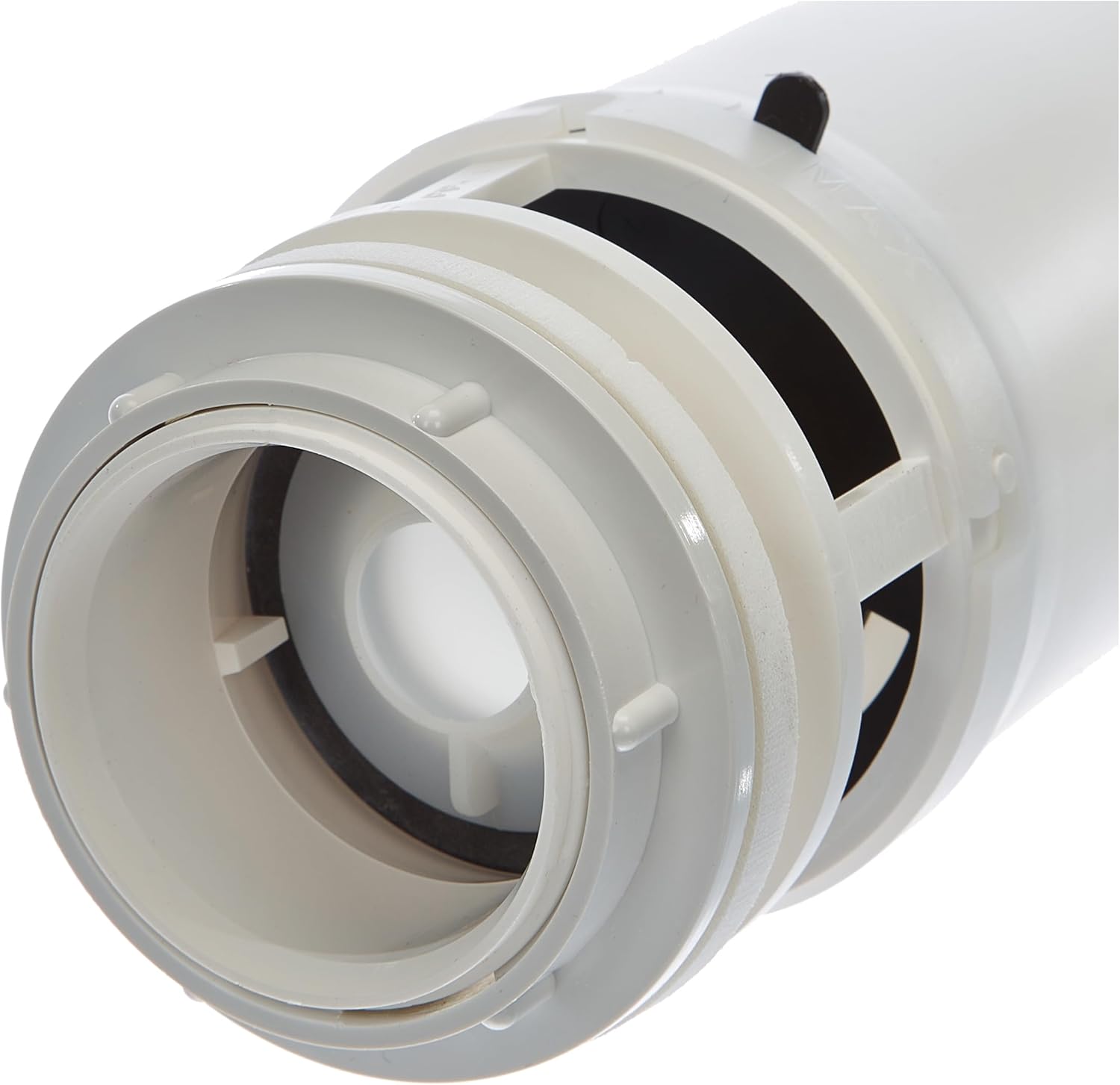
Figure 3: Detailed view of the bottom connection point of the drain valve, illustrating the sealing components.
3. Operating Instructions
The Alcaplast A2000 Drain Valve is designed for simple and effective operation.
3.1 Basic Operation
- To initiate drainage, press the main button on the top of the valve. This will open the valve, allowing water to flow out.
- The valve is equipped with a stop function. To interrupt the drainage process at any point, press the stop button. This will close the valve, halting water flow.
- To resume drainage after using the stop function, press the main button again.
4. Maintenance
Regular maintenance ensures the longevity and optimal performance of your Alcaplast A2000 Drain Valve.
- Cleaning: Periodically clean the visible chrome button and surrounding areas with a soft cloth and mild, non-abrasive cleaner. Avoid harsh chemicals that could damage the finish or material.
- Inspection: Annually inspect the valve for any signs of wear, leaks, or blockages. Check seals and connections for integrity.
- Addressing Blockages: If drainage becomes slow, check for potential blockages within the drain mechanism. Consult a plumber if blockages persist or are difficult to access.
5. Troubleshooting
This section addresses common issues you might encounter with your Alcaplast A2000 Drain Valve.
- Valve Not Draining:
- Ensure the stop button is not engaged.
- Check for obstructions or debris within the drain mechanism.
- Verify that the valve is correctly installed and aligned.
- Valve Not Stopping / Leaking:
- Inspect the seals for wear or damage. Worn seals may need replacement.
- Ensure the stop button mechanism is functioning correctly and fully engaging.
- Check all connections for tightness.
- Slow Drainage:
- Indicates a partial blockage. Follow maintenance steps for addressing blockages.
- Ensure the water level adjustment is set correctly.
If issues persist after attempting these troubleshooting steps, it is recommended to contact a qualified plumber or the manufacturer for assistance.
6. Specifications
Detailed technical specifications for the Alcaplast A2000 Drain Valve.
| Attribute | Detail |
|---|---|
| Manufacturer | Alcaplast |
| Part Number | A2000 |
| Item Model Number | A2000 |
| Item Weight | 12.3 ounces |
| Product Dimensions | 3.23 x 4.49 x 15.43 inches |
| Color | Chrome |
| Material | Acrylonitrile Butadiene Styrene (ABS) |
| Item Package Quantity | 1 |
| Included Components | Drain valve with stop button |

Figure 4: Diagram illustrating the approximate dimensions of the Alcaplast A2000 Drain Valve (16 inches / 41 cm in height).
7. Warranty and Support
For specific warranty information regarding your Alcaplast A2000 Drain Valve, please refer to the documentation provided at the time of purchase or contact your retailer. Warranty terms typically cover manufacturing defects.
For technical support, spare parts, or further assistance, please contact Alcaplast customer service or your authorized dealer. Contact information can usually be found on the manufacturer's official website or on your purchase receipt.
