1. Introduction
This manual provides essential information for the safe and effective operation of your Sony PXW-FS5 XDCAM Super 35 Camera System. Please read this manual thoroughly before using the camera and retain it for future reference. The PXW-FS5 is a professional camcorder designed for versatility and high-quality video capture, featuring a Super 35 Exmor sensor and 4K recording capabilities.
2. Safety Information
Always observe the following safety precautions to prevent damage to the camera and ensure personal safety.
- Power Source: Use only the specified power adapter and battery pack.
- Handling: Avoid dropping or subjecting the camera to strong impacts. Do not expose the camera to water or moisture.
- Temperature: Operate the camera within the recommended temperature range. Avoid extreme heat or cold.
- Cleaning: Use a soft, dry cloth for cleaning. Do not use harsh chemicals or solvents.
- Battery Safety: Do not disassemble, crush, or expose batteries to fire. Dispose of used batteries according to local regulations.
3. Package Contents
Verify that all items listed below are included in your package:
- Camcorder (Sony PXW-FS5 body)
- Power Adapter
- Battery Pack (1 Lithium Ion battery required)
- Handle Unit
- LCD Monitor
- Eyecup
- USB Cable
- Shoulder Strap
4. Product Overview
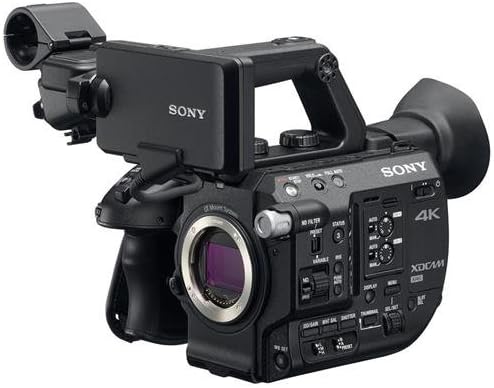
Familiarize yourself with the main components and controls of the PXW-FS5 camcorder.


5. Setup
5.1. Attaching the Handle and LCD Monitor
- Attach the handle unit to the top of the camera body by aligning the mounting points and tightening the screw.
- Connect the LCD monitor to the designated port on the handle or camera body. Adjust its position for comfortable viewing.
5.2. Battery Installation
- Ensure the camera is powered off.
- Slide the battery pack into the battery slot at the rear of the camera until it clicks into place.
- To remove, press the battery release lever and slide the battery out.
5.3. Lens Attachment
The PXW-FS5 features an E-mount for interchangeable lenses.
- Remove the body cap from the camera and the rear lens cap from the lens.
- Align the white index mark on the lens with the white index mark on the camera's E-mount.
- Rotate the lens clockwise until it locks into place.
- To remove, press the lens release button and rotate the lens counter-clockwise.
5.4. Memory Card Insertion
The camera supports SD flash memory cards.
- Open the memory card slot cover.
- Insert the memory card into one of the two available slots with the label facing the correct direction until it clicks.
- Close the memory card slot cover.
6. Operating the Camera
6.1. Powering On/Off
Locate the power switch, typically near the battery compartment or on the handle, and slide it to the 'ON' or 'OFF' position.
6.2. Basic Recording
Press the REC START/STOP button (usually red) on the handle or camera body to begin and end recording. The recording status will be indicated on the LCD monitor.
6.3. Zoom and Focus
The detachable handle often includes a zoom rocker and focus trigger for precise control. For manual focus, rotate the focus ring on the lens. The camera also features fast hybrid autofocus.
6.4. Menu Navigation
Use the menu button and navigation controls to access and adjust camera settings such as exposure, white balance, frame rate, and recording format. Refer to the on-screen menu for detailed options.
6.5. Electronic Variable ND Filters
The PXW-FS5 features built-in electronic Variable ND Filters, offering a linear range from 1/4 to 1/128, as well as an auto ND function. Use the dedicated ND filter dial or buttons to adjust exposure in bright conditions without changing aperture or shutter speed.
6.6. 4K Recording
The camera supports 4K 30p recording in XAVC Long GOP codec. For 4K 60p/50p recording, an optional CBKZ-FS5RIF upgrade kit and a compatible third-party external recorder (e.g., Convergent Design Odyssey 7Q, ATOMOS Shogun) are required.
6.7. High Frame Rate (HFR) Recording
Achieve stunning slow-motion footage with 240fps HFR in Full HD. 240fps HFR in 4K is also possible with the optional CBKZ-FS5RIF upgrade kit and suitable external recorder.
7. Maintenance
7.1. Cleaning
- Camera Body: Wipe with a soft, dry cloth. For stubborn dirt, use a cloth lightly dampened with water and then wipe dry.
- Lens: Use a lens brush to remove dust, then gently wipe with a lens cleaning cloth and lens cleaning solution.
- LCD Monitor/Viewfinder: Use a soft, lint-free cloth. Avoid pressing hard on the screen.
7.2. Storage
When not in use, store the camera in a cool, dry place away from direct sunlight and extreme temperatures. Use a desiccant to prevent mold and mildew, especially in humid environments. Remove the battery if storing for extended periods.
8. Troubleshooting
If you encounter issues with your PXW-FS5, refer to the following common solutions:
- Camera does not power on: Check if the battery is charged and correctly inserted, or if the AC adapter is properly connected.
- No image on LCD/viewfinder: Ensure the monitor cable is securely connected. Check display settings in the menu.
- Recording issues: Verify that a compatible memory card is inserted and has sufficient free space. Check recording format settings.
- Autofocus not working: Ensure the lens is set to autofocus (AF) mode. Check lighting conditions; very low light can affect AF performance.
- Audio issues: Check microphone connections and audio input levels in the menu.
For more complex issues, consult the full service manual or contact Sony customer support.
9. Specifications
| Product Dimensions | 22.8 x 13.25 x 22 inches |
| Item Weight | 8.48 pounds |
| Item Model Number | PXWFS5 |
| Batteries | 1 Lithium Ion batteries required |
| Photo Sensor Technology | Super 35-Sized CMOS Sensor |
| Video Capture Resolution | 1080p (up to 4K with upgrades/external recorder) |
| Maximum Focal Length | 158 Millimeters |
| Maximum Aperture | 4 f |
| Flash Memory Type | SD |
| Video Capture Format | 4K |
| Supported Audio Format | WAV, AAC, MP3 |
| Screen Size | 3.5 Inches |
| Connectivity Technology | Audio Input (2 x 3-pin XLR Line/mic/mic +48), SDI Output (1 x BNC HD/3G-SDI), HDMI 2.0 (1 x Type A), USB (1 x Multi/Micro) |
10. Warranty and Support
For warranty information and customer support, please refer to the warranty card included with your product or visit the official Sony website. Keep your proof of purchase for warranty claims.


