
Introduction
This manual provides detailed instructions for the safe and efficient operation, maintenance, and troubleshooting of your Olympia A 230 Plus DIN A4 Laminator. Please read this manual thoroughly before using the device to ensure proper function and to prevent damage.
Safety Instructions
Always observe the following safety precautions:
- Do not operate the laminator with wet hands.
- Keep the laminator away from water or other liquids.
- Ensure proper ventilation around the device during operation.
- Unplug the laminator when not in use or before cleaning.
- Do not insert objects other than laminating pouches into the feed opening.
- Keep out of reach of children.
Product Overview
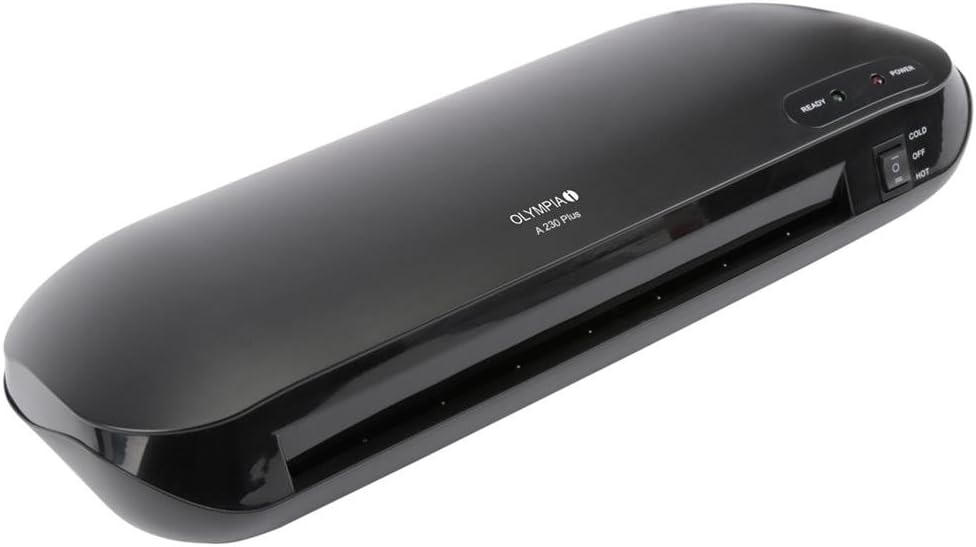
Image: The Olympia A 230 Plus DIN A4 Laminator, a compact black device with control switches and indicator lights visible on the top right side.
The Olympia A 230 Plus is a compact laminator designed for home and office use, capable of laminating documents up to DIN A4 size. It features both hot and cold lamination modes.
Components:
- Power Switch: Controls the device's power and mode (Cold/Off/Hot).
- Power Indicator Light: Illuminates when the device is powered on.
- Ready Indicator Light: Illuminates when the laminator has reached the optimal operating temperature for hot lamination.
- Feed Opening: Where laminating pouches are inserted.
- Exit Slot: Where laminated documents emerge.
Setup
- Unpacking: Carefully remove the laminator from its packaging. Retain packaging for future storage or transport.
- Placement: Place the laminator on a stable, flat, and heat-resistant surface. Ensure there is sufficient space around the device for ventilation and for documents to pass through the feed and exit slots.
- Power Connection: Plug the power cord into a standard electrical outlet.
Operating Instructions
Hot Lamination:
- Power On: Set the power switch to the "HOT" position. The Power indicator light will illuminate.
- Warm-up: Allow the laminator to warm up. The Ready indicator light will illuminate (typically after 3-5 minutes) when the device is ready for use.
- Prepare Document: Place the document to be laminated inside a laminating pouch, ensuring it is centered and leaves a small margin around the edges.
- Insert Pouch: Insert the sealed edge of the laminating pouch squarely into the feed opening. The laminator will automatically pull the pouch through.
- Retrieve Document: Once the laminated document exits the rear slot, allow it to cool on a flat surface before handling.
- Power Off: After use, set the power switch to "OFF" and unplug the device.
Cold Lamination:
- Power On: Set the power switch to the "COLD" position. The Power indicator light will illuminate. No warm-up is required for cold lamination.
- Prepare Document: Use self-adhesive cold laminating pouches. Place the document inside the pouch according to the pouch manufacturer's instructions.
- Insert Pouch: Insert the sealed edge of the cold laminating pouch squarely into the feed opening.
- Retrieve Document: Collect the laminated document from the exit slot.
- Power Off: After use, set the power switch to "OFF" and unplug the device.
Maintenance
Regular maintenance ensures the longevity and optimal performance of your laminator.
- Cleaning: Ensure the laminator is unplugged and completely cool before cleaning. Use a soft, dry cloth to wipe the exterior. Do not use abrasive cleaners or solvents.
- Roller Cleaning: Periodically run a laminator cleaning sheet (available separately) through the machine to remove adhesive residue from the rollers.
- Storage: Store the laminator in a dry, dust-free environment when not in use.
Troubleshooting
| Problem | Possible Cause | Solution |
|---|---|---|
| Laminator not turning on. | No power supply. | Check if the power cord is securely plugged into the laminator and the wall outlet. Test the outlet with another device. |
| Laminated document is cloudy or bubbly. | Incorrect temperature setting or pouch thickness. | Ensure the laminator is fully warmed up (Ready light on). Use the correct pouch thickness for the laminator's capabilities. |
| Pouch jams in the machine. | Pouch inserted crookedly or too thick. | Turn off the laminator and carefully pull the pouch out. Ensure the pouch is inserted straight and is not too thick for the machine. |
| Laminator smells burnt. | Overheating or foreign object. | Immediately unplug the laminator and allow it to cool down. Check for any foreign objects. If the smell persists, discontinue use and contact support. |
Specifications
- Model: Olympia A 230 Plus
- Item Model Number: 3127
- Laminating Width: Up to DIN A4
- Lamination Type: Hot and Cold
- Warm-up Time: Approximately 3-5 minutes
- Dimensions: 14.41 x 5.75 x 2.6 inches (approx.)
- Weight: 1.87 pounds (approx.)
- Color: Black
- Manufacturer: Olympia Group
Warranty and Support
For warranty information and technical support, please refer to the official Olympia Group website or contact their customer service directly. Keep your purchase receipt as proof of purchase.
Manufacturer: Olympia Group
Date First Available: February 3, 2016