1. Introduction
Thank you for purchasing the JVC Kenwood PS-S550W Compact Speaker. This manual provides essential information for the safe and efficient use of your speaker, including setup, operation, maintenance, and troubleshooting.
The PS-S550W is designed to deliver clear and comfortable sound primarily in small to medium-sized venues such as halls and banquet rooms. Its constant directivity horn, with a horizontal 70° and vertical 70° dispersion, ensures well-balanced sound distribution to the intended listening area. This compact yet powerful speaker offers versatile mounting options, including ceiling, wall, and stand mounting for mobile PA applications. Horizontal mounting is also supported.

Figure 1: JVC Kenwood PS-S550W Compact Speaker. This image shows the front view of the white compact speaker with a metal grille, featuring the JVC logo in the center.
2. Important Safety Instructions
Please read and understand all safety instructions before using this product. Keep this manual for future reference.
- Power Source: Connect the speaker only to the specified amplifier output. Do not overload the speaker.
- Placement: Ensure the speaker is installed on a stable surface or securely mounted to a wall or ceiling using appropriate hardware. Avoid placing it in direct sunlight, near heat sources, or in areas with high humidity or dust.
- Moisture: Do not expose the speaker to rain or moisture. This product is not waterproof.
- Ventilation: Do not block ventilation openings. Ensure adequate airflow around the speaker.
- Servicing: Do not attempt to service this product yourself. Refer all servicing to qualified service personnel.
- Children: Keep out of reach of children.
3. Package Contents
Verify that all items are present in the package:
- JVC Kenwood PS-S550W Compact Speaker (1 unit)
- Instruction Manual (this document)
- Mounting hardware (if included with specific model variant, check packaging)
If any items are missing or damaged, please contact your dealer immediately.
4. Setup and Installation
Proper installation is crucial for optimal performance and safety. The PS-S550W offers flexible installation options.
4.1 Mounting Options
The speaker can be installed in various configurations:
- Wall Mounting: Use appropriate wall brackets (sold separately) to securely attach the speaker to a wall.
- Ceiling Mounting: Utilize ceiling mounting hardware (sold separately) for overhead installation.
- Stand Mounting: For mobile PA applications, the speaker can be mounted on a compatible speaker stand. Compatible hanger/stand models include PS-U70B/W, PS-U80B/W, and PS-U300B (sold separately).
- Horizontal Mounting: The speaker supports horizontal orientation for specific sound dispersion requirements.
Refer to the dimensions diagram below for precise measurements and mounting points.
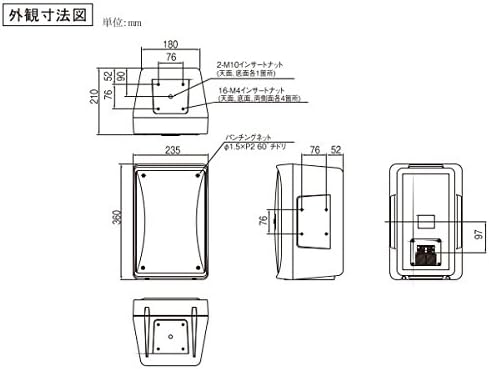
Figure 2: JVC Kenwood PS-S550W Dimensions Diagram. This technical drawing illustrates the speaker's dimensions in millimeters, including front, side, top, and bottom views, along with details on insert nuts for mounting.
4.2 Audio Connection
Connect the speaker to a suitable amplifier using high-quality speaker cables. Ensure correct polarity (+ to + and - to -) to prevent phase issues and ensure optimal sound quality. Consult your amplifier's manual for specific connection instructions.
5. Operating Instructions
Once installed and connected, operating the PS-S550W is straightforward.
5.1 Powering On/Off
The speaker does not have its own power switch. It receives power and audio signals directly from the connected amplifier. Turn your amplifier on or off to power the speaker.
5.2 Volume Control
Adjust the volume using the controls on your connected amplifier or audio mixer. Start with a low volume and gradually increase it to a comfortable listening level.
5.3 Sound Dispersion
The PS-S550W features a constant directivity horn designed to provide a consistent sound field. For best results, ensure the speaker is aimed towards the primary listening area. The 70° horizontal and 70° vertical dispersion pattern helps distribute sound evenly.
6. Maintenance
Regular maintenance helps prolong the life and performance of your speaker.
- Cleaning: Wipe the speaker cabinet with a soft, dry cloth. For stubborn dirt, use a slightly damp cloth and then dry thoroughly. Do not use abrasive cleaners, waxes, or solvents.
- Grille: Gently clean the speaker grille with a soft brush or vacuum cleaner with a brush attachment to remove dust.
- Storage: If storing the speaker for an extended period, keep it in a cool, dry place, away from direct sunlight and extreme temperatures.
7. Troubleshooting
If you encounter issues with your PS-S550W speaker, refer to the following common problems and solutions:
| Problem | Possible Cause | Solution |
|---|---|---|
| No sound from speaker |
|
|
| Distorted or unclear sound |
|
|
| Intermittent sound |
|
|
If the problem persists after trying these solutions, please contact JVC Kenwood customer support or your dealer.
8. Specifications
Key technical specifications for the JVC Kenwood PS-S550W Compact Speaker:
| Feature | Specification |
|---|---|
| Model Number | PS-S550W |
| Brand | JVC Kenwood |
| Speaker Type | Compact 2-Way Speaker |
| Woofer Diameter | 16 cm |
| Recommended Use | Audio Playback / PA Systems (Small to Medium Venues) |
| Mounting Type | Wall Mount, Ceiling Mount, Stand Mount (Horizontal mounting supported) |
| Directivity Horn | Horizontal 70° / Vertical 70° |
| Battery Required | No |
| Waterproof | No |
9. Warranty and Support
JVC Kenwood products are manufactured to high-quality standards. For information regarding warranty coverage, please refer to the warranty card included with your purchase or visit the official JVC Kenwood website.
For technical support, service, or inquiries about compatible accessories, please contact your local JVC Kenwood dealer or customer service center. Contact information can typically be found on the official brand website.
Online Resources:
- Official JVC Kenwood Website: www.jvckenwood.com
- Product Support Page: (Check official website for specific PS-S550W support page)


