Introduction
This manual provides comprehensive instructions for the setup, operation, and maintenance of your RCA 4 Device Universal Remote. This remote is designed to control up to four different audio/video components, simplifying your home entertainment experience. Please read this manual thoroughly before using the remote to ensure proper functionality and to maximize its capabilities.
Product Overview
The RCA 4 Device Universal Remote (Model: LYSB01B0MKAHY-ELECTRNCS) is an infrared (IR) remote control capable of operating various electronic devices such as televisions, satellite/cable boxes, DVD players, and VCRs. Its ergonomic design and clearly labeled buttons facilitate ease of use.
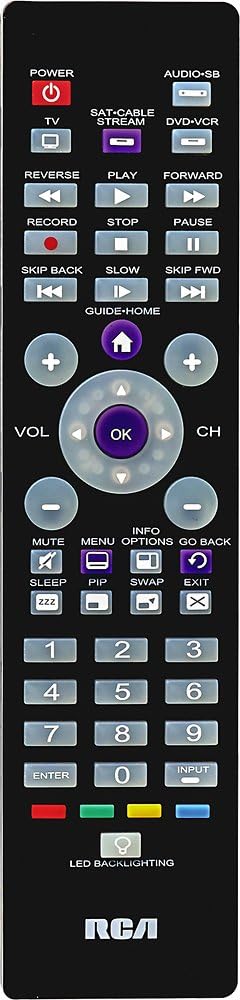
Image 1: Front view of the RCA 4 Device Universal Remote. This image displays the full layout of the remote control, including the power button, device selection buttons (TV, SAT/CABLE, DVD-VCR), numeric keypad, channel and volume controls, playback buttons, and other function keys. The RCA logo is visible at the bottom.
Setup
1. Battery Installation
The remote requires two (2) AA batteries (not included). Ensure correct polarity when inserting the batteries.
- Open the battery compartment cover on the back of the remote.
- Insert two AA batteries, matching the (+) and (-) terminals as indicated inside the compartment.
- Replace the battery compartment cover.
2. Programming the Remote
To control your devices, the remote must be programmed with the correct codes. There are typically two methods:
Method A: Direct Code Entry
This method involves entering a specific code for your device's brand. A code list is usually provided with the remote (refer to the separate code list document if available).
- Turn on the device you wish to program (e.g., TV).
- Press and hold the desired device button (e.g., TV) on the remote.
- While holding the device button, press and hold the POWER button simultaneously.
- Release both buttons. The POWER button should remain lit.
- Enter the 4-digit code for your device's brand using the numeric keypad.
- If the code is valid, the POWER button will turn off. If it blinks and stays on, the code is invalid; try another code.
- Test the remote by pressing the POWER button. If the device turns off, the programming was successful. If not, repeat the process with the next code for your brand.
Method B: Auto Code Search
If you cannot find a code or prefer not to use direct entry, the remote can search for the correct code.
- Turn on the device you wish to program.
- Press and hold the desired device button (e.g., TV) for approximately 5 seconds until the POWER button lights up.
- Release the device button.
- Point the remote at the device and repeatedly press the POWER button (or CH+) until the device turns off. This may take several presses.
- Once the device turns off, immediately press the ENTER button to save the code. The POWER button will turn off.
- Test the remote's functions. If not all functions work, repeat the search process to find a better code.

Image 2: Angled side view of the RCA 4 Device Universal Remote. This perspective shows the remote's ergonomic shape and thickness, providing a better understanding of its physical design.
Operating Instructions
Once programmed, your universal remote can control your selected devices. Always ensure the remote is pointed directly at the device's IR receiver.
1. Selecting a Device
To control a specific device, press the corresponding device button at the top of the remote:
- TV: For your television.
- SAT-CABLE-STREAM: For satellite receiver, cable box, or streaming device.
- DVD-VCR: For DVD player or VCR.
- AUDIO-SB: For audio systems or soundbars.
The selected device button will light up briefly to confirm your selection.
2. Basic Functions
- POWER: Turns the selected device on or off.
- VOL (+/-): Increases or decreases the volume.
- CH (+/-): Changes the channel up or down.
- MUTE: Silences the audio. Press again to restore.
- Numeric Keypad (0-9): For direct channel entry or menu navigation.
- ENTER: Confirms selections or completes channel entry.
- INPUT: Cycles through video input sources on your TV.
3. Playback Controls
These buttons are primarily used for DVD players, VCRs, or streaming devices when the DVD-VCR or SAT-CABLE-STREAM device is selected.
- PLAY: Starts playback.
- PAUSE: Pauses playback.
- STOP: Stops playback.
- RECORD: Initiates recording (if supported by the device).
- REVERSE: Rewinds playback.
- FORWARD: Fast forwards playback.
- SKIP BACK / SKIP FWD: Skips backward or forward (e.g., chapter skip).
- SLOW: Activates slow-motion playback (if supported).
4. Advanced Functions
- GUIDE-HOME: Accesses the program guide or home menu.
- INFO: Displays program information.
- MENU: Opens the device's main menu.
- OPTIONS: Accesses additional options or settings.
- GO BACK: Returns to the previous screen or menu.
- SLEEP: Sets a sleep timer for the TV.
- PIP: Picture-in-Picture function (if supported by TV).
- SWAP: Swaps between main and PIP screens.
- EXIT: Exits menus or on-screen displays.
- LED BACKLIGHTING: Activates the button backlighting for use in low-light conditions.

Image 3: Another angled side view of the RCA 4 Device Universal Remote. This view provides an alternative perspective of the remote's design and button placement, aiding in visual identification of controls.
Maintenance
Proper care will extend the life of your universal remote.
- Cleaning: Use a soft, dry cloth to clean the remote. Do not use liquid cleaners or abrasive materials.
- Battery Replacement: Replace batteries when the remote's response becomes sluggish or the indicator light fails to illuminate. Always replace both batteries at the same time with new AA batteries.
- Storage: If the remote will not be used for an extended period, remove the batteries to prevent leakage and potential damage. Store in a cool, dry place.
- Avoid Exposure: Do not expose the remote to extreme temperatures, direct sunlight, or moisture.
Troubleshooting
If you encounter issues with your remote, refer to the following common problems and solutions:
| Problem | Possible Cause | Solution |
|---|---|---|
| Remote does not operate device. | Incorrect device code entered; batteries are low or dead; remote not pointed at device. |
|
| Some buttons do not work. | The programmed code may not support all functions of your device. | Try programming the remote with another code from the code list for your device's brand. Some universal remotes may not fully support all advanced functions of every device. |
| Remote indicator light does not illuminate. | Batteries are dead or incorrectly installed. | Check battery polarity and replace with fresh AA batteries. |
Specifications
- Brand: RCA
- Model Number: LYSB01B0MKAHY-ELECTRNCS
- Product Dimensions: 10 x 6 x 3 inches (approximately)
- Item Weight: 4.2 ounces
- Batteries: 2 AA batteries required (not included)
- Max Number of Supported Devices: 4
- Connectivity Technology: Infrared (IR)
- Special Feature: Universal
- Compatible Devices: Television, Satellite/Cable Box, DVD Player, VCR, Audio System/Soundbar
Support
For further assistance, troubleshooting, or to obtain a complete list of device codes, please refer to the official RCA support website or contact RCA customer service. Keep your product model number (LYSB01B0MKAHY-ELECTRNCS) handy when seeking support.
Note: Product specifications and features are subject to change without notice.


