
Introduction
Thank you for purchasing the Home Zone Security Motion Activated LED Security Light. This product is designed to provide reliable and efficient outdoor lighting with motion detection capabilities, enhancing the security of your property. Please read this manual thoroughly before installation and operation to ensure proper use and safety.
Safety Information
- WARNING: Risk of electric shock. Disconnect power at the fuse or circuit breaker before installation or servicing.
- This product must be installed in accordance with the applicable installation code by a person familiar with the construction and operation of the product and the hazards involved.
- Ensure all electrical connections are secure and comply with local codes and ordinances.
- Do not install near combustible materials or surfaces.
- Do not look directly into the LED light source when illuminated.
- This fixture is designed for outdoor use and should be mounted on a wall or eave.
Package Contents
Verify that all components are present before beginning installation:
- LED Security Light Fixture (1)
- Mounting Hardware Kit (screws, wire nuts, gasket) (1 set)
- Instruction Manual (1)
Setup and Installation
Tools Required: Screwdriver, Pliers, Wire Strippers, Electrical Tape, Safety Glasses, Ladder.
- Turn Off Power: Before starting, ensure the power to the installation area is turned off at the circuit breaker or fuse box.
- Prepare Mounting Surface: Choose a suitable outdoor location, preferably on a wall or eave, where the light can cover the desired area. The fixture should be mounted at a height of 6-10 feet (1.8-3 meters) for optimal motion detection.
- Attach Mounting Plate: Secure the mounting plate to the junction box using the provided screws. Ensure the plate is flush and stable.
- Wiring: Connect the electrical wires from the fixture to your household wiring. Match the wires: Black to Black (Live), White to White (Neutral), and Green/Bare Copper to Green/Bare Copper (Ground). Use the provided wire nuts and secure connections with electrical tape.
- Mount Fixture: Carefully align the fixture with the mounting plate and secure it with the center screw. Ensure the gasket is properly seated to prevent water intrusion.
- Adjust Light Heads: Loosen the adjustment screws on the light heads and pivot them to the desired angles. Tighten the screws to secure their position.
- Adjust Motion Sensor: The motion sensor can be rotated horizontally and tilted vertically to cover the desired detection area. Ensure the sensor is not obstructed.
- Restore Power: Once installation is complete and all connections are secure, restore power at the circuit breaker.
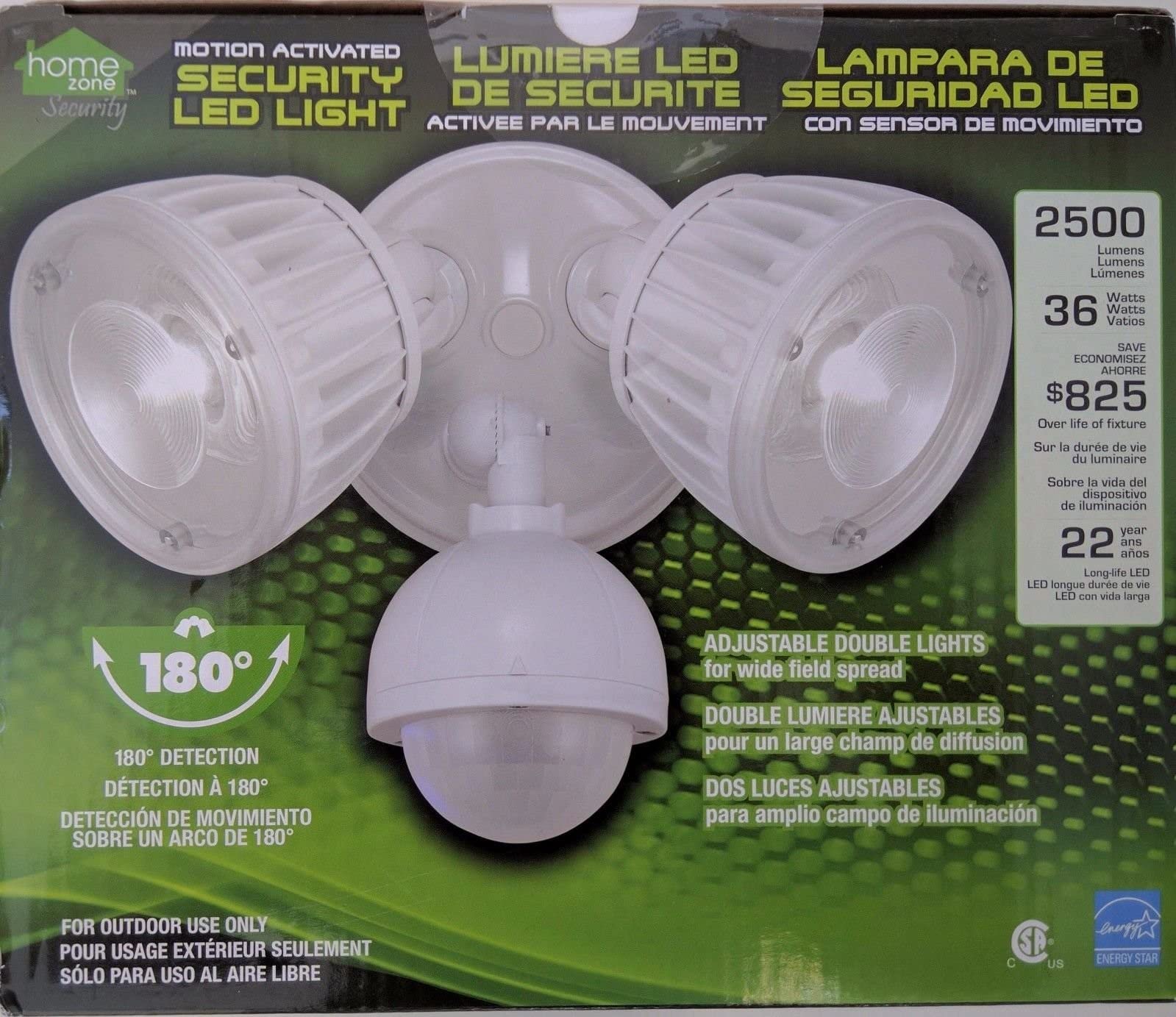
An image showing the complete Home Zone Security motion-activated LED security light fixture, typically mounted on a wall.
Operating Instructions
The motion sensor has adjustable settings to customize its operation:
- SENS (Sensitivity): Controls the detection range of the motion sensor. Turn clockwise for higher sensitivity (longer range) and counter-clockwise for lower sensitivity (shorter range).
- TIME: Sets how long the light remains on after motion is detected. Adjust from a few seconds to several minutes.
- LUX (Ambient Light): Determines the ambient light level at which the sensor will activate the light. Set to the sun icon for daytime and nighttime operation, or to the moon icon for nighttime-only operation.
Important Note on Detection Zone: The motion sensor is designed to detect movement in front of the fixture. It may have limited or no detection directly below the light. For optimal performance, ensure the sensor is aimed to cover the desired area, typically at least 20 degrees outwards from the wall where it is mounted.
Maintenance
- Cleaning: Clean the fixture with a soft, damp cloth. Do not use abrasive cleaners or solvents, as they may damage the finish or electrical components.
- LEDs: The LED light sources are integrated and not user-replaceable. Do not attempt to open the light heads.
- Inspection: Periodically check the fixture for any signs of damage, loose wiring, or corrosion.
Troubleshooting
| Problem | Possible Cause | Solution |
|---|---|---|
| Light does not turn on. | No power; faulty wiring; LUX setting too high for current ambient light. | Check circuit breaker; verify wiring connections; adjust LUX setting. |
| Light stays on continuously. | Continuous motion detected; TIME setting too long; faulty sensor. | Ensure no constant motion in detection zone; reduce TIME setting; contact support if sensor is faulty. |
| Motion sensor not detecting. | SENS setting too low; sensor obstructed; detection zone issue. | Increase SENS setting; clear obstructions; adjust sensor angle to cover desired area, noting limited detection directly below the fixture. |
| Light flickers. | Loose wiring connection; power fluctuations. | Check and secure all wiring connections; consult an electrician if power fluctuations persist. |
Specifications
| Brand | Home Zone Security |
| Model Number | AEC-34QA2-AC16W |
| Light Output | 2500 Lumens |
| Light Source Type | LED |
| Number of Light Sources | 2 |
| Power Source | AC Powered (120 Volts Hardwired) |
| Wattage | 36 W |
| Material | Aluminum |
| Indoor/Outdoor Use | Outdoor |
| Assembly Required | No |
| Item Weight | 2.6 Pounds |
| UPC | 823420944606 |
Warranty and Support
Home Zone Security products are designed for quality and reliability. For warranty information or technical support, please refer to the documentation included with your purchase or visit the official Home Zone Security website. Please have your model number (AEC-34QA2-AC16W) and proof of purchase ready when contacting support.


