
F&D A140F
F&D A140F 2.1 Speaker System
User Manual
1. Introduction
This manual provides essential information for the proper setup, operation, and maintenance of your F&D A140F 2.1 Speaker System. Please read these instructions carefully before using the product to ensure optimal performance and safety. Keep this manual for future reference.
2. Product Overview
The F&D A140F is a 2.1 channel multimedia speaker system designed to deliver enhanced audio. It features a powerful subwoofer and two satellite speakers, offering a balanced sound experience for various media. The system includes multiple connectivity options and user-friendly controls.

Image 1: The F&D A140F 2.1 Speaker System, showing the central subwoofer unit and two compact satellite speakers.
Key Features:
- 3-inch full-range drivers for satellite speakers.
- 4-inch heavy-duty subwoofer speaker for deep bass.
- Heavy-duty metal grill for satellite speakers.
- Innovative automatic multi-color LED lighting.
- Plug and play USB / CARD (SD / MMC/MS) reader.
- USB reader supporting MP3 / WMA dual formats decoding.
- Advanced PLL Technology for uninterrupted digital FM experience.
- Dedicated buttons for USB reader control (Source, Play/Pause, Next, Previous).
- High-efficient energy-saving design for low power consumption.
- Side panel controls for volume and bass adjustment.
Video 1: An official overview of the F&D 2.1 Speaker System, highlighting its audio performance, specifications, connectivity features, and smart controls.
3. What's in the Box
Upon unpacking your F&D A140F 2.1 Speaker System, please ensure all the following items are present:
- 1 x Subwoofer Unit
- 2 x Satellite Speakers
- 1 x Remote Control
- 1 x 3.5mm to RCA Stereo Audio Cable
- 1 x RCA to RCA Stereo Audio Cable (optional, may vary by region)
- 1 x Warranty Card
- 1 x Battery (for remote control)
- 1 x Operational Manual (this document)
4. Setup Instructions
Follow these steps to set up your speaker system:
- Placement: Place the subwoofer on a stable surface, preferably on the floor for optimal bass. Position the satellite speakers on either side of your listening area, ensuring they are at an equal distance from you for balanced stereo sound.
- Connect Satellite Speakers: Connect the cables from the satellite speakers to the corresponding output ports on the rear panel of the subwoofer. Ensure a secure connection.
- Connect Audio Source:
- For devices with a 3.5mm audio output (e.g., smartphones, laptops): Use the provided 3.5mm to RCA stereo audio cable. Connect the 3.5mm end to your device and the RCA ends to the 'AUDIO IN' ports on the subwoofer.
- For devices with RCA audio output (e.g., TVs, DVD players): Use an RCA to RCA stereo audio cable (one may be included). Connect one end to your device's audio output and the other to the 'AUDIO IN' ports on the subwoofer.
- Power Connection: Connect the power cable from the subwoofer to a standard AC 220V-240V ~50/60Hz power outlet.
- Power On: Turn on the main power switch located on the subwoofer. The LED display should light up.
5. Operating Instructions
Basic Operation:
- Power On/Off: Use the main power switch on the subwoofer or the power button on the remote control to turn the system on or off.
- Source Selection: Press the 'SOURCE' button on the subwoofer or remote control to cycle through input modes: AUX, USB, SD/MMC/MS Card, FM Radio.
- Volume Control: Adjust the master volume using the 'Volume+/-' buttons on the side panel of the subwoofer or the remote control.
- Bass Control: Adjust the bass level using the dedicated bass control knob on the side panel of the subwoofer.
USB / Card Reader Operation:
Insert a USB drive or SD/MMC/MS card into the respective slot on the subwoofer. The system will automatically switch to USB/Card mode and begin playing compatible audio files (MP3/WMA).
- Play/Pause: Press the 'Play/Pause' button to pause or resume playback.
- Next/Previous: Press the 'Next/CH+' or 'Previous/CH-' buttons to skip to the next or previous track.
FM Radio Operation:
Switch to FM mode using the 'SOURCE' button.
- Auto Scan: Press the 'SCAN' button to automatically scan and save available FM radio stations.
- Change Channel: Use the 'CH+' or 'CH-' buttons to navigate through saved stations.
- Manual Tuning: Use the 'TUNE+' or 'TUNE-' buttons for fine-tuning radio frequencies.
6. Controls
The F&D A140F speaker system features both on-unit controls and a remote control for convenient operation.
Subwoofer Side Panel Controls:
- Volume Knob: Adjusts the overall volume level.
- Bass Knob: Adjusts the bass intensity.
- USB Port: For connecting USB flash drives.
- Card Slot: For inserting SD/MMC/MS memory cards.
- Source Button: Cycles through input modes.
- Play/Pause Button: Controls media playback.
- Previous/CH- Button: Skips to previous track/FM channel.
- Next/CH+ Button: Skips to next track/FM channel.
Remote Control:
The included remote control provides full functionality from a distance.
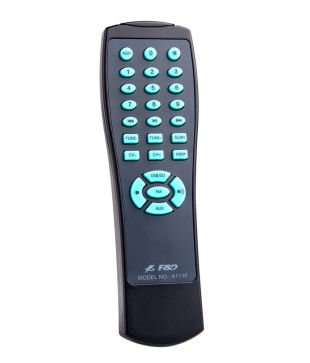
Image 2: The remote control for the F&D A140F speaker system, featuring numerical buttons, source selection, playback controls, and volume adjustment.
The remote control includes buttons for:
- Power On/Off
- Source Selection (USB/SD, FM, AUX)
- Volume Up/Down
- Play/Pause
- Next/Previous Track/Channel
- Numerical Keypad for direct track/channel selection
- FM Scan, Tune+/-
7. Connectivity
The F&D A140F offers versatile connectivity options to link with various audio devices:
- USB Port: Supports USB flash drives for direct playback of MP3 and WMA audio files.
- Card Reader: Compatible with SD, MMC, and MS memory cards for audio playback.
- AUX Input (3.5mm to RCA): Connects to devices like smartphones, tablets, laptops, and MP3 players using the provided 3.5mm to RCA cable.
- RCA Input (RCA to RCA): Connects to devices such as televisions, DVD players, and other audio sources with RCA output.
- FM Radio: Built-in FM tuner for listening to radio broadcasts.
8. Specifications
| Feature | Specification |
|---|---|
| Brand | F&D |
| Model Number | A140F |
| Audio Output Mode | Stereo (2.1 Channels) |
| Output Power (RMS) | 37W (Satellites: 12Wx2 + Subwoofer: 13W) |
| Frequency Response (Satellites) | 160Hz ~ 20KHz |
| Frequency Response (Subwoofer) | 45Hz ~ 105Hz |
| Signal-to-Noise Ratio (S/N) | ≥65dB |
| Separation | ≥35dB |
| Satellite Speaker Driver | 3-inch full range |
| Subwoofer Speaker Driver | 4-inch heavy duty |
| Connectivity Technology | USB, Card Reader (SD/MMC/MS), 3.5mm AUX, RCA |
| Power Input | AC 220V-240V ~50/60Hz 0.5A |
| Control Method | Buttons (on-unit and remote) |
| Material | Metal (grill) |
| Subwoofer Dimensions (WxHxD) | 210 x 240 x 245 mm |
| Satellite Dimensions (WxHxD) | 153 x 96 x 112 mm |
| Item Weight | 3.42 kg (Gross) |
| Compatible Devices | Desktop, Laptop, MP3 Player, Smartphone, Tablet, Television |
| Wireless Technology Type | Bluetooth (as per specifications, primary connectivity is wired/USB/Card) |
9. Troubleshooting
If you encounter any issues with your F&D A140F speaker system, please refer to the following common problems and solutions:
- No Power:
- Ensure the power cable is securely plugged into both the subwoofer and a working AC outlet.
- Check if the main power switch on the subwoofer is in the 'ON' position.
- Verify the power outlet is functional by plugging in another device.
- No Sound:
- Confirm that the correct audio source is selected (AUX, USB, FM). Press the 'SOURCE' button to cycle through inputs.
- Increase the master volume on the subwoofer or remote control.
- Check all audio cables for secure connections between the source device and the subwoofer.
- Ensure the audio output on your source device is not muted or set to a very low volume.
- Verify satellite speakers are correctly connected to the subwoofer.
- Distorted Sound:
- Reduce the volume level on both the speaker system and the source device.
- Check audio cable connections for any loose or damaged cables.
- Ensure the audio source is of good quality.
- USB/Card Reader Not Working:
- Ensure the USB drive or memory card is inserted correctly and fully.
- Verify that the audio files are in a supported format (MP3, WMA).
- Try a different USB drive or memory card to rule out media issues.
- Ensure the system is in USB/Card mode.
- Poor FM Reception:
- Adjust the position of the FM antenna (if external) or the speaker system itself to improve signal reception.
- Perform an auto-scan to find stronger stations.
- Avoid placing the system near other electronic devices that may cause interference.
- Remote Control Not Working:
- Ensure the battery is correctly inserted with the correct polarity.
- Replace the battery with a new one.
- Point the remote control directly at the infrared receiver on the subwoofer.
- Remove any obstacles between the remote and the subwoofer.
10. Warranty and Support
The F&D A140F 2.1 Speaker System comes with a 1-year warranty from the date of purchase. Please retain your purchase receipt and the warranty card for any warranty claims.
For technical support, service, or further inquiries, please refer to the contact information provided on your warranty card or visit the official F&D website.
Related documentsA140F


Ask a question about this manual
Ask about setup, troubleshooting, compatibility, parts, safety, or missing instructions. Manuals+ will review the question and use this page’s manual context to help answer it.