1. Introduction
The KODAK PIXPRO SP360 4K VR Camera is designed for capturing immersive 360-degree video. This manual provides essential information for setting up, operating, and maintaining your camera to ensure optimal performance.
2. What's in the Box
The KODAK PIXPRO SP360 4K Dual Pro Pack includes the following items:
- Two (2) KODAK PIXPRO SP360 4K Cameras
- Two (2) Rechargeable Li-ion Batteries
- USB Cable
- AC Adapter
- Quick Start Guide
- Warranty Card
- Service Card
- Lens Cover
- Protective Cover
- Lens Ring
- Battery Charger
- Carrying Case
- Cleaning Cloth
- SP360 4K Overview Card
- SP360 4K Online Company Store Card
- Selfie Stick
- Dual Camera Base Mount
- Remote Control Mount
- Suction Cup Mount
- Remote Control Battery
- Nylon Wrist Strap
- Accessories Tool

Image: All items included in the KODAK PIXPRO SP360 4K Dual Pro Pack, laid out on a white surface. This includes two cameras, various mounts, cables, chargers, and documentation.
3. Setup
3.1. Charging the Battery
Before first use, fully charge the camera's battery using the provided AC adapter and USB cable. Insert the battery into the camera, connect the USB cable to the camera and the AC adapter, then plug the adapter into a power outlet. The charging indicator will show the charging status.
3.2. Inserting a MicroSD Card
The camera requires a Class 10 MicroSD card (up to 128GB, not included) for recording. Open the side cover, insert the MicroSD card into the slot until it clicks, and then close the cover securely.
3.3. Attaching Mounts
Various mounts are included to suit different recording scenarios. For dual camera setups, use the Dual Camera Base Mount. For handheld use, attach the camera to the Selfie Stick. Ensure all mounts are securely fastened before use.

Image: A single KODAK PIXPRO SP360 4K camera mounted on a selfie stick, demonstrating a typical handheld setup.

Image: Two KODAK PIXPRO SP360 4K cameras mounted back-to-back in the Dual Camera Base Mount, ready for full 360-degree spherical video capture.
4. Operating Instructions
4.1. Powering On/Off
Press and hold the Power button (usually marked with a circle and a line) to turn the camera on or off. The status indicator light will illuminate when the camera is on.

Image: Top view of the KODAK PIXPRO SP360 4K camera, highlighting the power, mode, and OK buttons, along with the recording indicator and Wi-Fi status.
4.2. Recording Video
With the camera powered on, press the Record button (red circle) to start recording. Press it again to stop. The recording indicator light will flash during recording.
4.3. Taking Photos
Switch to photo mode using the Mode button. Press the OK button to capture a still image.
4.4. Using the Remote Control
The RF remote control allows you to wirelessly control one or two cameras. Use the switches to select camera 1, camera 2, or both. The large red button triggers recording/photo capture. The remote can be worn as a wrist strap or attached to a mount.
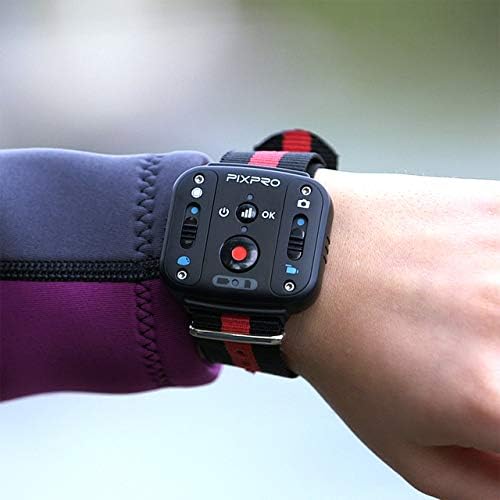
Image: The KODAK PIXPRO SP360 4K remote control, designed to be worn on the wrist, showing its control buttons for camera operation.
4.5. Connecting to a Smart Device (Wi-Fi)
Enable Wi-Fi on the camera. On your iOS/Android smart device, connect to the camera's Wi-Fi network. Download and use the KODAK PIXPRO SP360 4K app to control the camera, view live footage, and transfer files.
4.6. Using as a Webcam
The KODAK PIXPRO SP360 4K camera can function as a webcam. Connect the camera to your computer via a Micro USB cable. Download and install the necessary drivers from the official KODAK PIXPRO website. Select "PIXPRO SP360 4K UVC" as the video input device in your webcam software (e.g., Skype).

Image: A screenshot illustrating the steps to configure the KODAK PIXPRO SP360 4K as a webcam, including driver download links and software settings.
Download drivers: Americas Support | Europe Support
5. Maintenance
5.1. Cleaning the Lens
Use the provided cleaning cloth to gently wipe the lens. Avoid using abrasive materials or harsh chemicals that could scratch the lens coating.
5.2. Battery Care
Store batteries in a cool, dry place. Avoid extreme temperatures. If the camera will not be used for an extended period, remove the battery.
5.3. Firmware Updates
Periodically check the KODAK PIXPRO website for firmware updates to ensure optimal performance and access to new features. Follow the instructions provided on the website for updating the firmware.
6. Troubleshooting
6.1. Camera Not Powering On
- Ensure the battery is fully charged.
- Verify the battery is correctly inserted.
- If using external power, ensure the cable and adapter are functioning correctly.
6.2. Blurry Footage
- Clean the camera lens with the provided cleaning cloth.
- Ensure the lens cover is removed before recording.
- If the focus is consistently blurry, refer to the video tutorial on adjusting the lens focus.
Video: A detailed tutorial demonstrating how to fix the focus on the KODAK PIXPRO SP360 4K Action Camera. This involves disassembling parts of the camera to access and adjust the lens.
6.3. Wi-Fi Connectivity Issues
- Ensure Wi-Fi is enabled on the camera and your smart device.
- Restart both the camera and your smart device.
- Ensure you are within the camera's Wi-Fi range.
6.4. Software Issues (Stitching/Editing)
- Ensure you are using the latest version of the PIXPRO 360 VR Suite.
- For Mac users, ensure security settings allow installation from unidentified developers if prompted.
- Consider using more robust third-party editing software like Adobe Premiere or Final Cut Pro for advanced editing.
Video: A review of the Kodak PIXPRO SP360 4K camera, discussing its features, video quality, and the accompanying software. It highlights the camera's capabilities and potential areas for improvement in the software experience.
7. Specifications
| Product Dimensions | 2.06 x 1.88 x 1.96 inches |
| Item Weight | 3.68 ounces |
| Item Model Number | SP360 4K-BK5 |
| Batteries | 1 Lithium Polymer battery required (included) |
| Brand | KODAK |
| Photo Sensor Technology | CMOS |
| Video Capture Resolution | 4K |
| Maximum Focal Length | 8.2 Millimeters |
| Maximum Aperture | 2.8 Millimeters |
| Video Capture Format | 2880x2880: 30fps (1:1), 2048x2048: 30fps (1:1), 1440x1440: 60fps/30fps (1:1), 1072x1072: 60fps/30fps (1:1) |
| Supported Audio Format | AAC |
| Screen Size | 1 Inches |
| Connectivity Technology | Wi-Fi |
7.1. Environmental Durability
- Shockproof: Withstands drops from up to 1.5m (5ft).
- Freezeproof: Operates in temperatures down to -10°C.
- Dustproof: Resistant to dust ingress.
Video: An overview of the KODAK PIXPRO SP360 4K Dual Pro Pack VR Camera, highlighting its features, accessories, and rugged design for various environments.
8. Warranty & Support
For warranty information, please refer to the Warranty Card included in your product packaging. For additional support, including FAQs, troubleshooting guides, and contact information, visit the official KODAK PIXPRO website.
- 2-Year Protection Plan: Available for purchase.
- 3-Year Protection Plan: Available for purchase.
- Complete Protect: Monthly plan covering eligible past and future purchases.


