Raffel Systems HC-6601-FR4 Power Recline with Massage Hand Control
User Manual
1. Introduction
Thank you for choosing the Raffel Systems HC-6601-FR4 Power Recline with Massage Hand Control. This control is designed to operate power recline and massage functions in compatible furniture, typically using a 5-pin connection. This manual provides essential information for proper setup, operation, and maintenance to ensure safe and effective use of your hand control.
2. Safety Information
Please read and understand all safety instructions before using the hand control. Failure to follow these instructions may result in injury or damage to the product.
- Always use the hand control with compatible furniture in a stable and secure location.
- Do not use the massage function or recline while sleeping or unattended.
- Keep the hand control away from heat sources and liquids to prevent damage or injury.
- Ensure all connections are secure before operation.
- Do not attempt to disassemble or repair the hand control yourself. Contact qualified service personnel if needed.
3. Product Overview
The Raffel Systems HC-6601-FR4 is a compact and durable hand control designed for ease of use. It features intuitive buttons for controlling recline and massage functions.
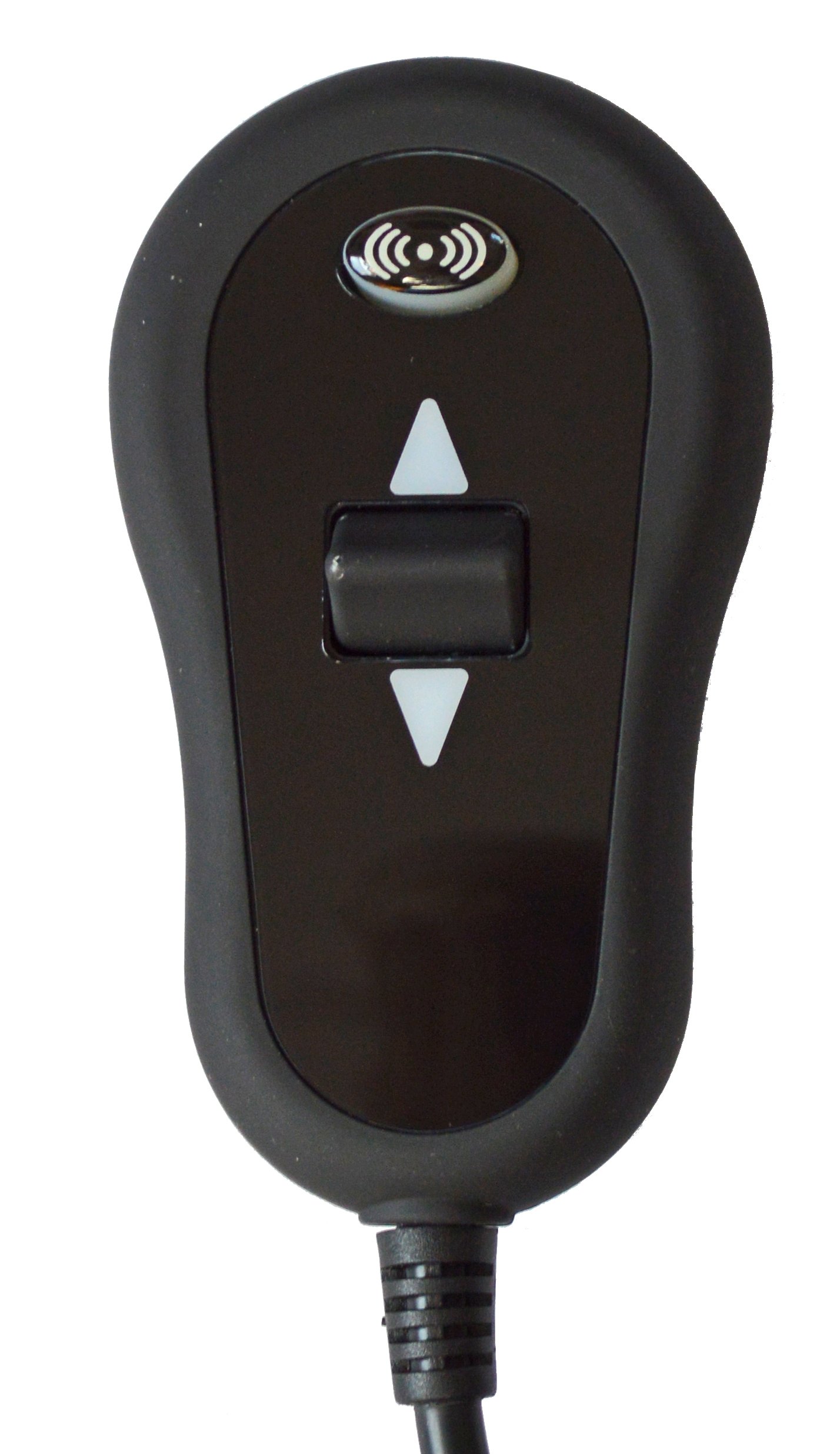
Figure 1: Front view of the Raffel Systems HC-6601-FR4 Hand Control, showing the recline toggle switch and massage button.
The control typically connects via a 5-pin DIN connector, providing a secure and reliable connection to your furniture's motor system.

Figure 2: Raffel Systems HC-6601-FR4 Hand Control showing the coiled cord and the 5-pin connector for attachment to the furniture's power system.
4. Setup and Installation
The Raffel Systems HC-6601-FR4 Hand Control is designed for easy installation and is generally ready to use without complex assembly.
- Identify the Connection Port: Locate the corresponding 5-pin port on your power recline furniture. This port is typically found near the motor or power supply unit.
- Connect the Hand Control: Align the 5-pin connector from the hand control with the port on your furniture. Gently push until it clicks securely into place. Do not force the connection.
- Secure Wiring: Ensure the cable is routed safely, avoiding pinch points or areas where it could be tripped over.
- Power On: Once connected, ensure your furniture's power supply is plugged into a working electrical outlet.

Figure 3: Raffel Systems HC-6601-FR4 Hand Control showing the full wiring harness, including the 5-pin connector and additional wires for power and massage functions.
For a visual guide on connecting a similar lift chair remote control, please refer to the video below:
Video 1: Demonstration of connecting a lift chair remote control. This video illustrates the general process of connecting a remote to a lift chair, which can be helpful for understanding the connection of the HC-6601-FR4.
5. Operating Instructions
The HC-6601-FR4 hand control features a simple interface for operating your power recline and massage functions.
- Recline Function: Use the toggle switch (up/down arrows) to adjust the recline position of your furniture. Press the top arrow to recline backward and the bottom arrow to return to an upright position.
- Massage Function: Press the dedicated massage button (often indicated by a wave or vibration icon) to activate or deactivate the massage feature. Some models may have multiple massage settings or intensity levels, which can be cycled through by repeatedly pressing the button.
Always operate the recline and massage functions smoothly and avoid sudden movements. Release the button once the desired position or setting is achieved.
6. Maintenance
To ensure the longevity and proper functioning of your hand control, follow these simple maintenance guidelines:
- Cleaning: Wipe the hand control clean with a soft, damp cloth. Avoid using harsh chemicals or abrasive cleaners, as these can damage the plastic finish.
- Storage: When not in use, store the hand control in a safe place where it will not be subjected to excessive heat, moisture, or physical damage.
- Cable Care: Regularly inspect the cable for any signs of wear, fraying, or damage. If damage is observed, discontinue use and seek a replacement.
7. Troubleshooting
If you experience issues with your hand control, consider the following troubleshooting steps:
- No Response: Check if the hand control's cable is securely connected to the furniture's port. Ensure the furniture's power supply is plugged in and receiving power.
- Intermittent Function: Inspect the cable for any visible damage. Try unplugging and re-plugging the connector to ensure a solid connection.
- Incorrect Movement: Verify that you are pressing the correct buttons for the desired function (recline up/down, massage on/off).
If the problem persists after attempting these steps, contact customer support for further assistance.
8. Specifications
| Model Name | HC-6601-FR4 |
| Brand | Raffel |
| Color | Black |
| Product Dimensions | 1"D x 2"W x 4"H |
| Material | Plastic |
| Item Weight | 0.01 ounces |
| Special Feature | Rechargeable (Note: Product description states 'Cordless: Operates on rechargeable batteries for portability.' but the image shows a wired control. Please verify actual product feature.) |
| Assembly Instructions | Ready to use, no assembly required. |
9. Warranty Information
Specific warranty details for the Raffel Systems HC-6601-FR4 Hand Control are not provided in the product information. Please refer to your purchase documentation or contact the seller/manufacturer directly for warranty terms and conditions.
10. Customer Support
For technical assistance, troubleshooting beyond this manual, or inquiries regarding your Raffel Systems HC-6601-FR4 Hand Control, please contact the retailer or manufacturer where you purchased the product. Have your model number (HC-6601-FR4) and purchase date ready when contacting support.


