
Defiant DFI-5983-WH
Defiant LED Motion Security Light User Manual
Model: DFI-5983-WH
Introduction
The Defiant 180-Degree LED Motion Security Light is designed to provide enhanced safety and security for your property. Featuring DualBrite technology, it offers seamless light coverage with accent lighting from dusk-to-dawn and full brightness upon motion detection. This unit utilizes long-lasting LED technology, eliminating the need for bulb replacement.

Image: Front view of the Defiant LED Motion Security Light, showing the two adjustable light heads and the motion sensor below.
Safety Information
Always follow basic safety precautions when installing or maintaining electrical products to reduce the risk of fire, electric shock, and personal injury.
- Turn off power at the circuit breaker or fuse box before installation or servicing.
- Consult a qualified electrician if you are unsure about the installation process.
- Ensure all wiring connections are secure and comply with local electrical codes.
- Do not attempt to modify the product.
- This product is designed for outdoor use and should be mounted in a location protected from direct heavy rain, such as under a soffit, for optimal longevity.
Package Contents
Verify that all components are present before beginning installation:
- Defiant LED Motion Security Light unit
- Mounting hardware (screws, wire nuts)
- Installation instructions (this manual)
Features
- Bright LED Light: Provides 2050 lumens of output for clear illumination.
- Wide Motion Detection: 180-degree motion detection with a range of up to 70 ft.
- DualBrite Technology: Offers 2-level lighting, providing accent light from dusk-to-dawn and full light upon motion detection.
- Flexible Mounting: Can be mounted on walls or eaves.
- Integrated LEDs: No bulbs to replace.
- Tool-free Adjustments: Easy adjustment of lamp heads and sensor.

Image: Diagram highlighting key features such as 180-degree detection, LED technology, DualBrite, and easy installation.
Setup and Installation
The Defiant LED Motion Security Light is designed for quick and safe installation. Follow these steps carefully:
- Step 1: Prepare Wiring
Ensure power is turned off at the circuit breaker. Connect the house wiring to the mounting plate. The mounting plate contains the electrical connections. - Step 2: Mount Base Plate
Secure the base plate to the junction box on your wall or eave. Ensure the wiring is properly connected and secured within the base plate. - Step 3: Attach Light Fixture
Align the main light housing with the base plate. The electrical prongs on the light fixture will plug into the base plate. Secure the light fixture to the base plate.

Image: Visual representation of the three-step installation process: preparing wiring, mounting the base plate, and attaching the light fixture.
For detailed wiring diagrams, refer to the included wiring instructions or consult a professional electrician.
Operating Instructions
The Defiant LED Motion Security Light features adjustable settings for optimal performance.
DualBrite Technology
DualBrite allows the light to operate at a low accent level from dusk-to-dawn, providing continuous subtle illumination. When motion is detected within its range, the light will automatically switch to full brightness for a set duration, then return to the accent level.
Motion Sensor Adjustment
The motion sensor can be adjusted to control sensitivity and the duration the light stays on after motion is detected. The selectable "ON" duration timer offers manual override options (test, 1, 5, or 20 minutes).
- Sensitivity: Adjust the sensor head to cover the desired detection area.
- Time Setting: Use the control dial on the sensor to set how long the light remains at full brightness after motion stops.

Image: Detailed view of the Defiant LED Motion Security Light, illustrating tool-free lamp head adjustment, light dispersing lens, and the motion sensor with its adjustable settings.
Maintenance
The Defiant LED Motion Security Light requires minimal maintenance.
- Cleaning: Periodically wipe the light fixture and sensor lens with a soft, damp cloth to remove dirt and debris. Do not use abrasive cleaners or solvents.
- Inspection: Annually inspect the wiring and mounting for any signs of wear or damage. Ensure all connections remain secure.
- LEDs: The integrated LED bulbs are designed for long life and do not require replacement.
Troubleshooting
| Problem | Possible Cause | Solution |
|---|---|---|
| Light does not turn on. | No power; faulty wiring; sensor obstructed. | Check circuit breaker. Verify wiring connections. Clear any obstructions from the sensor. |
| Light stays on continuously. | Sensor sensitivity too high; continuous motion in detection area. | Adjust sensor sensitivity. Ensure no constant motion sources (e.g., tree branches) are in the detection zone. |
| Light flashes or flickers. | Loose wiring connection; power fluctuations. | Check and secure all wiring connections. Consult an electrician if power fluctuations are suspected. |
| Motion detection range is poor. | Sensor angle incorrect; obstructions. | Adjust the sensor head to optimize coverage. Remove any objects blocking the sensor's view. |
Specifications
| Attribute | Detail |
|---|---|
| Brand | Defiant |
| Model Number | DFI-5983-WH |
| Light Output (Lumens) | 2050 Lumens |
| Wattage | 82 watts |
| Voltage | 120 Volts |
| Motion Detection Range | Up to 70 Feet |
| Motion Detection Angle | 180-degree |
| Color | White |
| Material | Plastic |
| Mounting Type | Wall Mount |
| Product Dimensions | 9"D x 10"W x 7"H |
| Item Weight | 0.01 Ounces |
| Type of Bulb | LED (Integrated) |
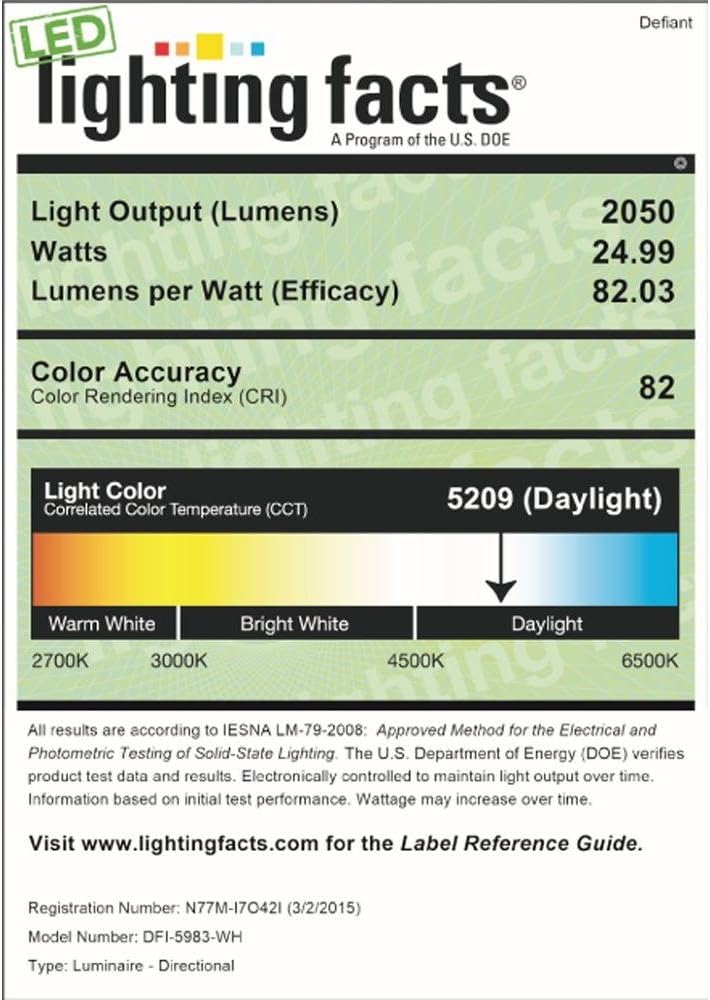
Image: LED Lighting Facts label, detailing light output, watts, lumens per watt, color accuracy, and correlated color temperature (Daylight).
Warranty and Support
For warranty information or technical support, please refer to the contact details provided with your purchase or visit the official Defiant website. Keep your proof of purchase for warranty claims.
Related documentsDFI-5983-WH


Ask a question about this manual
Ask about setup, troubleshooting, compatibility, parts, safety, or missing instructions. Manuals+ will review the question and use this page’s manual context to help answer it.