
Introduction
This manual provides essential instructions for the RadioShack 2.4V/700mAh Ni-Cd Cordless Phone Battery. This battery is designed to power compatible cordless telephones, offering reliable performance. Please read this manual thoroughly before installation and use to ensure proper function and longevity of your battery.
Product Features
- Delivers 2.4 volts with a capacity of 700mAh.
- Utilizes Nickel-Cadmium (Ni-Cd) battery chemistry.
- Specifically designed for use in cordless phones.
Compatibility
This battery is compatible with various RadioShack cordless phone models, including 43-3533, 43-3534, 43-3541, 43-3542, and 43-3543. It also serves as a replacement for RadioShack Enercell 23-933, Uniden EXP4540, EXP370, and EXP371 batteries. Always verify your phone's battery requirements before installation.
Setup and Installation
Follow these steps to install the battery in your cordless phone:
- Locate Battery Compartment: Identify the battery compartment on your cordless phone handset. This is typically found on the back or bottom of the handset and may require removing a cover.
- Remove Old Battery (if applicable): If replacing an existing battery, carefully disconnect it from the phone's connector and remove it from the compartment.
- Connect New Battery: Align the battery connector with the corresponding port inside the phone's battery compartment. Gently push until it clicks securely into place.
- Position Battery: Place the new battery securely within the compartment. Ensure that no wires are pinched or obstructing the cover.
- Close Compartment: Replace the battery compartment cover, ensuring it is latched or screwed shut.
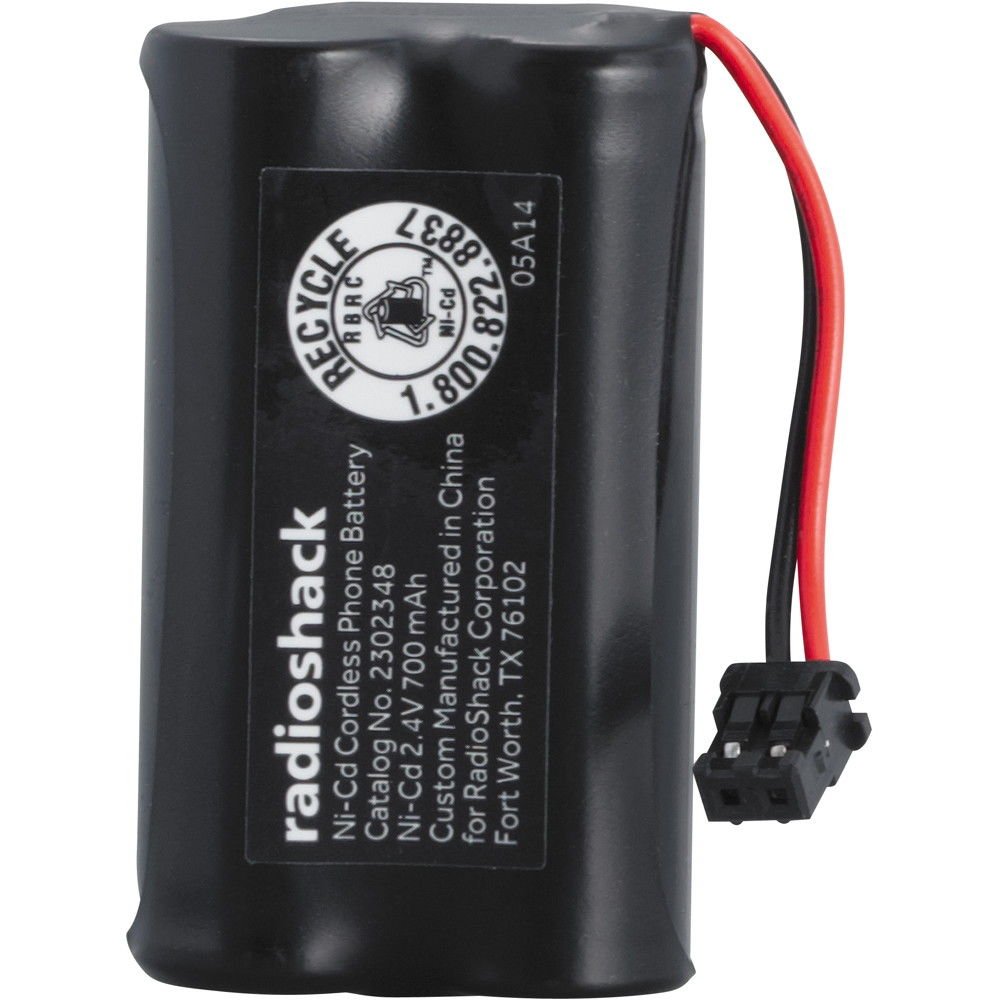
Image: RadioShack 2.4V/700mAh Ni-Cd Cordless Phone Battery. This image displays the battery pack, typically used in cordless phones, showing its compact form factor and connector.
Charging and Initial Use
Proper charging is crucial for Ni-Cd battery performance:
- Initial Charge: After installing the battery, place the cordless phone handset on its charging base.
- Full Charge Cycle: For optimal performance and to condition the Ni-Cd battery, allow it to charge continuously for at least 12-16 hours before its first use, even if the phone indicates a full charge sooner.
- Regular Charging: Return the handset to the charging base when not in use to maintain its charge and ensure it is ready for use.
Maintenance
To maximize the lifespan and performance of your Ni-Cd battery:
- Deep Cycle (Monthly): To prevent the "memory effect" common in Ni-Cd batteries, allow the phone to fully discharge (until it powers off) approximately once a month. After complete discharge, fully recharge it for 12-16 hours.
- Cleaning: Periodically clean the battery contacts and the phone's charging contacts using a dry, soft cloth to ensure good electrical connection.
- Storage: If storing the battery for an extended period (more than one month), charge it fully, then store it in a cool, dry place. Recharge every 3-6 months to prevent deep discharge, which can damage the battery.
- Temperature: Avoid exposing the battery to extreme temperatures, both hot and cold, as this can degrade performance and shorten its lifespan.
Troubleshooting
Battery Not Holding Charge
If the battery does not hold a charge, ensure it has completed an initial 12-16 hour charge cycle. Perform a deep discharge and full recharge cycle as described in the Maintenance section. If the issue persists, the battery may be at the end of its service life and require replacement.
Phone Not Powering On
Verify that the battery is correctly installed and fully charged. Check that the phone's charging base is properly connected to power and functioning correctly. Ensure the battery connector is firmly seated.
Reduced Talk Time
Reduced talk time can indicate that the battery is nearing the end of its lifespan or is suffering from the "memory effect." Try performing a deep discharge and full recharge cycle. If talk time remains significantly low, consider replacing the battery.
Specifications
| Feature | Detail |
|---|---|
| Model Number | 2302348 |
| Voltage | 2.4V |
| Capacity | 700mAh |
| Battery Chemistry | Nickel-Cadmium (Ni-Cd) |
| Product Dimensions | 4.5 x 2.8 x 0.7 inches |
| Item Weight | 1.6 ounces |
| Manufacturer | RadioShack |
Safety Information
Observe the following safety precautions:
- Do not short-circuit the battery terminals.
- Do not dispose of batteries in fire; they may explode.
- Do not disassemble, crush, or puncture the battery.
- Keep batteries out of reach of children.
- Dispose of used batteries according to local regulations for Ni-Cd battery recycling. Many electronic stores and recycling centers accept them.
- Use only with compatible devices as specified in this manual or by your phone's manufacturer.
Warranty and Support
For warranty information or technical support regarding your RadioShack battery, please refer to the original product packaging or contact RadioShack customer service. Keep your purchase receipt as proof of purchase.
You can visit the official RadioShack store for more information: RadioShack Store.