
Introduction
This manual provides essential instructions for the safe and effective use of your Canon PIXMA GI790 Magenta Ink Bottle. This ink is designed for use with Canon PIXMA G-series inkjet printers, ensuring optimal print quality and printer longevity. Please read this manual thoroughly before use.
Compatible Printer Models: G1010, G2000, G2012, G3000, G3010, G3012, G4010.
Package Contents
- 1 x Canon PIXMA GI790 Magenta Ink Bottle
Setup and Ink Refilling
Follow these steps to correctly refill your Canon PIXMA G-series printer's magenta ink tank.
- Prepare the Printer: Ensure your printer is powered on. Open the ink tank cover on your printer. Locate the magenta ink tank.
- Open the Ink Bottle: Carefully twist off the cap of the Canon GI790 Magenta Ink Bottle. Do not squeeze the bottle.
- Refill the Ink Tank: Align the nozzle of the ink bottle with the inlet of the magenta ink tank. Insert the bottle firmly. The ink will flow automatically into the tank. Do not squeeze the bottle.
- Monitor Ink Level: Observe the ink tank to ensure it fills to the upper limit line. Stop refilling once the tank is full.
- Remove and Recap: Gently remove the ink bottle from the tank. Recap the ink bottle securely if there is any remaining ink. Close the ink tank cover on your printer.
- Initial Setup (if applicable): If this is the first time refilling, or if prompted by the printer, follow any on-screen instructions on your printer's display or computer.

Image: Canon GI790 Magenta Ink Bottle with its cap removed, showing the nozzle designed for spill-free refilling.
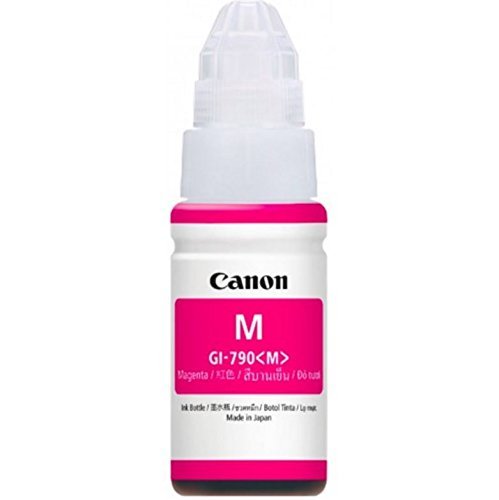
Image: A single Canon GI790 Magenta Ink Bottle, illustrating its design and color.
Operating Instructions
Once the ink tank is refilled, your printer is ready for use. Ensure your printer drivers are installed and updated for optimal performance.
- Printing: Send print jobs from your computer or device as usual. The printer will draw ink from the refilled tank.
- Ink Level Monitoring: Regularly check the ink levels in your printer's tanks, either visually or through your printer's software utility. Refill the ink before it drops below the lower limit line to prevent air from entering the ink tubes.
- Page Yield: This Magenta ink bottle is designed to yield approximately 7000 prints. Actual yield may vary significantly based on content of printed pages, print settings, temperature, and humidity.
Maintenance
- Storage: Store unused ink bottles upright in a cool, dark place, away from direct sunlight and extreme temperatures. Keep out of reach of children.
- Genuine Ink: Always use genuine Canon ink bottles. Using counterfeit or non-genuine ink can harm your printer and may void its warranty.
- Printer Head Cleaning: If print quality degrades (e.g., streaks, faded colors), perform a print head cleaning cycle through your printer's maintenance utility. Refer to your printer's manual for specific instructions.
Troubleshooting
If you encounter issues after refilling or during printing, consider the following:
- Ink Not Flowing: Ensure the ink bottle nozzle is correctly seated in the ink tank inlet. Do not squeeze the bottle; the ink flows by gravity. Check for any blockages in the tank inlet.
- Poor Print Quality:
- Verify that the ink tank is sufficiently filled.
- Perform a print head cleaning and nozzle check from your printer's utility software.
- Ensure you are using genuine Canon ink.
- Printer Not Recognizing Ink: This ink bottle is a refill for an ink tank system, so the printer typically does not "recognize" the bottle itself. If the printer indicates low ink after refilling, ensure the tank was filled above the lower limit line and that the ink tank cover is properly closed.
- Spills: In case of ink spills, wipe immediately with a damp cloth. Ink can stain.
For printer-specific errors or complex issues, refer to your Canon printer's instruction manual or contact Canon customer support.
Specifications
| Model Name | PIXMA GI790M |
| Brand | Canon |
| Ink Colour | Magenta |
| Ink Type | Dye-based |
| Page Yield | Approx. 7000 prints (ISO/IEC 24711 standard) |
| Compatible Devices | Canon PIXMA G1010, G2000, G2012, G3000, G3010, G3012, G4010 |
| Item Weight | 300 Grams |
| Item Dimensions (D x W x H) | 6D x 6W x 15H Centimeters |
| Country of Origin | Japan |
Warranty Information
This Canon PIXMA GI790 Magenta Ink Bottle comes with a 7-day carry-in warranty from the date of purchase. This warranty covers manufacturing defects only. Please retain your purchase receipt as proof of purchase.
The warranty does not cover damage resulting from misuse, improper storage, or the use of non-genuine ink products.
Customer Support
For product-related queries, technical assistance, or warranty claims, please contact Canon customer support:
- Phone: 1860 180 3366
- Operating Hours: Monday to Friday, 9:30 AM - 5:30 PM (IST)
- Manufacturer Contact Information: Canon Inc., 3-30-2, Shimomaruko, Ohta-ku, Tokyo 146-8501, Japan
- Importer Contact Information: Canon India Pvt Limited. 214-218, 2nd floor, Narain Manzil, Barakhamba Road, Connaught Place, New Delhi-110001, India
Please have your product details and purchase information ready when contacting support.


