
1. Introduction
This manual provides comprehensive instructions for the installation, operation, maintenance, and troubleshooting of your FSP Group 700W ATX Power Supply, model FSP700-80UEPB. This industrial-grade switching power supply delivers up to 700 Watts of power, featuring an active Power Factor Correction (PFC) circuit design and 80 Plus Platinum certification for high efficiency. It is engineered for reliable performance in server, workstation, communication, and other automation applications, complying with international safety and EMC standards.
Key Features:
- 80 Plus Platinum Certified for high energy efficiency.
- Low Ripple & Noise output for stable power delivery.
- Output over voltage protection.
- Short circuit protection on all outputs.
- Resettable power shut down.
- Internal 4 cm cooling fan.
- Four +12V outputs (+12V/1, +12V/2, +12V/3, +12V/4).
- Designed for 100% burn-in under high ambient temperature (50℃).
- Vacuum-impregnated transformer for enhanced durability.
- MTBF: 100,000 hours at 25℃.
- 100% Hi-pot tested.
- Line input fuse protection.
2. Safety Information
WARNING: HAZARDOUS AREA. DO NOT REMOVE THE COVER. NO USER-SERVICEABLE COMPONENTS INSIDE. REFER SERVICING TO QUALIFIED SERVICE PERSONNEL.
- Always disconnect the power cord from the wall outlet before installing, removing, or cleaning the power supply.
- Do not operate the power supply in high humidity or extreme temperature environments.
- Ensure proper grounding to prevent electrical shock.
- Do not block the ventilation openings of the power supply.
- Use only the power cord provided or a suitable replacement rated for your region.
- This power supply is designed for internal computer use only.
3. Package Contents
Verify that all items are present in the package:
- FSP700-80UEPB Power Supply Unit
- AC Power Cord
- Set of modular cables (if applicable)
- User Manual (this document)

Image: Contents of the FSP Group 700W ATX Power Supply package, including the PSU, power cord, and various cables, alongside a brown cardboard box.
4. Setup and Installation
Follow these steps to install the FSP700-80UEPB power supply into your system:
- Prepare Your System: Ensure your computer system is completely powered off and disconnected from the AC power outlet.
- Remove Old Power Supply (if applicable): If replacing an existing power supply, carefully disconnect all cables from the motherboard and other components. Unscrew and remove the old power supply from the chassis.
- Mount the New Power Supply: Insert the FSP700-80UEPB into the designated power supply bay in your rack-mount case. Secure it with the appropriate screws.
- Connect Main Power Cables:
- Connect the 20+4 pin ATX main power connector to the motherboard.
- Connect the 4+4 pin or 8-pin EPS12V CPU power connector to the motherboard.

Image: A selection of power cables provided with the FSP700-80UEPB power supply.
- Connect Peripheral Cables: Connect SATA power connectors to hard drives, SSDs, and optical drives. Connect PCIe power connectors to graphics cards if required.
- Connect AC Power: Once all internal connections are secure, connect the AC power cord to the power supply's inlet and then to a grounded wall outlet.
- Power On: Flip the power switch on the back of the power supply to the 'ON' position. Then, power on your computer system.

Image: Rear panel of the FSP700-80UEPB, illustrating the AC power input, power switch, and exhaust fan.
5. Operating Instructions
The FSP700-80UEPB power supply operates automatically once installed and connected correctly. It provides stable power to your system components.
- Power On/Off: Use the main power switch on the rear of the power supply to cut off or restore AC power to the unit. For normal operation, leave this switch in the 'ON' position and use your system's power button to turn the computer on or off.
- PMBus V1.2: This power supply supports PMBus V1.2 for digital power management. Refer to your motherboard or system management software documentation for details on utilizing PMBus features, such as monitoring voltage, current, and temperature.

Image: Side view of the FSP700-80UEPB power supply, showing its metallic casing, product label, and the bundle of output cables.
6. Maintenance
Proper maintenance ensures the longevity and optimal performance of your power supply.
- Cleaning: Periodically clean the exterior of the power supply and its fan grille to prevent dust buildup. Use a soft, dry cloth or compressed air. Ensure the power supply is disconnected from AC power before cleaning.
- Ventilation: Ensure that the air intake and exhaust vents of the power supply are not obstructed. Adequate airflow is crucial for cooling.
- Cable Management: Organize internal cables to improve airflow within the computer case, which can help maintain lower operating temperatures for all components, including the PSU.
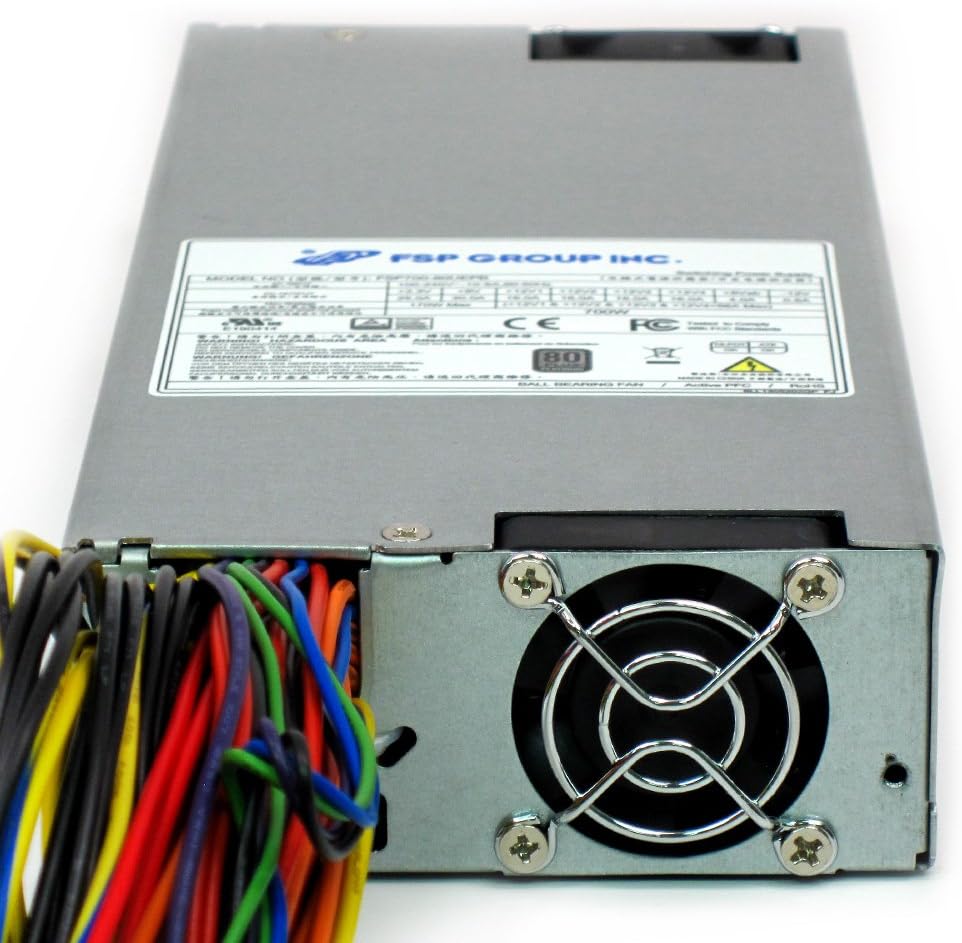
Image: Top-down view of the FSP700-80UEPB, showing the fan grille and the overall compact 1U form factor.
7. Troubleshooting
If you encounter issues with your FSP700-80UEPB power supply, refer to the following common troubleshooting steps:
- No Power:
- Check if the AC power cord is securely connected to both the power supply and the wall outlet.
- Ensure the power switch on the back of the PSU is in the 'ON' position.
- Verify that the wall outlet is functional by plugging in another device.
- Confirm all internal power cables (20+4 pin ATX, 4+4/8-pin EPS12V) are correctly seated.
- System Instability/Random Shutdowns:
- This could indicate an overloaded power supply or a faulty component. Ensure your system's power requirements do not exceed the PSU's 700W capacity.
- Check for proper ventilation and ensure the PSU fan is spinning. Overheating can cause shutdowns.
- If possible, test the power supply with a different system or use a PSU tester to verify its output voltages.
- Loud Fan Noise:
- A certain level of fan noise is normal, especially under load.
- If the noise is excessive or unusual, check for dust buildup in the fan or obstructions.
- Ensure the power supply is not operating in an excessively hot environment.
If problems persist after following these steps, contact FSP Group technical support or a qualified service professional.
8. Specifications
| Feature | Specification |
|---|---|
| Model Number | FSP700-80UEPB |
| Brand | FSP |
| Output Wattage | 700 Watts |
| Efficiency Certification | 80 Plus Platinum |
| Form Factor | 1U Size, ATX12V / EPS12V |
| Dimensions (LxWxH) | 9.4 x 3.9 x 1.6 inches (23.9 x 9.9 x 4.1 cm) |
| Item Weight | 4.8 pounds (2.18 kg) |
| Cooling Method | Air (Internal 4 cm fan) |
| Connector Type | ATX |
| Compatible Devices | Desktop Computer, Gaming PC, Workstation, Server, Communication Equipment, Automation Applications |
| Power Source | AC |
| Date First Available | January 7, 2016 |

Image: Product label displaying detailed electrical specifications and certifications for the FSP700-80UEPB.
9. Warranty and Support
FSP Group products are manufactured to high-quality standards. For specific warranty terms and conditions, please refer to the warranty card included with your product or visit the official FSP Group website. Keep your purchase receipt as proof of purchase for warranty claims.
For technical assistance, troubleshooting beyond this manual, or warranty inquiries, please contact FSP Group customer support through their official channels. Contact information can typically be found on the FSP Group website or on the product packaging.
Online Resources:
- Visit the FSP Store on Amazon for product information.
- Search for 'FSP Group official website' for global support and product details.