
1. Introduction
This manual provides comprehensive instructions for the safe and effective use, maintenance, and troubleshooting of your J5 Tactical Hyper V 400 Lumen Tactical LED Flashlight. Designed for durability and high performance, this flashlight is suitable for various applications including hunting, cycling, climbing, camping, and general household tasks.
2. Product Overview
The J5 Tactical Hyper V is a compact yet powerful LED flashlight featuring an ultra-bright 400 lumen output. Its robust aluminum alloy construction ensures durability, while its adjustable focus allows for versatile lighting from a wide floodlight to a concentrated spotlight. The flashlight operates on three AAA batteries, providing extended use.
Key Features:
- Ultra Bright: Max 400 Lumens, capable of illuminating objects up to 800 feet away.
- Adjustable Focus: Zoomable beam for wide-to-narrow light projection.
- Multiple Modes: High, Low, and Strobe settings for various lighting needs.
- Durable Construction: Made with a compact aluminum alloy case, designed to withstand drops and temporary water submersion.
- Portable: Compact size allows for easy carrying in a pocket, backpack, or clipped to a belt.
- Battery Efficient: Operates on 3 x AAA batteries (not included), offering long-lasting performance.
Product Visuals:

Figure 2.1: J5 Tactical Hyper V Flashlight and its retail packaging.

Figure 2.2: The J5 Tactical Hyper V flashlight alongside its removable battery holder for AAA batteries.
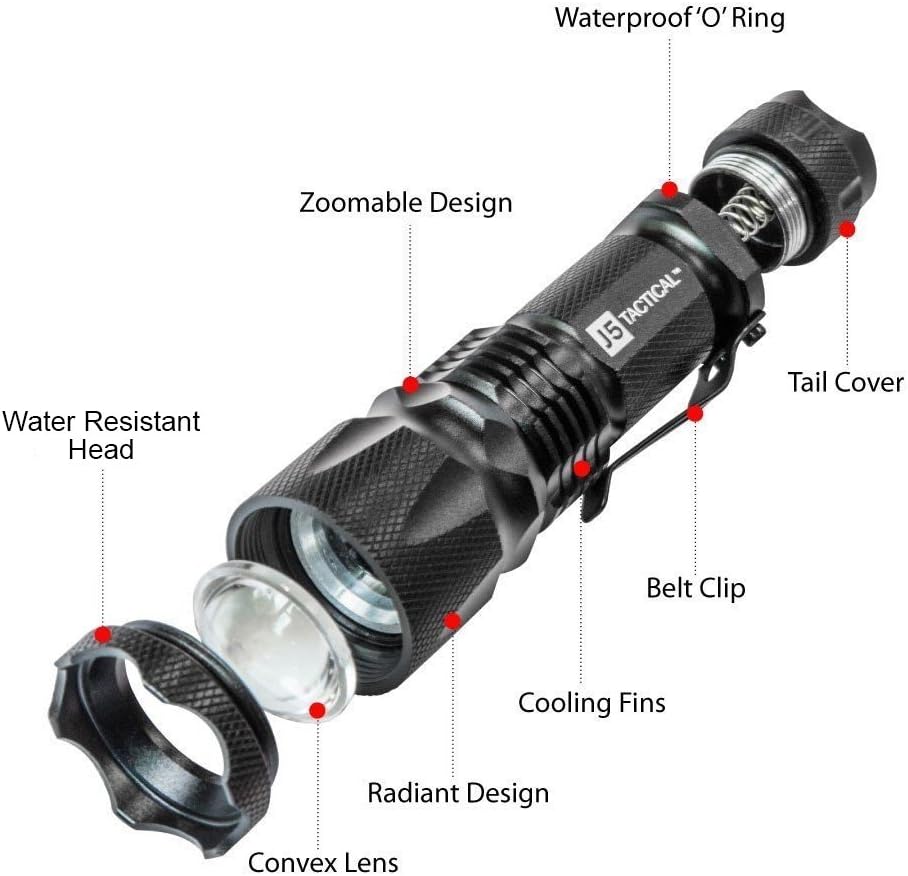
Figure 2.3: Detailed exploded view illustrating the main components of the J5 Tactical Hyper V flashlight, including the convex lens, cooling fins, belt clip, and tail cover with waterproof 'O' ring.

Figure 2.4: Visual representation of the J5 Tactical Hyper V flashlight's dimensions and a summary of its key specifications, including lumen output, materials, and battery type.

Figure 2.5: Examples of the J5 Tactical LED Flashlight in different practical applications, such as outdoor activities, camping, and emergency lighting.
3. Setup
Battery Installation:
- Unscrew the tail cap of the flashlight by turning it counter-clockwise.
- Insert three AAA batteries into the battery holder, ensuring correct polarity (+/-).
- Place the battery holder with the installed batteries into the flashlight body.
- Screw the tail cap back on clockwise until it is securely tightened.
Note: Batteries are not included with the flashlight. Ensure to use fresh, high-quality AAA batteries for optimal performance.
4. Operating Instructions
Power On/Off and Mode Selection:
- To turn the flashlight ON, press the red rubber button on the tail cap until it clicks. The flashlight will typically start in High mode.
- To cycle through the modes (High, Low, Strobe), lightly press the tail cap button without clicking it off. Each light press will advance to the next mode.
- To turn the flashlight OFF, press the tail cap button firmly until it clicks.
Adjusting Focus (Zoom Function):
The J5 Tactical Hyper V features an adjustable focus mechanism. To change the beam width:
- Gently slide the head of the flashlight forward or backward.
- Sliding the head forward will narrow the beam, creating a focused spotlight.
- Sliding the head backward will widen the beam, creating a broad floodlight.
5. Maintenance
Cleaning:
Wipe the flashlight body with a soft, damp cloth. Do not use abrasive cleaners or solvents. Ensure the lens is clean for optimal light output.
Battery Care:
- Remove batteries if the flashlight will not be used for an extended period to prevent leakage and damage.
- Replace all three AAA batteries simultaneously to ensure consistent performance.
Water Resistance:
The J5 Tactical Hyper V is designed to be water-resistant. Ensure the tail cap is fully tightened to maintain its water resistance. It is not intended for prolonged submersion.
6. Troubleshooting
| Problem | Possible Cause | Solution |
|---|---|---|
| Flashlight does not turn on. |
|
|
| Light is dim or flickers. |
|
|
| Cannot change modes. |
|
|
7. Specifications
| Feature | Detail |
|---|---|
| Brand | J5 Tactical |
| Model Name | Hyper V-Single |
| Light Source Type | LED |
| Brightness | 400 Lumens |
| Power Source | Battery Powered (3 x AAA batteries required, not included) |
| Material | Aluminum |
| Color | Black |
| Special Feature | Adjustable, Water Resistant |
| Item Weight | 4 ounces |
| Runtime | 2 hours (approximate) |
| Light Path Distance | Up to 800 feet |
8. Warranty and Support
The J5 Tactical Hyper V Flashlight comes with a One-year Warranty.
Satisfaction Guaranteed: If you are not completely satisfied with your J5 Tactical Flashlight or encounter any issues, please contact J5 Tactical customer support for a replacement or refund. Your satisfaction is 100% guaranteed.


