
1. Introduction
Thank you for choosing the Comfee Dehumidifier. This manual provides essential information for the safe and efficient operation, maintenance, and troubleshooting of your appliance. Please read this manual thoroughly before using the dehumidifier and keep it for future reference.
The Comfee Dehumidifier is designed to reduce excess moisture in the air, creating a more comfortable and healthier indoor environment. It is suitable for use in various spaces such as basements, holiday homes, and laundry rooms.
2. Safety Instructions
Always follow basic safety precautions when using electrical appliances to reduce the risk of fire, electric shock, and injury.
- Ensure the power supply matches the voltage specified on the rating label.
- Do not operate the dehumidifier with a damaged cord or plug.
- Always unplug the appliance before cleaning, servicing, or moving it.
- Place the dehumidifier on a firm, level surface to prevent water spillage.
- Maintain at least 20 cm (8 inches) clearance around the unit for proper airflow.
- Do not insert objects into the air inlet or outlet.
- Keep children and pets away from the appliance during operation.
- Do not use the dehumidifier in areas where flammable gases or liquids are stored.
- Do not modify or attempt to repair the unit yourself. Contact qualified service personnel.
3. Product Overview
Familiarize yourself with the main components of your Comfee Dehumidifier.

Image 3.1: Front view of the Comfee Dehumidifier. The unit is white with a black top panel and a circular indicator light on the lower front section.
Main Components:
- Control Panel: Located on the top, used to adjust settings.
- Air Inlet: Where air enters the unit for dehumidification.
- Air Outlet: Where dry air is expelled.
- Water Tank: Collects condensed water. Visible water level indicator.
- Continuous Drainage Port: For connecting a hose for continuous water removal.
- Air Filter: Located at the air inlet, filters dust and particles.
- Casters and Handle: For easy mobility.
4. Setup
Unpacking:
- Carefully remove the dehumidifier from its packaging.
- Remove all packing materials, including any tape or protective films.
- Inspect the unit for any damage. If damaged, do not operate and contact your retailer.
Placement:
- Place the dehumidifier on a stable, level surface in the desired location.
- Ensure there is at least 20 cm (8 inches) of space around the unit to allow for proper air circulation.
- Avoid placing the unit near heat sources or in direct sunlight.
- Do not block the air inlet or outlet.
Power Connection:
Plug the power cord into a properly grounded electrical outlet. The unit is now ready for operation.
5. Operating Instructions
The control panel allows you to manage the dehumidifier's functions.

Image 5.1: Close-up view of the Comfee Dehumidifier's control panel, showing buttons for Timer, Fan, Humidity settings, Display, Mode selection, and Power.
Control Panel Functions:
- 1. TIMER Set Control Pads: Press to set the 24-hour timer for automatic power on/off.
- 2. FAN Pad: Press to select fan speed (Low, Medium, High).
- 3. Humidity Set Control Pads (+/-): Press to adjust the desired humidity level.
- 4. Display: Shows current humidity, timer settings, or error codes.
- 6. Mode Selection: Press to cycle through operating modes (e.g., Continuous, Auto, Dryer).
- 7. Power Pad: Press to turn the unit On or Off.
Operating Modes:
- Auto Mode: The unit automatically adjusts its operation to maintain the set humidity level.
- Continuous Mode: The unit operates continuously regardless of the humidity level, ideal for very damp conditions.
- Dryer Mode: Optimized for drying laundry, providing continuous powerful dehumidification.
Setting Humidity:
In Auto Mode, use the Humidity Set Control Pads (+/-) to select your desired humidity level, typically between 40% and 60% for optimal comfort.
Timer Function:
The 24-hour timer allows you to program the unit to turn on or off automatically after a set period. Press the TIMER button and use the +/- pads to set the desired hours.
Water Tank Full Indicator:
When the water tank is full, the unit will automatically shut off, and an indicator light (often labeled 'Full' or similar) will illuminate on the control panel. Empty the water tank to resume operation.
6. Maintenance
Regular maintenance ensures optimal performance and extends the lifespan of your dehumidifier.
Emptying the Water Tank:
When the water tank is full, the unit will stop operating. Carefully remove the water tank from the front of the unit, empty the collected water, and then reinsert the tank securely. Ensure the tank is properly seated to allow the unit to resume operation.
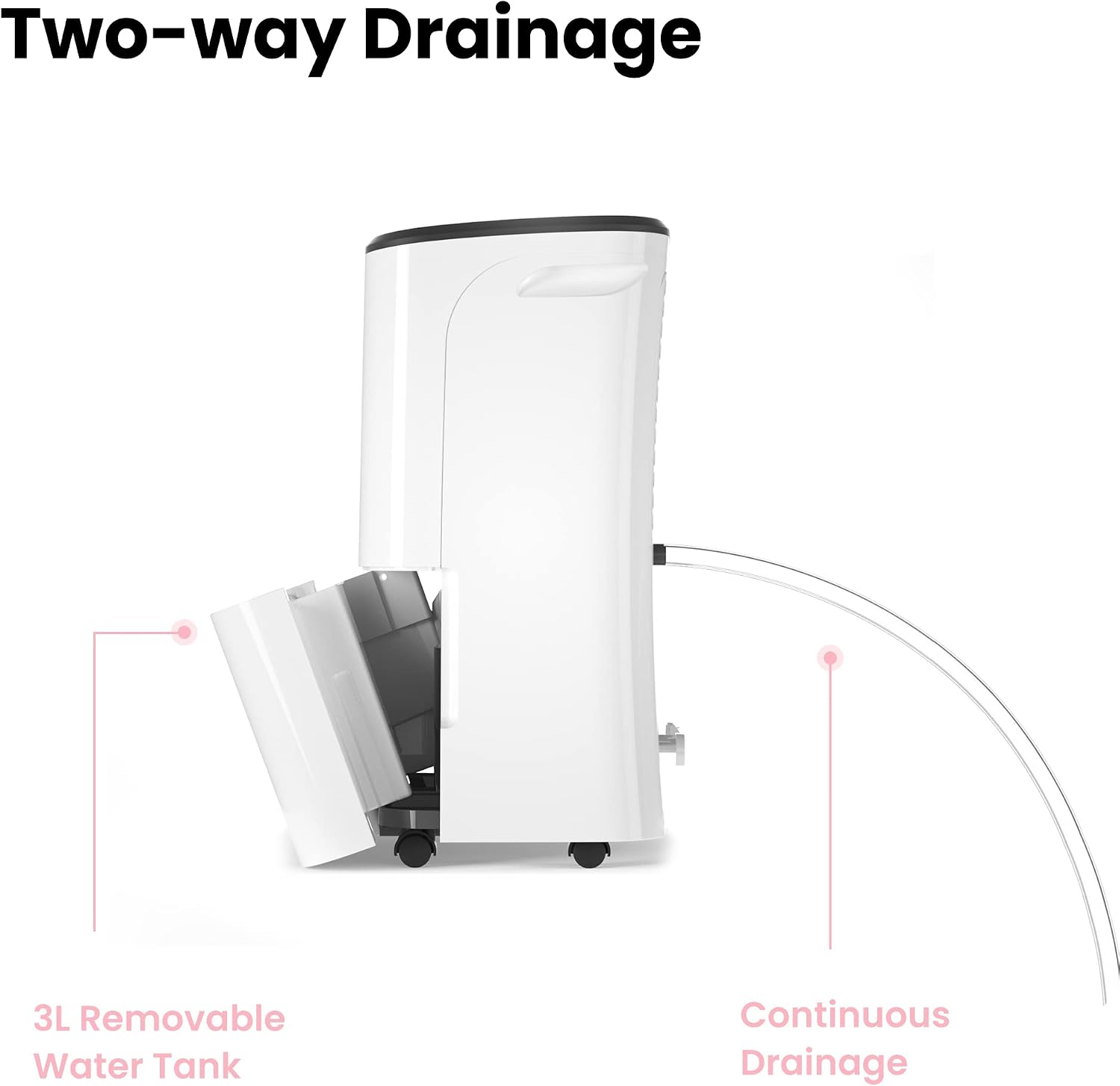
Image 6.1: Side view of the Comfee Dehumidifier illustrating the two-way drainage system, showing the removable 3L water tank and the continuous drainage hose connection.
Continuous Drainage:
For extended operation without needing to empty the water tank, you can set up continuous drainage. Locate the continuous drainage port on the back or side of the unit. Connect a suitable drainage hose (not included) to this port and direct the other end to a floor drain or a larger container. Ensure the hose is sloped downwards to allow gravity to drain the water effectively.
Cleaning the Air Filter:
The air filter should be cleaned regularly (e.g., every two weeks or monthly, depending on usage) to prevent dust buildup and maintain efficiency.
- Unplug the dehumidifier from the power outlet.
- Remove the air filter from its housing (usually located at the back or side).
- Clean the filter using a vacuum cleaner to remove loose dust. For heavier dirt, wash it gently with warm, soapy water.
- Rinse the filter thoroughly and allow it to air dry completely before reinserting it.
- Reinstall the dry filter and plug the unit back in.
Storage:
If storing the unit for an extended period, ensure the water tank is empty and clean, and the air filter is clean and dry. Store the unit upright in a dry, cool place, protected from dust.
7. Troubleshooting
Before contacting customer support, please refer to the following common issues and their solutions.
| Problem | Possible Cause | Solution |
|---|---|---|
| Dehumidifier does not turn on. | No power supply. Water tank full or not properly inserted. | Check power cord and outlet. Empty and reinsert water tank correctly. |
| No water collected or insufficient dehumidification. | Air filter clogged. Room temperature too low. Humidity setting too high. Doors/windows open. | Clean the air filter. Ensure ambient temperature is within 5-35°C. Lower the desired humidity setting. Close all doors and windows in the room. |
| Unit is noisy. | Unit not on a level surface. Air filter clogged. | Place on a flat, stable surface. Clean the air filter. |
| Water leaks from the unit. | Water tank not properly inserted. Continuous drainage hose loose or blocked. | Reinsert water tank correctly. Check hose connection and ensure it's not blocked. |
8. Specifications
Technical specifications for the Comfee Dehumidifier models.

Image 8.1: Diagram showing the dimensions of the Comfee Dehumidifier (51 cm height, 35 cm width, 24.5 cm depth) along with R290 Eco Friendly and CE/TÜV Rheinland Certified logos.
| Feature | Detail |
|---|---|
| Brand | COMFEE' |
| Model Number (as per product title) | MDDF-16DEN3 |
| Model Number (from specifications) | MDDF-20DEN3, MDDF-20DEN7 |
| Dehumidification Capacity | 16 Liters/24 hours (MDDF-16DEN3) 20 Liters/24 hours (MDDF-20DEN3/MDDF-20DEN7) |
| Recommended Room Size | Approx. 80 m³ (MDDF-16DEN3) 40 m² (MDDF-20DEN3/MDDF-20DEN7) |
| Power | 440 Watts |
| Dimensions (L x W x H) | 35 x 24.5 x 51 cm |
| Weight | 15 Kilograms |
| Water Tank Volume | 3 Liters (Removable) |
| Noise Level | 48 dB |
| Operating Temperature Range | 5-35°C |
| Special Features | 24-hour timer, Electronic control, Visible water level indicator, Easy-to-clean dust filter, Automatic humidity removal |
| Refrigerant | R290 (Eco Friendly) |
9. Warranty and Support
Information regarding product warranty and customer support was not provided in the available product data. Please refer to the documentation included with your purchase or visit the official Comfee website for details on warranty coverage, service centers, and contact information for technical assistance.
