
Kobalt 0749269
Contents
Kobalt Folding Lock-Back Utility Knife
Instruction Manual for Model 0749269
Brand: Kobalt
1. Important Safety Information
WARNING: This utility knife contains an extremely sharp blade. Improper use can result in severe injury. Always exercise extreme caution when handling, operating, or changing the blade.
- Keep out of reach of children.
- Always wear appropriate personal protective equipment, such as safety gloves and eye protection.
- Ensure the blade is fully extended and locked before use.
- Ensure the blade is fully retracted or removed and stored safely when not in use.
- Never apply excessive force to the knife; let the blade do the work.
- Dispose of used blades responsibly in a puncture-resistant container.
- Do not use for electrical work or as a pry tool.
2. Product Overview
The Kobalt Folding Lock-Back Utility Knife is designed for various cutting tasks. It features a durable aluminum handle, a secure lock-back mechanism, and a Speed Release feature for quick blade changes. This package includes 10 stainless steel blades and a separate blade storage case.
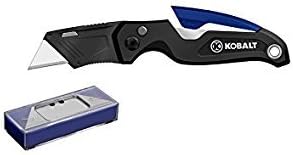
Figure 1: Kobalt Folding Lock-Back Utility Knife (top) and included blade storage case (bottom). The knife features a black and blue handle with a silver blade. The storage case is blue with a silver top.
3. Setup and Blade Installation
Your Kobalt utility knife may come with a blade pre-installed or require initial installation. Always handle new blades with extreme care.
- Unpacking: Carefully remove the utility knife and the blade storage case from its packaging. Inspect for any damage.
- Opening the Knife: Press the thumb stud or use the flipper tab (if present) to open the knife until the blade is fully extended and the lock-back mechanism engages with an audible click.
- Accessing the Blade Release: Locate the blade release button or lever, typically near the base of the blade on the handle. This is part of the Speed Release mechanism.
- Removing/Installing a Blade:
- Press and hold the blade release button/lever.
- Carefully slide the existing blade out or insert a new standard utility blade into the slot. Ensure the blade is seated correctly and securely.
- Release the button/lever. Gently tug on the blade to confirm it is locked in place.
- Blade Storage: The included case can store the 10 spare stainless steel blades. Keep them securely stored when not in use.
4. Operating Instructions
Follow these steps for safe and effective operation of your utility knife.
- Opening the Blade: With the knife folded, use the thumb stud or flipper to smoothly open the blade until it clicks into the fully extended and locked position. Verify the blade is securely locked before use.
- Making a Cut:
- Place the material to be cut on a stable, protected surface.
- Hold the knife firmly with a secure grip.
- Apply steady, controlled pressure and guide the blade along the desired cutting line. Avoid cutting towards yourself or others.
- Closing the Blade:
- Locate the lock-back release lever on the spine of the handle.
- Press down on the release lever while carefully folding the blade back into the handle.
- Ensure the blade is fully retracted and secured within the handle before storing.
5. Maintenance
Proper maintenance ensures the longevity and safe operation of your utility knife.
- Cleaning: After each use, wipe down the knife handle and blade (if exposed) with a dry cloth to remove any debris. For stubborn grime, a slightly damp cloth can be used, followed by thorough drying. Do not immerse the knife in water.
- Lubrication: Periodically apply a small amount of light machine oil to the pivot point of the folding mechanism to ensure smooth operation.
- Blade Replacement: Replace blades as soon as they become dull or damaged. A dull blade requires more force and increases the risk of injury. Refer to Section 3 for blade installation instructions.
- Storage: Always store the knife in a closed and locked position, out of reach of children and in a dry environment to prevent rust.
6. Troubleshooting
If you encounter issues with your utility knife, consider the following:
| Problem | Possible Cause | Solution |
|---|---|---|
| Blade does not lock open securely. | Debris in the lock-back mechanism; mechanism worn; blade not fully extended. | Clean the mechanism. Ensure blade is fully extended until it clicks. If worn, discontinue use. |
| Difficulty changing blade. | Blade release button/lever not fully depressed; blade stuck due to debris. | Ensure the release is fully engaged. Clean any debris from the blade slot. |
| Blade feels dull or tears material. | Blade is dull or damaged. | Replace the blade with a new, sharp one. |
7. Specifications
- Model Number: 0749269
- Handle Material: Aluminum
- Blade Material: Stainless Steel
- Knife Style: Folding Lock-Back Utility Knife
- Item Length: 3 Inches (referring to the blade length or folded length)
- Approximate Item Weight: 0.45 Pounds (7.2 ounces)
- Special Features: Foldable design, Speed Release mechanism
- Included: Utility knife, 10 Stainless Steel Blades
- UPC: 820909568872
8. Warranty and Support
For specific warranty information, product support, or to inquire about replacement parts, please refer to the documentation included with your purchase or contact Kobalt customer service directly. You may also visit the official Kobalt website for further assistance.
Documents and downloads
Ask a question about this manual
Ask about setup, troubleshooting, compatibility, parts, safety, or missing instructions. Manuals+ will review the question and use this page’s manual context to help answer it.