
Introduction
This manual provides detailed instructions for the installation, configuration, and operation of the Grandstream GXP2170 IP Phone. The GXP2170 is an enterprise-grade IP phone designed for users with high call volumes, offering advanced features and connectivity options.
Package Contents
Verify that all items are present in your package:
- IP Phone
- Power Adapter
- Handset with Cord
- Network Cable
- Base Stand
- Quick Install Guide
Physical Overview
Familiarize yourself with the components of your GXP2170 IP Phone.

Figure 1: Front view of the Grandstream GXP2170 IP Phone, showing the color display, line keys, navigation cluster, and dial pad.
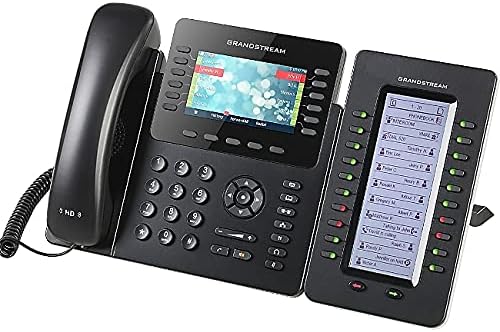
Figure 2: Grandstream GXP2170 IP Phone connected to an optional GXP2200EXT expansion module, demonstrating extended BLF/speed-dial capabilities.

Figure 3: Side view of the Grandstream GXP2170 IP Phone, illustrating the adjustable desk stand for optimal viewing angle.
Key Components:
- 4.3-inch Color Display: Provides visual information and access to phone features.
- Line Keys: Up to 12 line keys/line appearances for managing multiple calls and SIP accounts.
- Soft Keys: Context-sensitive buttons below the display for various functions.
- Navigation Cluster: For menu navigation and selection.
- Dial Pad: Standard numeric keypad.
- Function Keys: Dedicated keys for common functions like message, headset, hold, transfer, conference, speakerphone, volume, and redial.
- Integrated Bluetooth: For syncing with mobile devices and Bluetooth headsets.
- Dual Gigabit Ethernet Ports: For network connectivity and PC pass-through.
- Integrated PoE: Power over Ethernet support for simplified installation.
Setup
Follow these steps to set up your Grandstream GXP2170 IP Phone.
- Attach the Base Stand: Align the stand with the slots on the back of the phone and slide it into place until it clicks. The stand can be adjusted for different viewing angles.
- Connect the Handset: Plug one end of the coiled handset cord into the handset jack on the side of the phone and the other end into the handset.
- Connect the Network Cable:
- If using Power over Ethernet (PoE): Connect one end of the Ethernet cable to the "LAN" port on the phone and the other end to a PoE-enabled switch or hub.
- If not using PoE: Connect one end of the Ethernet cable to the "LAN" port on the phone and the other end to your network switch/router. Then, connect the power adapter to the phone's power jack and an electrical outlet.
- (Optional) Connect to PC: If you wish to connect a computer through the phone, connect an Ethernet cable from the "PC" port on the phone to your computer's Ethernet port.
- Initial Boot-up: The phone will power on and begin the boot-up sequence. The display will show network information and provisioning status.
- Configuration: The phone can be configured via its web interface or through an auto-provisioning server (e.g., Grandstream UCM series IP PBXs). Refer to the User Guide (PDF) for detailed configuration instructions.
Operating Instructions
Making Calls:
- Off-hook Dialing: Pick up the handset, press the Speakerphone button, or press a Line key. Enter the number and press the "Dial" soft key or the "Send" button.
- On-hook Dialing: Enter the number first, then pick up the handset, press the Speakerphone button, or press a Line key.
- Redial: Press the Redial button to call the last dialed number.
Receiving Calls:
- When the phone rings, pick up the handset, press the Speakerphone button, or press the flashing Line key.
Call Management:
- Hold: During an active call, press the "Hold" button. Press the flashing Line key again to resume the call.
- Transfer: During an active call, press the "Transfer" button. Dial the transfer destination number and press the "Transfer" soft key.
- Conference: During an active call, press the "Conference" button. Dial the number of the next participant and press the "Send" soft key. Once connected, press the "Conference" soft key again to join all parties. The GXP2170 supports 5-way voice conferencing.
- Mute: Press the "Mute" button to mute your microphone during a call. Press it again to unmute.
Using BLF/Speed-Dial Keys:
The GXP2170 features up to 48 digital, on-screen BLF/speed-dial keys. These can be configured to monitor other extensions' status (Busy Lamp Field) or to quickly dial frequently used numbers. Configuration is typically done via the phone's web interface or provisioning server.
Bluetooth Connectivity:
The integrated Bluetooth allows for pairing with mobile devices and Bluetooth headsets. Access the Bluetooth settings via the phone's menu to pair devices. This feature enhances mobility and hands-free communication.
Maintenance
To ensure the longevity and optimal performance of your Grandstream GXP2170 IP Phone, follow these maintenance guidelines:
- Cleaning: Use a soft, dry cloth to clean the phone's surface and display. Avoid using abrasive cleaners, solvents, or strong chemicals, as these can damage the finish and electronic components.
- Environment: Keep the phone in a dry environment, away from direct sunlight, excessive heat, and moisture. Ensure proper ventilation around the device.
- Cable Management: Ensure all cables are securely connected and not under strain. Avoid bending cables sharply.
- Software Updates: Regularly check for firmware updates from Grandstream's official website. Firmware updates often include performance improvements, bug fixes, and new features.
Troubleshooting
This section addresses common issues you might encounter with your GXP2170 IP Phone.
| Problem | Possible Cause | Solution |
|---|---|---|
| Phone does not power on. | No power, faulty adapter, or no PoE. |
|
| No dial tone. | Network connectivity issue, SIP registration failure. |
|
| Poor audio quality. | Network congestion, faulty handset/headset, or incorrect audio settings. |
|
| Bluetooth headset not connecting. | Headset not in pairing mode, out of range, or already paired with another device. |
|
Specifications
Key technical specifications for the Grandstream GXP2170 IP Phone:
- Lines: 12 line keys, 6 SIP accounts
- Display: 4.3 inch (480x272) color-screen LCD
- BLF/Speed-Dial Keys: 48 on-screen digital keys
- Ethernet: Dual Gigabit ports
- PoE: Integrated Power over Ethernet
- Bluetooth: Yes, integrated
- Audio: Full HD audio, 5-way voice conferencing
- Expansion Modules: Supports up to four GXP2200EXT Modules
- Security: State-of-the-art security encryption technology (SRTP and TLS)
- Dimensions (L x W x H): 8.98 x 1.81 x 8.11 inches
- Weight: 3.15 pounds (1.43 Kilograms)
- Material: Plastic
- Power Source: Corded Electric (or PoE)
Support and Warranty
For further assistance, detailed configuration guides, or warranty information, please refer to the following resources:
- Official User Guide (PDF): Download PDF
- Grandstream Support Website: Visit the official Grandstream website for product support, FAQs, and firmware downloads.
- Warranty: Standard manufacturer warranty applies. Please consult your purchase documentation or the Grandstream website for specific warranty terms and conditions.


