Introduction
This manual provides detailed instructions for the assembly, operation, and maintenance of your NEEWER Camera Shoulder Rig. This kit is designed to enhance stability and control for DSLR cameras and camcorders during video filmmaking, featuring a shoulder mount, 15mm rods, handgrips, and a matte box.
Components Overview
The NEEWER Camera Shoulder Rig includes the following main components:
- Main Rig Assembly: Central frame with mounting plate and rod clamps.
- Shoulder Pad: Padded support for comfortable shoulder mounting.
- Handgrips: Two ergonomic handgrips for stable two-handed operation.
- 15mm Rods: Standard rods for mounting accessories and extending the rig.
- Matte Box: Adjustable light-blocking accessory with top and side flags.
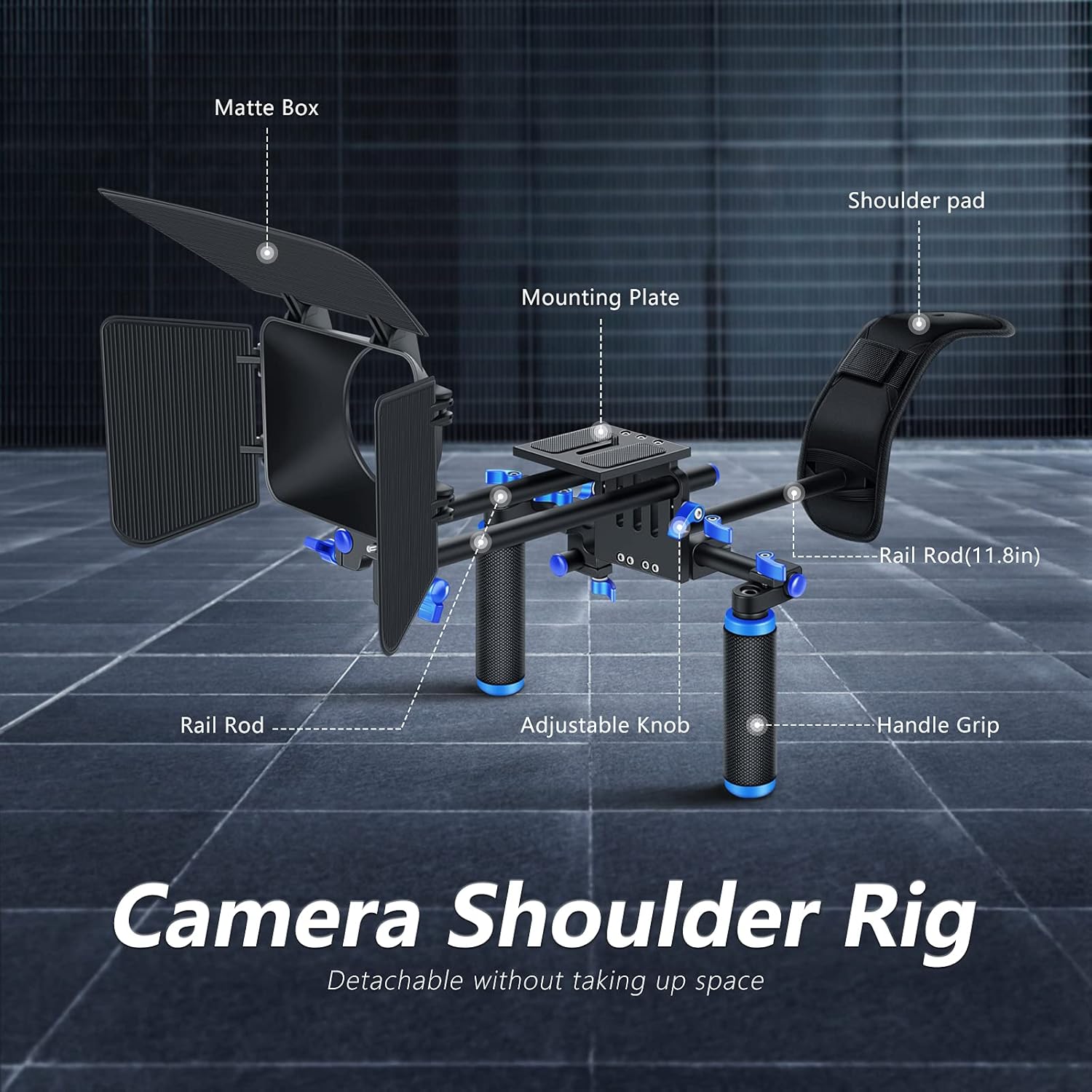
Figure 1: NEEWER Camera Shoulder Rig with labeled components.
Setup and Assembly
Follow these steps to assemble and configure your camera shoulder rig:
- Attach Handgrips: Secure the two handgrips to the main rig assembly using the adjustable knobs. Ensure they are tightened for a firm grip.
- Install Shoulder Pad: Slide the shoulder pad onto the rear 15mm rod. Adjust its position for optimal comfort and balance.
- Mount Camera: Attach your DSLR camera or camcorder to the mounting plate using the 1/4" or 3/8" screw holes. The plate features rubber padding for secure attachment.
- Assemble Matte Box: Attach the matte box to the front 15mm rods. The top and side flags can be snapped into place and adjusted to block unwanted light and prevent lens flare.
- Adjust Components: Utilize the various adjustable knobs and clamps throughout the rig to customize the position of the shoulder pad, handgrips, and matte box to suit your camera setup and shooting style.

Figure 2: Close-up of mounting plate, handgrip, and shoulder mount features.
Video 1: Demonstrates the assembly and adjustment of various components of the NEEWER Camera Shoulder Rig, including the shoulder pad, handgrips, and matte box. This video highlights the flexibility and ease of customization.
Video 2: A review of the Neewer Camera Rig, showcasing its assembly, various adjustable parts, and how a camera is mounted. It provides practical insights into setting up the rig for use.
Operating the Camera Shoulder Rig
The shoulder rig offers versatile operation modes to suit different filming needs:
- Shoulder-Mounted Use: Place the padded shoulder support on your shoulder and hold the handgrips firmly. This configuration provides stability for handheld shots, reducing camera shake and fatigue during extended filming sessions.
- Tripod-Mounted Use: The rig can be easily mounted onto a tripod using the integrated 1/4" and 3/8" screw holes on the base plate. This allows for static shots or controlled panning and tilting with enhanced stability.
- Matte Box Functionality: The matte box helps control light entering the lens. Adjust the top and side flags to block direct sunlight or other light sources that could cause glare or lens flare, improving image quality.

Figure 3: Demonstrates the rig in shoulder-mounted and tripod-mounted configurations.

Figure 4: The Matte Box with adjustable top and side flags for light control.
Maintenance
To ensure the longevity and optimal performance of your NEEWER Camera Shoulder Rig, follow these maintenance guidelines:
- Cleaning: Wipe down all metal and plastic components with a soft, dry cloth after each use to remove dust and debris. For stubborn dirt, use a slightly damp cloth and mild soap, then dry thoroughly.
- Storage: When not in use, disassemble the rig into its main components and store it in a dry, cool place, preferably in its original packaging or a protective bag, to prevent damage.
- Inspection: Periodically check all screws, knobs, and clamps for tightness. Tighten any loose parts to maintain stability. Inspect the shoulder pad and handgrips for wear and tear.
Troubleshooting
If you encounter any issues with your NEEWER Camera Shoulder Rig, consider the following:
- Instability: Ensure all adjustable knobs and clamps are securely tightened. Verify that your camera is properly mounted to the quick release plate.
- Difficulty Adjusting Components: Loosen the relevant knobs or levers sufficiently before attempting to adjust a component. Do not force any parts.
- Matte Box Flags Detaching: The plastic flags on the matte box are designed to be detachable. If they come off easily, ensure they are securely snapped into their hinges. Handle them with care to prevent breakage.
Specifications
| Feature | Detail |
|---|---|
| Product Dimensions | 32.28"D x 10.63"W x 18.11"H (82cm x 27cm x 46cm) |
| Item Weight | 4.09 pounds (1.86 Kilograms) |
| Compatible Devices | Camcorder, Camera (DSLR) |
| Rod Diameter | 15mm |
| Matte Box Lens Compatibility | Up to 90mm lens |
| Material | Aluminum alloy (main frame), Plastic (matte box flags) |
| UPC | 808018132504 |

Figure 5: Product dimensions of the NEEWER Camera Shoulder Rig.
Warranty and Support
For warranty information or technical support, please refer to the official NEEWER website or contact their customer service directly. Keep your purchase receipt for any warranty claims.


