
EKYLIN RCA6
EKYLIN RCA Video Cable with Trigger Wire User Manual
Model: RCA6
1. Introduction
Thank you for choosing the EKYLIN RCA Video Cable with Trigger Wire. This manual provides essential information for the proper installation, operation, and maintenance of your new cable. Please read this manual thoroughly before use to ensure optimal performance and longevity of the product.
2. Product Overview
The EKYLIN RCA Video Cable is a high-quality, shielded cable designed for reliable video signal transmission in automotive and surveillance applications. Its integrated red trigger wire simplifies installation for systems requiring automatic activation, such as rear view cameras.
Key Features:
- 6 Meters (20 Feet) Male to Male RCA connection.
- Integrated Red Trigger Wire for reverse detection.
- 100% shielded for superior protection against EMI/RFI interference.
- Weatherproof design for outdoor use.
- Compatible with various video devices including Dash DVDs, Parking Monitors, Rear View Cameras, CCTV/Surveillance Cameras, and TV Boxes.
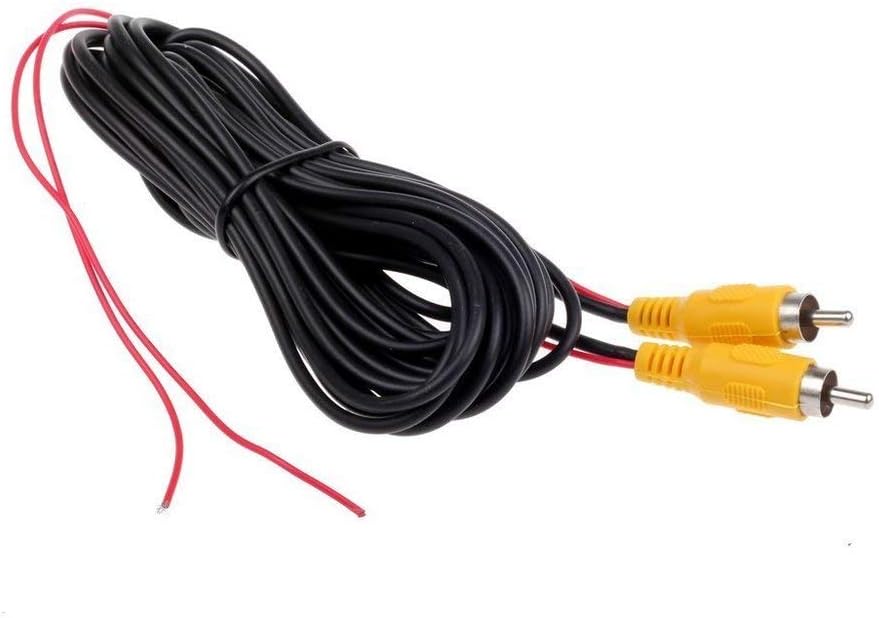
Figure 2.1: EKYLIN 6M RCA Video Cable with Trigger Wire. This image shows the coiled black cable with two yellow RCA male connectors and two red trigger wires extending from each end.

Figure 2.2: Internal construction of the cable, highlighting its 100% copper core for optimal signal transmission.
3. Setup and Installation
Proper installation is crucial for the cable's performance. Follow these steps carefully:
- Identify Components: Locate the RCA male connectors on both ends of the cable and the thin red trigger wires extending from them.
- Connect Video Signal: Connect one RCA male end of the cable to the video output of your camera (e.g., rear view camera). Connect the other RCA male end to the video input of your display unit (e.g., car monitor, Dash DVD, Android Radio).
- Connect Trigger Wire (Optional but Recommended): The red trigger wire is designed to automatically switch your monitor to the camera's video feed when the vehicle is put into reverse gear.
- Connect the red trigger wire near the camera end to the positive (+) power supply of your vehicle's reverse light.
- Connect the red trigger wire near the monitor end to the reverse trigger input of your car monitor or head unit. This input is typically labeled as 'Reverse', 'Back', or 'Trigger'.
- Secure Connections: Ensure all connections are firm and secure to prevent signal loss or intermittent operation.
- Route Cable Safely: Route the cable away from moving parts, sharp edges, and high-heat sources. Use cable ties or clips to secure it along the vehicle's chassis or interior panels.

Figure 3.1: Close-up view of the RCA cable showing the integrated red detection trigger wire, essential for automatic rear view video activation.

Figure 3.2: Diagram illustrating the connection of the RCA video cable with a backup camera and an Android radio. It shows the video signal path and the trigger wire connection for automatic display switching.
4. Operating Instructions
Once the EKYLIN RCA Video Cable is correctly installed, its operation is largely integrated with your connected devices:
- Automatic Activation: If the trigger wire is connected, your monitor or head unit should automatically switch to the rear view camera feed when the vehicle's reverse gear is engaged.
- Manual Selection: For systems without a trigger input or if the trigger wire is not connected, you may need to manually select the video input source on your monitor to view the camera feed. Refer to your monitor's user manual for specific instructions.
- Continuous Monitoring: For surveillance applications (e.g., CCTV), the cable provides a continuous video signal to the connected monitor or DVR, depending on the camera's power status.
5. Maintenance
The EKYLIN RCA Video Cable is designed for durability and requires minimal maintenance. However, following these guidelines can help ensure its long-term performance:
- Regular Inspection: Periodically check the cable for any signs of physical damage, such as cuts, kinks, or frayed insulation, especially in areas exposed to movement or harsh conditions.
- Connection Integrity: Ensure that the RCA connectors remain clean and free of dirt or corrosion. A loose or dirty connection can lead to signal degradation.
- Environmental Protection: While the cable is weatherproof, avoid prolonged submersion in water or exposure to extreme temperatures beyond its operating range.
- Cleaning: If necessary, gently wipe the cable with a soft, damp cloth. Do not use harsh chemicals or abrasive cleaners.
6. Troubleshooting
If you encounter issues with your EKYLIN RCA Video Cable, refer to the following common problems and solutions:
| Problem | Possible Cause | Solution |
|---|---|---|
| No video signal on monitor. | Loose connections, incorrect input selected, faulty camera/monitor. | Check all RCA connections. Ensure correct video input is selected on monitor. Test camera and monitor with another known-good cable if possible. |
| Flickering or distorted video. | Poor connection, electromagnetic interference (EMI/RFI), damaged cable. | Secure all connections. Ensure cable is routed away from power lines or other sources of interference. Inspect cable for damage. |
| Monitor does not switch automatically to reverse camera. | Trigger wire not connected, trigger wire connected incorrectly, monitor's reverse input issue. | Verify both ends of the red trigger wire are correctly connected to the reverse light positive and the monitor's trigger input. Check monitor settings. |
| Cable appears damaged. | Physical stress, improper installation. | If the cable is physically damaged, it may need to be replaced. |
7. Specifications
| Feature | Specification |
|---|---|
| Model Name | Rear View Parking Camera Cable |
| Model Number | RCA6 |
| Cable Length | 6 Meters (20 Feet) |
| Connector Type | RCA Male-to-Male |
| Cable Type | Composite Video Cable with Trigger Wire |
| Shielding | 100% shielded against EMI/RFI |
| Special Feature | Weatherproof |
| Compatible Devices | Monitor, Television, DVD Player, CCTV/Surveillance Camera, Rearview Camera |
| Product Dimensions | 6.69 x 0.79 x 3.54 inches (packaged) |
| Item Weight | 5.3 ounces (150 Grams) |
| UPC | 744370827231 |
| Country of Origin | China |
8. Warranty and Support
EKYLIN products are manufactured to high-quality standards. For specific warranty information regarding your RCA Video Cable, please refer to the product packaging or contact your retailer. If you require technical assistance or have questions not covered in this manual, please contact EKYLIN customer support through the vendor's contact information provided at the point of purchase.
For further assistance, you may also visit the official EKYLIN brand page or contact the seller directly via the platform where the product was purchased.
Ask a question about this manual
Ask about setup, troubleshooting, compatibility, parts, safety, or missing instructions. Manuals+ will review the question and use this page’s manual context to help answer it.