
JVC RD-D70
JVC RD-D70 Hi-Fi All-in-One System User Manual
Model: RD-D70
Brand: JVC
Introduction
This manual provides comprehensive instructions for the setup, operation, and maintenance of your JVC RD-D70 Hi-Fi All-in-One System. Please read this manual thoroughly before using the unit to ensure proper and safe operation. Keep this manual for future reference.

Image: The JVC RD-D70 Hi-Fi system, a compact black unit with two front speakers, a central display, control buttons, a CD tray, and a remote control placed next to it. An extendable antenna is visible at the back.
Setup
1. Unpacking
Carefully remove the unit and all accessories from the packaging. Ensure all components listed below are present:
- JVC RD-D70 Main Unit
- Remote Control
- Power Cable
- User Manual (this document)
2. Placement
Place the unit on a stable, flat surface away from direct sunlight, heat sources, and excessive dust or moisture. Ensure adequate ventilation around the unit.
3. Connecting Power
Connect the supplied power cable to the AC IN socket on the rear of the unit, then plug the other end into a standard wall outlet.
4. Antenna Connection
Extend the telescopic antenna located at the rear of the unit for optimal DAB and FM radio reception. Adjust its position for the best signal quality.

Image: Rear view of the JVC RD-D70 unit, showing the power cable connected and the telescopic antenna extended upwards. Two bass reflex ports are also visible.
5. Initial Setup
Upon first power-on, the unit may prompt you to set the language and perform an automatic scan for DAB radio stations. Follow the on-screen instructions using the control buttons or remote control.
Operating Instructions
General Controls
- Power Button: Press to turn the unit on or off.
- Volume Knob: Rotate clockwise to increase volume, counter-clockwise to decrease.
- Mode Button: Press to cycle through available modes: DAB, FM, CD, Bluetooth, USB, AUX.
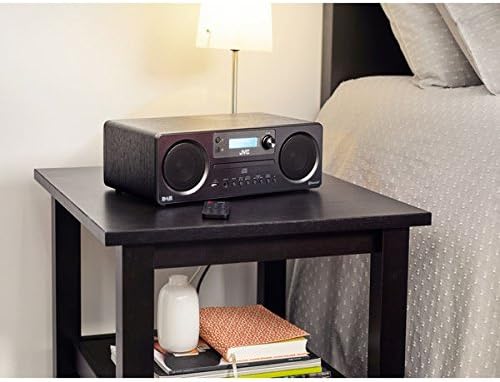
Image: A close-up view of the control panel buttons on the JVC RD-D70, including Mode, Scan, Enter/Stop, Tuning/Skip, and Mono/Stereo buttons, located below the CD tray.
DAB/FM Radio Operation
- Press the Mode button to select DAB or FM radio.
- For DAB, press Scan to perform a full scan for available stations.
- For FM, use the Tuning/Skip buttons to manually tune or press Scan to auto-scan.
- To save a preset: Tune to the desired station, press and hold the Enter/Stop button until the display shows "Preset Store", then use Tuning/Skip to select a preset number and press Enter/Stop again to confirm.
CD Player Operation
- Press the Mode button to select CD mode.
- Gently insert a CD into the disc slot with the label side facing up. The unit will automatically load the disc.
- Playback will begin automatically. Use the Play/Pause, Stop, and Skip buttons for control.
Bluetooth Operation
- Press the Mode button to select Bluetooth mode. The display will show "Pairing" or "BT Pairing".
- On your Bluetooth device (e.g., smartphone, tablet), enable Bluetooth and search for available devices.
- Select "JVC RD-D70" from the list of found devices.
- Once paired, you can play audio from your device through the JVC RD-D70.
USB Playback
- Insert a USB flash drive into the USB port on the front of the unit.
- Press the Mode button to select USB mode.
- The unit will automatically detect and play compatible audio files (e.g., MP3).

Image: A close-up view of the front panel of the JVC RD-D70, highlighting the USB 5V 1A port and the Audio In (3.5mm jack) port.
Auxiliary Input (AUX)
- Connect an external audio device (e.g., MP3 player, smartphone) to the AUDIO IN jack on the front of the unit using a 3.5mm audio cable (not supplied).
- Press the Mode button to select AUX mode.
- Play audio from your connected device.
Maintenance
Cleaning the Unit
Wipe the exterior of the unit with a soft, dry cloth. Do not use abrasive cleaners, waxes, or solvents as they may damage the finish. Ensure the unit is unplugged before cleaning.
CD Care
Handle CDs by their edges. Keep them clean and free from scratches. Store CDs in their cases when not in use. Do not use damaged or irregularly shaped discs.
General Care
Avoid exposing the unit to extreme temperatures, humidity, or direct sunlight. Do not block ventilation openings. If the unit will not be used for an extended period, unplug it from the power outlet.
Troubleshooting
Before contacting customer support, please refer to the following table for common issues and their solutions.
| Problem | Possible Cause | Solution |
|---|---|---|
| No power | Power cable not connected securely. | Ensure the power cable is firmly plugged into the unit and the wall outlet. |
| No sound | Volume is too low or muted. Incorrect input mode selected. | Increase volume. Press the Mode button to select the correct input source (e.g., CD, Bluetooth). |
| Poor radio reception | Antenna not extended or positioned correctly. Weak signal in the area. | Fully extend and adjust the telescopic antenna. Try relocating the unit to an area with better reception. |
| Bluetooth pairing fails | Device is out of range. Bluetooth not enabled on external device. Unit is not in pairing mode. | Ensure devices are within 10 meters. Enable Bluetooth on your device. Select Bluetooth mode on the JVC RD-D70 to enter pairing mode. |
| CD not playing | Disc is dirty, scratched, or inserted incorrectly. | Clean the disc with a soft cloth. Ensure the disc is inserted label-side up. Try a different CD. |
Specifications
- Brand: JVC
- Model: RD-D70
- Connectivity Technology: Bluetooth, USB
- Speaker Type: Stereo
- Power Source: Corded Electric
- Compatible Devices: Cellphone, Tablet, Navigation Device
- Bluetooth Compatible: Yes
- Number of Speakers: 2
- Radio Tuner: DAB/FM
- Disc Playback: CD
Warranty and Support
Warranty Information
Warranty terms and conditions for the JVC RD-D70 are typically provided with your purchase documentation or can be found on the official JVC website. Please retain your proof of purchase for warranty claims.
Customer Support
For further assistance, technical support, or service inquiries, please visit the official JVC support website or contact their customer service department. Contact details can usually be found on the JVC website or in your product packaging.
Related documentsRD-D70


Ask a question about this manual
Ask about setup, troubleshooting, compatibility, parts, safety, or missing instructions. Manuals+ will review the question and use this page’s manual context to help answer it.