
Makita XFD10Z
Makita XFD10Z 18V LXT Cordless Driver-Drill User Manual
Model: XFD10Z | Brand: Makita
1. Introduction
This manual provides essential information for the safe and effective operation, maintenance, and troubleshooting of your Makita XFD10Z 18V LXT Lithium-Ion Cordless Driver-Drill. Please read this manual thoroughly before using the tool.
The Makita XFD10Z is a compact and powerful 1/2" driver-drill designed for a wide range of drilling and fastening applications. It features an efficient 4-pole motor delivering 480 in. lbs. of Max Torque and a mechanical 2-speed transmission for versatile performance.
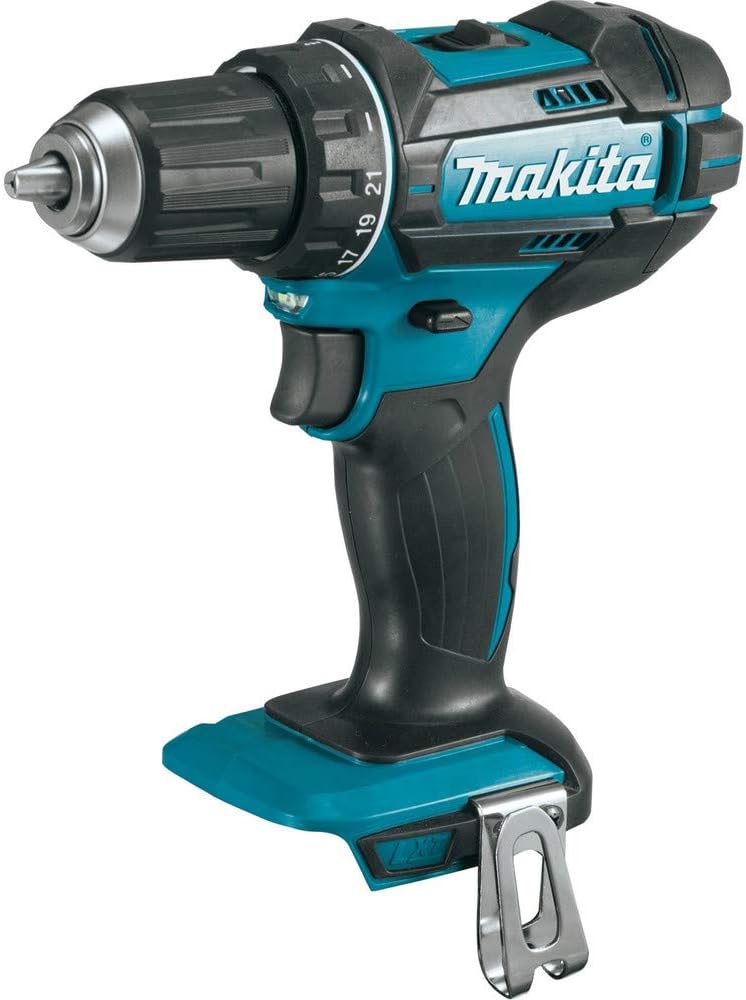
Figure 1: Front view of the Makita XFD10Z 18V LXT Cordless Driver-Drill.
2. Safety Information
WARNING: Read all safety warnings, instructions, illustrations and specifications provided with this power tool. Failure to follow all instructions listed below may result in electric shock, fire and/or serious injury.
This product contains chemicals known to the State of California to cause cancer and birth defects or other reproductive harm. For more information, visit www.P65Warnings.ca.gov.
CAUTION: Makita U.S.A., Inc. notifies tool users of the hazards and risks of using non-genuine ("knock-off") Makita Lithium-Ion batteries. These batteries may burst, causing fires, personal injuries, or property damage. Always use genuine Makita batteries.
For any questions regarding genuine Makita batteries or performance issues, contact a Makita Factory Service Center or Authorized Service Center, or call (800)-4-MAKITA.
3. Components
The Makita XFD10Z driver-drill is designed with user comfort and efficiency in mind. Key components include:
- 1/2" Chuck: Securely holds various drill bits and fastening accessories.
- Mechanical 2-Speed Transmission: Allows selection between high speed for drilling and high torque for fastening.
- Ergonomic Rubberized Soft Grip: Provides increased comfort and control during prolonged use.
- Dual L.E.D. Lights: Illuminates the work area for improved visibility, especially in dimly lit conditions. Features an afterglow function.
- Belt Clip: Conveniently attaches the tool to a belt for easy access.

Figure 2: Side view of the Makita XFD10Z 18V LXT Cordless Driver-Drill, highlighting key features.
4. Setup
4.1 Battery Installation (Battery Sold Separately)
- Ensure the tool is switched off.
- Align the battery pack with the battery housing on the tool.
- Slide the battery pack into the housing until it clicks into place. Ensure it is fully seated and secure.
- To remove, press the release button on the battery pack and slide it out.
4.2 Chuck Operation
- To open the chuck jaws, rotate the chuck counter-clockwise.
- Insert the drill bit or accessory into the chuck, ensuring it is centered.
- Rotate the chuck clockwise to tighten the jaws securely around the bit. Hand-tighten firmly.
- To remove the bit, rotate the chuck counter-clockwise.
4.3 Speed Transmission Selection
The tool features a mechanical 2-speed transmission:
- Low Speed (0-600 RPM): Ideal for heavy-duty fastening applications or when higher torque is required.
- High Speed (0-1,900 RPM): Suitable for drilling applications where faster rotation is needed.
To change the speed, slide the speed selector switch located on top of the tool to the desired position (1 for low speed, 2 for high speed). Ensure the tool is stopped before changing speeds to prevent gear damage.
5. Operating Instructions
5.1 Powering On/Off and Variable Speed Control
- To start the tool, pull the trigger switch. The speed increases as you increase pressure on the trigger.
- To stop the tool, release the trigger switch.
- The variable speed feature allows for precise control depending on the material and application.
5.2 Drilling and Fastening
- Select the appropriate speed setting (low for fastening, high for drilling).
- Apply steady, even pressure to the tool. Do not force the tool, allow the motor to do the work.
- For fastening, adjust the torque setting on the clutch collar to prevent over-tightening or stripping screws.
5.3 Using the Dual L.E.D. Lights
The dual L.E.D. lights automatically illuminate the work area when the trigger switch is pulled. They remain lit for a short period after the trigger is released (afterglow function) to further illuminate the workspace.
Video: Product Overview of the Makita XFD10Z 18V LXT Cordless Driver-Drill. This video demonstrates the key features and operation of the drill, including battery insertion, chuck adjustment, and variable speed control.
6. Maintenance
6.1 Cleaning
- Regularly clean the tool's ventilation openings to prevent overheating.
- Wipe the tool with a dry cloth. Do not use water or chemical cleaners.
6.2 Storage
- Store the tool in a cool, dry place, away from direct sunlight and moisture.
- Remove the battery pack from the tool before storage, especially for extended periods.
7. Troubleshooting
If you encounter issues with your Makita XFD10Z, refer to the following common troubleshooting steps:
| Problem | Possible Cause | Solution |
|---|---|---|
| Tool does not start | Battery not charged or improperly installed. | Ensure battery is fully charged and correctly inserted. |
| Reduced power or speed | Low battery charge; incorrect speed setting; excessive load. | Recharge battery; select higher speed setting; reduce pressure on tool. |
| Chuck not holding bit securely | Chuck not tightened sufficiently; worn chuck jaws. | Re-tighten chuck firmly; if issue persists, chuck may need replacement. |
For persistent issues or problems not listed here, please contact Makita customer support or an authorized service center.
8. Specifications
| Feature | Detail |
|---|---|
| Brand | Makita |
| Model Number | XFD10Z |
| Power Source | 18V LXT Lithium-Ion Battery (Tool Only) |
| Motor Type | Makita-built 4-pole motor |
| Maximum Torque | 480 in. lbs. |
| No Load Speed (Low) | 0-600 RPM |
| No Load Speed (High) | 0-1,900 RPM |
| Chuck Size | 1/2 inch |
| Product Dimensions (L x W x H) | 8.6"L x 3.7"W x 8.9"H |
| Item Weight | 2.9 Pounds |
| Special Features | Variable Speed, Dual L.E.D. Lights, Extreme Protection Technology (XPT) |
9. Warranty and Support
Your Makita XFD10Z 18V LXT Lithium-Ion Cordless Driver-Drill comes with a 3-year limited warranty from the date of original purchase. This warranty covers defects in materials and workmanship. Please retain your proof of purchase for warranty claims.
For detailed warranty information, service, or technical support, please refer to the official Makita User Guide or visit the Makita website.
- Official User Guide (PDF): Download PDF
- Visit the Makita Store: Makita Official Store
Related documentsXFD10Z


Ask a question about this manual
Ask about setup, troubleshooting, compatibility, parts, safety, or missing instructions. Manuals+ will review the question and use this page’s manual context to help answer it.