
Product Overview
The Airmaster CF71760 is a robust 24-inch industrial circulating fan designed for floor mounting. It features a powerful motor and durable construction suitable for various industrial and commercial applications. This fan provides efficient air circulation with three speed settings.
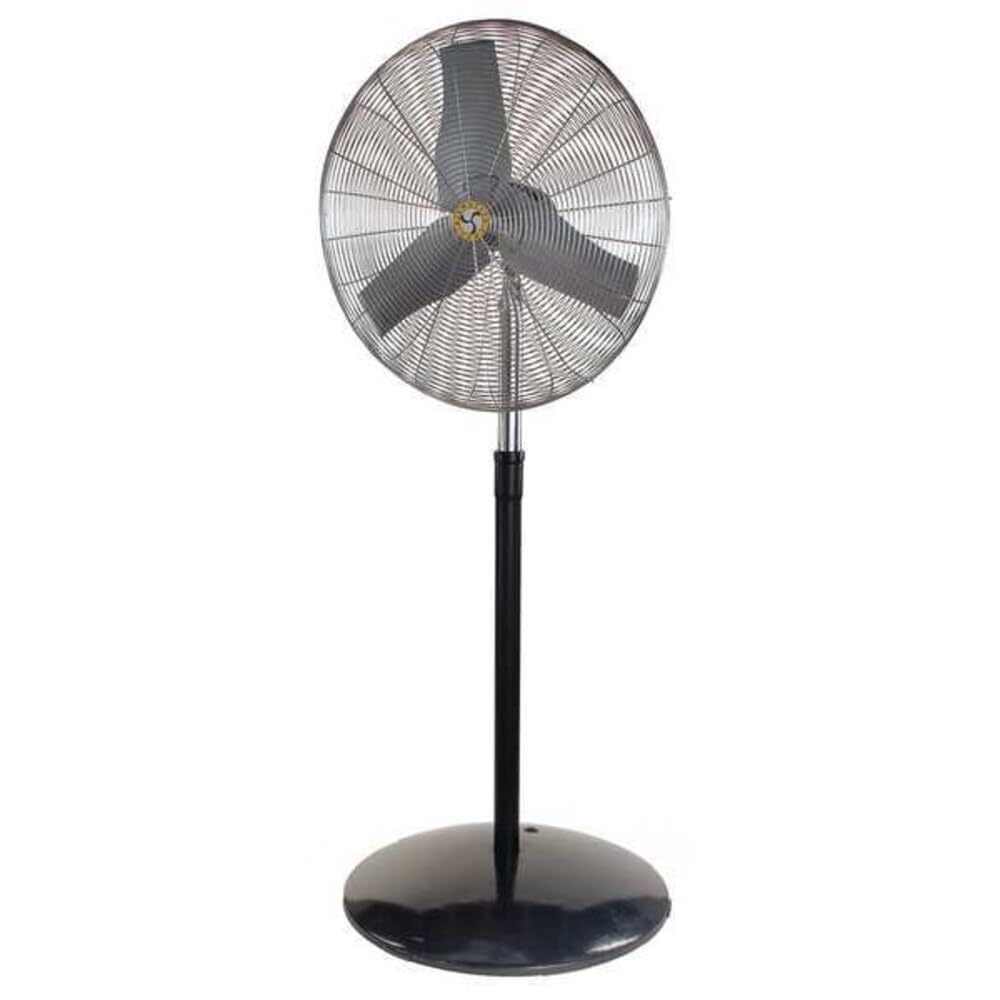
Image: The Airmaster CF71760 24-inch Industrial Floor Fan, shown assembled with its floor stand. This fan is designed for powerful air circulation in industrial settings.
Important Safety Instructions
Read all instructions carefully before using this fan. Failure to follow these instructions may result in electric shock, fire, or serious personal injury.
- Always unplug the fan from the power outlet before cleaning, servicing, or moving it.
- Do not operate any fan with a damaged cord or plug. Discard fan or return to an authorized service facility for examination and/or repair.
- Do not run cord under carpeting. Do not cover cord with throw rugs, runners, or similar coverings. Arrange cord away from traffic areas and where it will not be tripped over.
- Do not insert or allow fingers or foreign objects to enter any ventilation or exhaust opening as it may cause an electric shock or fire, or damage the fan.
- Do not use outdoors. This fan is designed for indoor use only.
- To disconnect fan, turn controls to OFF, then remove plug from outlet.
- Use this fan only as described in this manual. Any other use not recommended by the manufacturer may cause fire, electric shock, or injury to persons.
- Avoid using extension cords if possible. If an extension cord must be used, use the shortest possible cord and ensure it is rated for the fan's power requirements.
Package Contents
Verify that all components are present before assembly.
- Fan Head Assembly
- Pedestal Stand (Base and Pole)
- Mounting Hardware (Bolts, Washers, Nuts)
- User Manual
Setup and Assembly
Follow these steps to assemble your Airmaster CF71760 fan.
- Unpack Components: Carefully remove all parts from the packaging. Retain packaging for future storage or transport.
- Assemble Pedestal Base: Attach the pole to the base of the pedestal stand using the provided hardware. Ensure all connections are secure.
- Mount Fan Head: Secure the fan head assembly to the top of the pedestal pole. Align the mounting holes and fasten with the appropriate bolts, washers, and nuts. Do not overtighten.
- Position Fan: Place the assembled fan on a stable, level surface. Ensure there is adequate clearance around the fan for proper airflow and to prevent obstruction.
Operating Instructions
This section details how to operate your Airmaster CF71760 fan.
- Power Connection: Plug the fan's power cord into a standard 115V AC electrical outlet. Ensure the outlet is properly grounded.
- Speed Selection: The fan features a button control for speed adjustment. Press the button to cycle through the available speed settings (Low, Medium, High) and Off.
- Adjusting Airflow Direction: The fan head can be tilted vertically to direct airflow. Loosen the adjustment knob on the side of the fan head, tilt to the desired angle, and then tighten the knob securely.
- Oscillation: The fan is equipped with an oscillation feature for wider air distribution. Locate the oscillation control (typically a knob or switch on the motor housing) and activate it as desired.
- Turning Off: To turn off the fan, cycle through the speed settings until the fan stops, or press the OFF button if available. Unplug the fan from the outlet when not in use for extended periods.
Maintenance
Regular maintenance ensures optimal performance and extends the life of your fan.
- Cleaning: Always unplug the fan before cleaning. Use a soft, damp cloth to wipe the exterior surfaces. Do not use abrasive cleaners or solvents. For blade cleaning, carefully remove the front grille (if designed for removal) and wipe the blades. Ensure all parts are dry before reassembling and operating.
- Motor Lubrication: The fan motor is permanently lubricated and requires no additional oiling.
- Storage: When not in use, store the fan in a cool, dry place. It is recommended to cover the fan to protect it from dust.
Troubleshooting
| Problem | Possible Cause | Solution |
|---|---|---|
| Fan does not turn on. | No power to the unit; Fan not plugged in; Circuit breaker tripped. | Ensure fan is securely plugged into a live outlet. Check circuit breaker/fuse. |
| Reduced airflow. | Fan blades or grille are dirty; Obstruction near fan. | Clean fan blades and grilles. Remove any obstructions. |
| Fan makes unusual noise. | Loose parts; Fan not on a level surface; Debris in fan. | Check for loose screws or components. Place fan on a stable, level surface. Unplug and inspect for debris. |
| Fan oscillates intermittently or not at all. | Oscillation mechanism obstructed or damaged. | Ensure no obstructions are preventing oscillation. If issue persists, contact customer support. |
Specifications
- Model: CF71760
- Brand: Airmaster
- Fan Type: Industrial Circulating Floor Fan
- Blade Diameter: 24 inches
- Number of Speeds: 3
- Power Source: Corded Electric
- Voltage: 115 Volts
- Frequency: 60 Hz
- Wattage: 260 W
- Blade Material: Plastic
- Mounting Type: Floor Mount, Pedestal
- Special Features: Oscillating
- Assembled Dimensions (Height x Width): 88 1/2 inches x 27 inches
- Item Weight: 81 Pounds
- Certifications: cULus
Warranty and Support
Airmaster products are manufactured to high-quality standards. For warranty information or technical support, please contact Airmaster customer service.
Airmaster Customer Service: Please refer to the official Airmaster website or your purchase documentation for current contact information.
You can also visit the Airmaster Store on Amazon for more product information.


