Introduction
This manual provides comprehensive instructions for the installation, operation, and maintenance of your KOSO Rx1N GP Style Universal Speedometer. Please read this manual thoroughly before installation and use to ensure proper function and safety. Keep this manual for future reference.
Safety Information
Always prioritize safety during installation and operation. Incorrect installation can lead to damage to the product or vehicle, and potential injury. If you are unsure about any part of the installation process, consult a qualified technician.
- Ensure the vehicle's power is disconnected before beginning installation.
- Verify all wiring connections are secure and correctly insulated to prevent short circuits.
- Do not attempt to modify the speedometer. Unauthorized modifications can void the warranty and pose safety risks.
- Keep the speedometer away from excessive moisture, heat, and direct sunlight.
Package Contents
Before proceeding with installation, please verify that all components are present in the package:
- KOSO Rx1N GP Style Universal Speedometer Unit
- Wiring Harness
- Mounting Bracket and Hardware
- Speed Sensor (if included with specific kit)
- User Manual (this document)
Setup and Installation
The KOSO Rx1N GP Style Speedometer is designed for universal application. Specific mounting and wiring may vary depending on your vehicle model. Refer to your vehicle's service manual for detailed wiring diagrams if necessary.
1. Mounting the Speedometer
- Select a suitable location on your vehicle's dashboard or handlebar that provides clear visibility and does not obstruct controls.
- Attach the mounting bracket to the speedometer unit using the provided hardware.
- Secure the speedometer assembly to your chosen location. Ensure it is firmly attached and does not vibrate excessively.
2. Wiring Connections
The wiring harness connects the speedometer to your vehicle's electrical system. Below is a general guide. Always cross-reference with the specific wiring diagram provided with your product if available.
- Red Wire: Connect to a switched +12V power source (e.g., ignition ON).
- Black Wire: Connect to vehicle ground (-).
- Orange Wire: Connect to vehicle illumination circuit (+12V when lights are on) for backlight control.
- Yellow Wire: Connect to speed sensor signal input.
- Blue Wire: Connect to RPM signal input (e.g., ignition coil negative terminal or ECU RPM output).
- Green Wire: Connect to neutral indicator signal.
- Other Wires: Refer to the specific wiring diagram for turn signals, high beam, fuel level, etc.
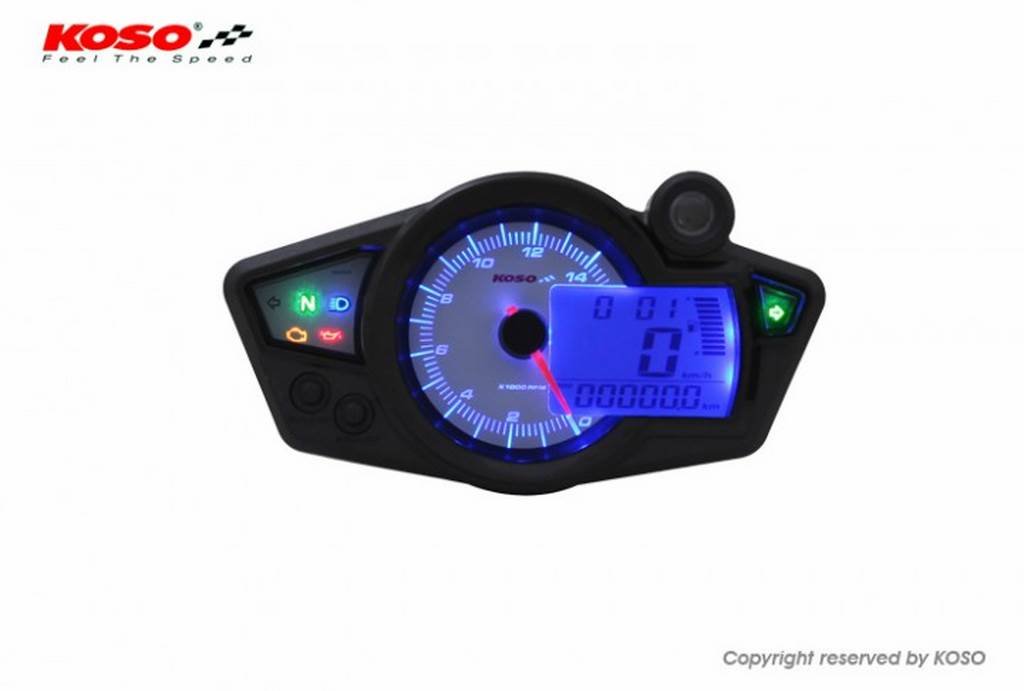 Image: KOSO Rx1N GP Style Universal Speedometer. This image shows the speedometer unit, typically mounted on a motorcycle dashboard, with its digital display active, featuring white and blue backlighting.
3. Initial Power-On and Calibration
- After all connections are made, reconnect the vehicle's power.
- Turn the ignition ON. The speedometer should power up and perform a self-test.
- Follow the on-screen prompts or refer to the detailed calibration section (if available in a separate product-specific manual) to set parameters such as wheel circumference, number of speed sensor pulses, and engine cylinder count for accurate readings.
Operating Instructions
The KOSO Rx1N GP Style Speedometer features a clear digital display and intuitive controls. Specific button functions may vary slightly, but general operation is as follows:
Display Functions
- Speed Display: Shows current vehicle speed in km/h or mph.
- RPM Display: Shows engine revolutions per minute.
- Odometer: Records total distance traveled.
- Trip Meter: Records distance for a single trip, resettable.
- Clock: Displays current time.
- Indicator Lights: Neutral, high beam, turn signals, warning lights.
Button Functions
Typically, the speedometer will have one or more buttons for navigation and setting adjustments.
- Short Press: Cycles through display modes (e.g., Odometer, Trip A, Trip B, Clock).
- Long Press: Enters setting mode or resets trip meters.
- Combination Press: May activate specific functions or advanced settings.
Refer to the detailed button operation section in your product's specific manual for precise instructions on setting the clock, units (km/h or mph), and other customizable parameters.
Maintenance
The KOSO Rx1N GP Style Speedometer is designed for durability and requires minimal maintenance.
- Cleaning: Use a soft, damp cloth to clean the display and casing. Avoid abrasive cleaners or solvents, which can damage the surface.
- Inspection: Periodically check all wiring connections for signs of wear, corrosion, or looseness. Ensure the mounting is secure.
- Storage: If the vehicle is stored for an extended period, ensure the speedometer is protected from extreme temperatures and moisture.
Troubleshooting
If you encounter issues with your speedometer, refer to the following common problems and solutions:
| Problem | Possible Cause | Solution |
|---|---|---|
| No power/Display off | Loose power connection, blown fuse, faulty wiring. | Check red and black wire connections. Inspect vehicle fuse box. Test power source. |
| Incorrect speed reading | Incorrect wheel circumference setting, faulty speed sensor, loose sensor connection. | Recalibrate wheel circumference. Check speed sensor wiring. Test sensor function. |
| RPM not displayed or inaccurate | Incorrect cylinder setting, faulty RPM signal connection. | Verify cylinder setting. Check blue wire connection to RPM source. |
| Backlight not working | Orange wire not connected, faulty illumination circuit. | Check orange wire connection. Ensure vehicle lights are on. |
If the problem persists after attempting these solutions, contact KOSO customer support or a qualified technician.
Specifications
| Model | BA011220 |
| Brand | KOSO |
| Type | Universal Speedometer (Contachilometri universale) |
| Illumination | White / Blue (Bianca / Blu) |
| Certification | ABE Homologation (as per product feature) |
Warranty and Support
KOSO products are manufactured to high-quality standards. This product comes with a manufacturer's warranty against defects in materials and workmanship. The specific terms and duration of the warranty may vary by region. Please retain your proof of purchase for warranty claims.
For technical support, warranty service, or to purchase replacement parts, please visit the official KOSO website or contact your authorized KOSO dealer. Contact information can typically be found on the KOSO official website.
Note: Warranty does not cover damage caused by improper installation, misuse, accidents, or unauthorized modifications.