
1. Introduction
This instruction manual provides essential information for the safe and effective use of your Leviton S416-P11 International Pin and Sleeve Plug. Please read this manual thoroughly before installation and operation, and retain it for future reference. Proper installation and maintenance are crucial for optimal performance and safety.
2. Safety Information
WARNING: Risk of electric shock. Improper installation or use can result in serious injury or death. Always follow local electrical codes and standards.
- Ensure power is disconnected at the source before performing any wiring or installation.
- This device is designed for use with 440-460V AC, 60Hz electrical systems. Verify compatibility with your power supply.
- Only qualified personnel should perform electrical installations.
- Do not use if the product appears damaged.
- Ensure all connections are secure and properly insulated.
3. Product Overview
The Leviton S416-P11 is an International Pin and Sleeve Plug designed for industrial and commercial applications requiring a robust and reliable electrical connection. It features a 4-pole, 5-wire configuration with a 16 Amp current rating and is suitable for 440-460V AC systems. The plug is constructed from halogen-free engineered polymer material and is splashproof, offering enhanced durability and safety in various environments.
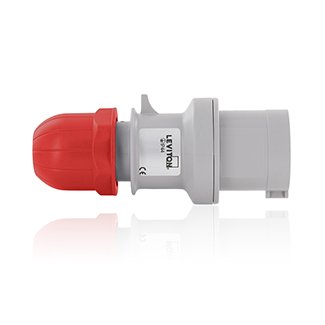
Figure 1: Leviton S416-P11 International Pin and Sleeve Plug. This image displays the grey plug body with a red cap, indicating its robust construction and design for secure electrical connections.
4. Setup and Installation
Follow these steps for proper installation of the S416-P11 plug:
- Disconnect Power: Ensure that the power supply to the circuit is completely disconnected before beginning any wiring. Verify with a voltage tester.
- Prepare Cable: Strip the outer jacket of the cable to the appropriate length, exposing the internal wires. The plug accommodates a cable outer diameter between 0.315 inches (min) and 0.59 inches (max).
- Wire Connections: Connect the five wires (4 poles + ground) to the corresponding terminals within the plug. Refer to the internal wiring diagram (if provided with the physical product) for correct terminal identification. Ensure each wire is securely fastened and that no stray strands are present.
- Secure Cable: Utilize the integrated cable clamp to firmly secure the cable, preventing strain on the wire connections.
- Assemble Plug: Reassemble the plug housing, ensuring all components are correctly aligned and tightened to maintain its splashproof rating.
- Verify: Double-check all connections and ensure the plug is fully assembled before restoring power.
5. Operating Instructions
To operate the Leviton S416-P11 plug:
- Align the plug with the corresponding receptacle, ensuring the keyways are correctly matched.
- Insert the plug firmly into the receptacle until it is fully seated.
- To disconnect, grasp the plug body and pull it straight out from the receptacle. Do not pull by the cable.
6. Maintenance
Regular maintenance helps ensure the longevity and safe operation of your plug:
- Inspection: Periodically inspect the plug for any signs of physical damage, cracks, discoloration, or loose connections.
- Cleaning: Disconnect power before cleaning. Wipe the exterior of the plug with a clean, dry cloth. Do not use abrasive cleaners or solvents.
- Environmental Protection: Ensure the plug's splashproof integrity is maintained by keeping all components securely fastened.
7. Troubleshooting
If you encounter issues with your S416-P11 plug, consider the following:
- No Power: Verify that the power supply to the circuit is active. Check circuit breakers or fuses. Ensure the plug is fully inserted into the receptacle.
- Loose Connection: Disconnect power and inspect the internal wiring connections within the plug and the receptacle for tightness.
- Physical Damage: If the plug shows signs of damage, discontinue use immediately and replace it.
For issues not resolved by these steps, consult a qualified electrician.
8. Specifications
| Feature | Detail |
|---|---|
| Model Number | S416-P11 |
| Product Type | Pin and Sleeve Plug |
| Poles / Wires | 4 Pole, 5 Wire |
| Current Rating | 16 Amp |
| Voltage Rating | 440-460V AC, 60 Hz |
| Cable Outer Diameter | 0.315 inch (min) to 0.59 inch (max) |
| Material | Halogen-Free Engineered Polymer |
| Environmental Rating | Splashproof |
| Approval | CE |
| Product Dimensions | 13.98 x 9.45 x 13.98 inches |
| Product Weight | 11.05 Pounds |
9. Warranty Information
Specific warranty details for the Leviton S416-P11 are not provided within this document. For comprehensive warranty information, please refer to the official Leviton website or contact Leviton customer service directly.
10. Support Information
For technical assistance, product inquiries, or further support regarding your Leviton S416-P11 plug, please visit the official Leviton website or contact their customer support department. Contact details and resources are typically available on the manufacturer's official channels.


