Introduction
The La Crosse Technology WS6811 is a digital temperature station designed to provide accurate indoor and outdoor temperature readings with customizable alerts. This manual will guide you through the setup, operation, and maintenance of your device to ensure optimal performance.
Package Contents
- 1 x WS6811 Main Display Unit
- 1 x Wireless Outdoor Temperature Sensor
- 1 x User Manual (this document)
- Note: 4 x AA LR6 1.5V batteries are required and not included.
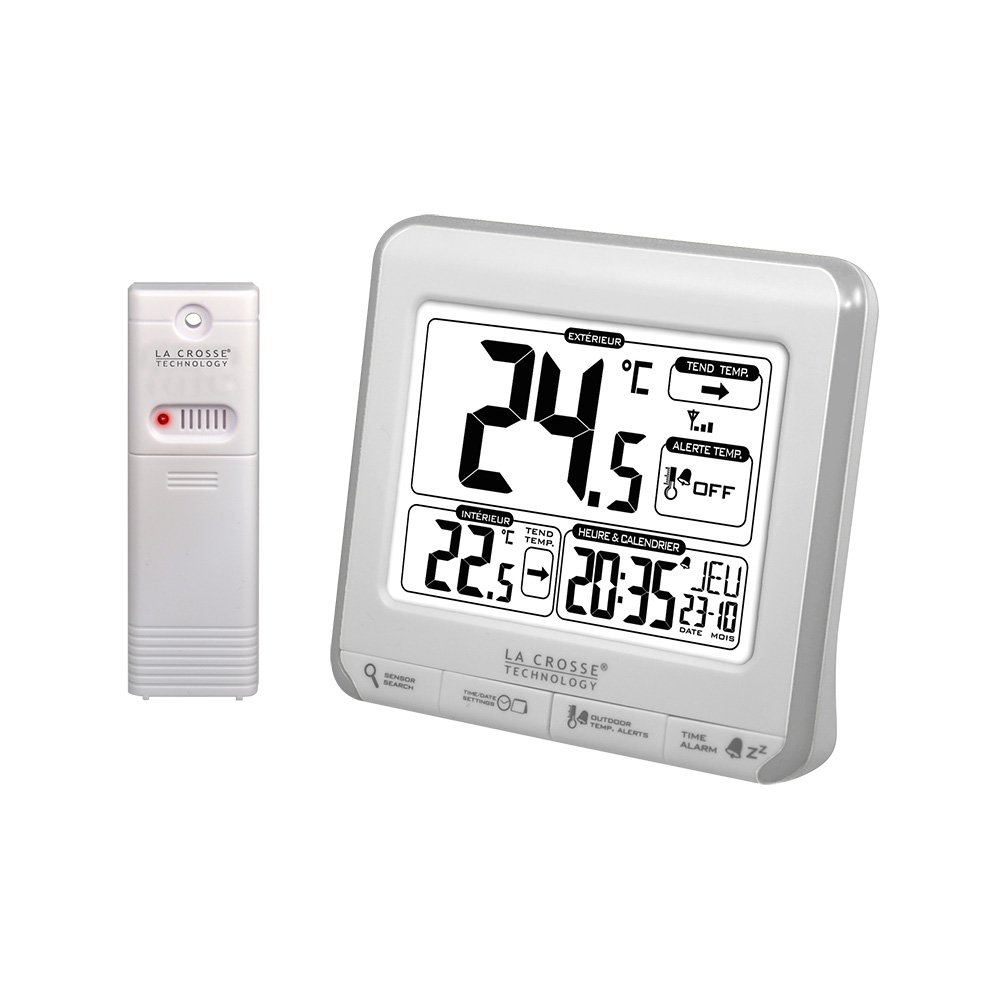
Image: The main display unit (right) and the wireless outdoor temperature sensor (left).
Setup
1. Battery Installation
Main Display Unit:
- Open the battery compartment cover on the back of the main unit.
- Insert 2 x AA LR6 1.5V batteries, observing the correct polarity (+/-).
- Close the battery compartment cover.
Wireless Outdoor Sensor:
- Open the battery compartment cover on the back of the sensor.
- Insert 2 x AA LR6 1.5V batteries, observing the correct polarity (+/-).
- Close the battery compartment cover.
The main unit will automatically begin searching for the outdoor sensor. This process may take a few minutes. Ensure both units are within range (up to 90 meters / 300 ft in open air) during initial setup.
2. Time and Date Setting
The time and date must be set manually. Refer to the buttons on the main unit (e.g., "SET" or "MODE" button) to enter the setting mode. Use the adjustment buttons (e.g., "+" or "-") to set the following:
- Time format (12H or 24H)
- Hour
- Minute
- Year
- Month
- Day
Confirm each setting to proceed to the next. The day of the week will update automatically.
3. Language Selection
The day of the week can be displayed in multiple languages. Access the language setting (often through the same "SET" or "MODE" button sequence) to choose from: French, English, German, Dutch, Italian, Spanish, and Danish.
4. Sensor Placement
Place the outdoor sensor in a shaded area, protected from direct sunlight and precipitation, to ensure accurate temperature readings. Avoid placing it near heat sources or reflective surfaces. The sensor should be mounted vertically for proper drainage and air circulation. Ensure it is within the 90-meter (300 ft) wireless range of the main unit.
Operating Instructions
Display Overview

Image: The main display unit showing various readings.
The LCD display provides the following information:
- Outdoor Temperature: Current temperature from the wireless sensor. Includes trend indicator and programmable high/low alerts.
- Indoor Temperature: Current temperature measured by the main unit. Includes trend indicator.
- Time & Calendar: Current time (12H/24H) and date (Month/Day/Date).
- Alarm with Snooze: Alarm status and snooze function (10 minutes).
- Wireless Transmission Strength: Indicator for the outdoor sensor's signal strength.
- Low Battery Indicators: Icons for both main unit and sensor batteries.
Temperature Units (°C/°F)
Press the designated button (often labeled "°C/°F" or similar) to switch between Celsius and Fahrenheit temperature display for both indoor and outdoor readings.
Min/Max Temperature Records
The station records daily minimum and maximum indoor and outdoor temperatures. Press the "MIN/MAX" button (or similar) to view these records. Pressing it again may cycle through min, max, and current readings. These records typically reset automatically every 24 hours.
Temperature Alerts
You can program high and low temperature alerts for the outdoor temperature. Refer to your unit's specific buttons (e.g., "ALERT" or "TEMP ALERT") to set the desired thresholds. When the outdoor temperature exceeds or falls below these set points, an audible alarm will sound, and an alert icon will flash on the display.
Alarm Function
The station includes an alarm with a 10-minute snooze function. Use the "ALARM" or "TIME ALARM" button to set the alarm time and activate/deactivate it. When the alarm sounds, press the "SNOOZE" button to temporarily silence it for 10 minutes.
Maintenance
- Battery Replacement: Replace batteries in both the main unit and the sensor when the low battery indicator appears on the display. Always replace all batteries at the same time with new, high-quality alkaline batteries.
- Cleaning: Clean the display and unit casing with a soft, damp cloth. Do not use abrasive cleaners or solvents.
- Storage: If storing the unit for an extended period, remove all batteries to prevent leakage.
Troubleshooting
| Problem | Possible Solution |
|---|---|
| No outdoor temperature reading / Dashes on display |
|
| Inaccurate outdoor temperature |
|
| Display is dim or blank |
|
| Interference with other wireless devices (e.g., Wi-Fi) |
|
Specifications
- Indoor Temperature Range: 0°C to 50°C (32°F to 122°F)
- Outdoor Temperature Range: -40°C to 60°C ((-40°F to 140°F)
- Temperature Accuracy: +/-1°C
- Indoor Temperature Interval: Every 30 seconds
- Outdoor Temperature Interval: Every 50 seconds
- Wireless Transmission Range: Up to 90 meters (300 ft) in open air
- Frequency: 433 MHz
- Main Unit Power: 2 x AA LR6 1.5V batteries (not included)
- Sensor Power: 2 x AA LR6 1.5V batteries (not included)
- Main Unit Dimensions: 108 x 38 x 99 mm (L x W x H)
- Sensor Dimensions: 40 x 20 x 130 mm (L x W x H)
- Display Type: LCD
- Special Features: Alarm, Wireless, Temperature Alerts, Min/Max Records, Trend Indicators
Warranty and Support
La Crosse Technology products are designed for reliability and performance. For specific warranty information, please refer to the warranty card included with your product or visit the official La Crosse Technology website. For technical support or further assistance, please contact La Crosse Technology customer service.
Please retain this manual for future reference.