Introduction
Thank you for purchasing the AFUNTA Boruit LED Headlamp. This manual provides essential information for the safe and effective use of your headlamp. Please read it thoroughly before operation and retain it for future reference.
Safety Information
- Do not look directly into the LED light when it is on, as it can cause temporary vision impairment or eye damage.
- Keep the headlamp out of reach of children.
- Ensure batteries are inserted with correct polarity. Incorrect insertion can damage the device.
- Do not mix old and new batteries, or different types of batteries.
- This headlamp is waterproof, but it is not designed for submersion. Avoid prolonged exposure to heavy rain or water.
- Do not attempt to disassemble or modify the headlamp, as this will void the warranty and may cause damage or injury.
Package Contents
- AFUNTA Boruit LED Headlamp Unit
- USB Charging Cable
- Adjustable Head Strap
Note: Batteries (e.g., 18650 type) are typically sold separately and are required for operation.
Product Overview
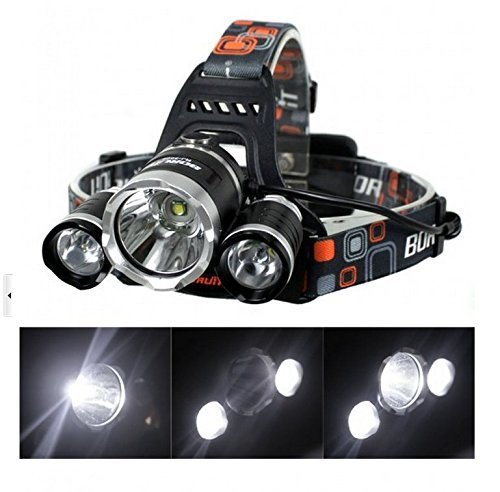
The AFUNTA Boruit LED Headlamp features a powerful 5000LM output with three CREE XM-L T6 LED lights, offering multiple lighting modes for various outdoor activities. Its waterproof design ensures reliability in diverse weather conditions, and the rechargeable capability provides convenience.
Setup
- Battery Installation: Open the battery compartment located at the rear of the headlamp. Insert two 18650 rechargeable batteries (not included) according to the polarity markings (+/-). Close the compartment securely.
- Strap Adjustment: Place the headlamp on your head. Adjust the elastic straps to ensure a comfortable and secure fit. The straps should be snug but not overly tight.
- Angle Adjustment: The light unit can be tilted vertically to direct the beam. Adjust the angle to suit your viewing needs. The base of the light unit can move approximately 20 degrees upwards and 90 degrees downwards, with 6 distinct click positions.
Operation
The headlamp features a single power button located on the top of the central light unit. Press the button to cycle through the lighting modes:
- First Press: Activates the central LED light only.
- Second Press: Activates the two side LED lights only.
- Third Press: Activates all three LED lights for maximum brightness.
- Fourth Press: Activates the flashing (strobe) mode.
- Fifth Press: Turns the headlamp off.
Charging
To charge the headlamp, connect the provided USB charging cable to the charging port on the headlamp unit. Connect the other end of the USB cable to a compatible USB power source (e.g., a computer USB port, wall adapter, or power bank). An indicator light will typically show the charging status. Ensure the batteries are installed before charging. The headlamp can be charged with the batteries inside.
Maintenance
- Cleaning: Wipe the headlamp with a soft, damp cloth. Do not use abrasive cleaners or solvents.
- Storage: When not in use for extended periods, remove the batteries to prevent leakage. Store the headlamp in a cool, dry place away from direct sunlight.
- Battery Care: Use only recommended rechargeable batteries. If the headlamp is used frequently, consider having spare charged batteries available.
Troubleshooting
- Headlamp does not turn on:
- Check if batteries are inserted correctly with the correct polarity.
- Ensure batteries are fully charged.
- Verify that the battery compartment is securely closed.
- If the switch appears faulty (e.g., stays dimly lit or doesn't turn off), contact customer support.
- Light is dim or flickers:
- Batteries may be low. Recharge or replace them.
- Ensure battery contacts are clean and free of corrosion.
- Headlamp does not charge:
- Ensure the USB cable is properly connected to both the headlamp and the power source.
- Try a different USB cable or power source.
- Verify that the batteries are correctly installed.
Specifications
| Feature | Detail |
|---|---|
| Model | CREE XM-L T6 (3 Lights) |
| Light Output | Up to 5000 Lumens |
| Lighting Modes | 4 (Central, Side, All, Strobe) |
| Power Source | Battery-powered (requires 2x 18650 batteries) |
| Light Source Type | LED |
| Waterproof Level | Waterproof (not for submersion) |
| Color | Black |
| Package Size | 15.1 x 12.1 x 9.9 cm |
| Weight | 287.99 g |
| ASIN | B0199MAVIA |
Warranty and Support
For warranty information or technical support, please refer to the documentation included with your purchase or contact the seller directly. Keep your purchase receipt as proof of purchase.


