1. Product Overview
The Monoprice USB-C 3-Port USB 3.0 Hub and Gigabit Ethernet Adapter (Model 114503) is designed to expand the connectivity options for your USB-C enabled devices. This compact adapter integrates three high-speed USB 3.0 Type-A ports and one Gigabit Ethernet port, providing both data transfer capabilities and a stable wired network connection. It is compatible with a wide range of operating systems, including MacOS, Windows, and Chrome OS, offering a plug-and-play experience without the need for additional driver installations on most modern systems.
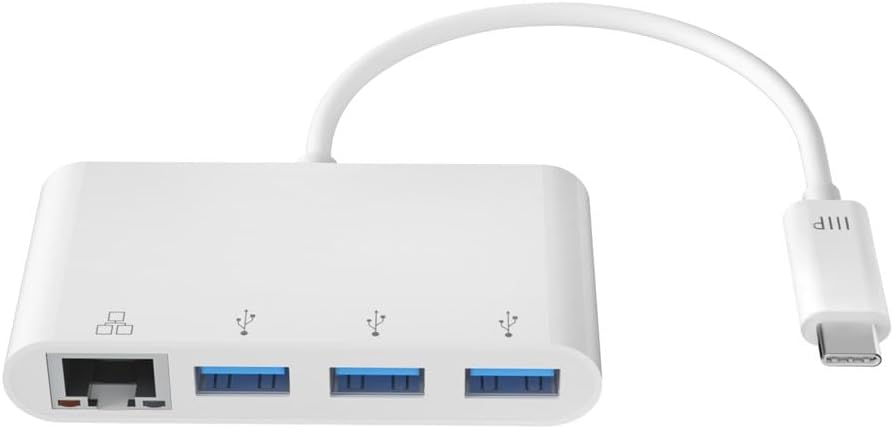
Image: Monoprice USB-C 3-Port USB 3.0 Hub and Gigabit Ethernet Adapter, showcasing the device with its integrated USB-C connector.
2. What's in the Box
- 1x Monoprice USB-C 3-Port USB 3.0 Hub and Gigabit Ethernet Adapter
3. Setup
The Monoprice USB-C 3-Port USB 3.0 Hub and Gigabit Ethernet Adapter is designed for simple plug-and-play functionality. No drivers or software installations are typically required for Windows, MacOS, or Chrome OS.
- Connect to Host Device: Plug the USB-C connector of the adapter into an available USB-C port on your laptop, tablet, or smartphone.
- Power Indicator: A small LED indicator on the adapter will illuminate to confirm it is powered and ready for use.
- Connect Peripherals: You can now connect your USB devices (e.g., mouse, keyboard, flash drives, external hard drives) to the USB 3.0 Type-A ports.
- Connect to Network: For a wired internet connection, plug an Ethernet cable from your router or modem into the Gigabit Ethernet port on the adapter.

Image: The adapter connected to a laptop, demonstrating simultaneous use of a USB flash drive and a wired Ethernet connection.
4. Operating Instructions
Using the USB 3.0 Hub
The adapter features three USB 3.0 Type-A ports. These ports support data transfer speeds up to 5Gbps, making them suitable for connecting high-speed external peripherals such as external hard drives, SSDs, and high-resolution webcams. They can also be used for charging mobile devices, though charging speeds may vary depending on the device and power requirements.

Image: A detailed view of the three USB 3.0 Type-A ports on the Monoprice adapter.
Using the Gigabit Ethernet Adapter
The integrated Gigabit Ethernet adapter provides a stable and high-speed wired network connection, supporting speeds up to 1000Mbps. This is ideal for activities requiring consistent bandwidth, such as online gaming, video conferencing, and large file transfers, offering superior security and speed compared to wireless connections.

Image: A close-up of the Gigabit Ethernet port on the Monoprice adapter.
5. Features
- 3-Port USB Hub: Adds three USB 3.0 Type-A ports, each capable of delivering data speeds up to 5Gbps, for connecting high-speed external peripherals and charging mobile devices.
- Wired Gigabit Ethernet: Enjoy the superior security and increased speeds of a wired Ethernet connection using the built-in Gigabit Ethernet Adapter.
- Plug & Play: A true Plug & Play device, no drivers or software installations are required to use the Gigabit adapter on a Windows or Mac OS X machine.
- Portable Design: Small and portable, you can easily slip this adapter into your laptop case and have it ready for use wherever and whenever the need arises.
- Wide Compatibility: Compatible with USB-C equipped laptops, such as the Apple MacBook and Google Chromebook, as well as the latest tablets, flash drives, and other smart devices.

Image: A diagram illustrating the various connections and devices that can be used with the Monoprice USB-C hub.
6. Specifications
| Brand | Monoprice |
| Model Number | 114503 |
| Product Dimensions | 6 x 5 x 5 inches |
| Item Weight | 1.44 ounces |
| Color | White |
| Hardware Interface | USB 3.0 |
| Compatible Devices | Laptops, Smartphones, Tablets |
| Data Transfer Rate (USB) | Up to 5Gbps |
| Ethernet Speed | Gigabit (1000Mbps) |
7. Troubleshooting
- No Internet Connection via Ethernet:
- Ensure the Ethernet cable is securely connected to both the adapter and your router/modem.
- Verify that your host device's network settings recognize the wired connection.
- Restart your computer and network equipment.
- USB Devices Not Recognized:
- Ensure the USB device is properly inserted into the adapter's USB 3.0 port.
- Try connecting the USB device directly to your computer's USB port to confirm it is functional.
- Some high-power USB devices may require an external power source, which this adapter does not provide.
- Wi-Fi Issues When Adapter is Connected:
- In some rare cases, particularly with certain MacOS versions, connecting an Ethernet adapter might disable Wi-Fi. Check your network preferences to ensure Wi-Fi is still enabled and prioritized correctly.
- Slow Data Transfer Speeds:
- Ensure you are using USB 3.0 compatible devices and cables to achieve maximum speeds.
- Verify your Ethernet cable is rated for Gigabit speeds (Cat5e or higher).
8. Maintenance
- Cleaning: Use a soft, dry cloth to clean the adapter. Avoid liquid cleaners or solvents.
- Storage: Store the adapter in a cool, dry place away from direct sunlight and extreme temperatures.
- Handling: Avoid dropping the adapter or subjecting it to strong impacts. Do not bend the integrated cable excessively.

Image: The compact size of the adapter, emphasizing its portability for easy storage and travel.
9. Warranty and Support
For detailed warranty information and technical support, please refer to the official Monoprice website or contact their customer service directly. Keep your purchase receipt for warranty claims.


