
LUX P711-010
Lux Pro Home Thermostat P711 User Manual
Model: P711-010 | 7-Day Programmable: 1 Heat & 1 Cool Stage
1. Product Overview
The Lux Pro Home Thermostat Model P711-010 is a versatile 7-day programmable thermostat designed for 1 heat and 1 cool stage HVAC systems. It offers flexible temperature control options, including 7-day, 5/2-day programming, or non-programmable settings. Key features include an easy-view backlight, keypad lock for security, and customizable display options for Fahrenheit or Celsius.
This thermostat is dual-powered, operating on 2 AA alkaline batteries (included) or a 24-volt system, ensuring reliable performance. It is designed for easy installation and intuitive operation, making it a convenient solution for managing your home's heating and cooling.

Figure 1: Front view of the Lux Pro P711 Thermostat, showing the display, fan and system mode switches, and control buttons.

Figure 2: Labeled diagram of the P711 control panel, indicating the LCD Display Screen, Fan Mode Switch, System Mode Switch, SET, NEXT, HOLD buttons, and UP and DOWN buttons.
2. Safety Information
Before installation or operation, please read all instructions carefully. Failure to follow these instructions could result in property damage or personal injury.
- Always turn off power to the heating/cooling system at the main fuse or circuit breaker panel before installing or servicing the thermostat.
- Ensure all wiring connections are secure and comply with local electrical codes.
- Do not short (jumper) across the electrical terminals on the thermostat base.
- This thermostat is designed for low voltage (24V) systems. Do not use with line voltage (120V/240V) systems.
- Keep batteries out of reach of children. Dispose of used batteries properly.
3. Installation
3.1. Compatibility
The P711 thermostat is compatible with a variety of 24V heating and cooling systems. Refer to the compatibility chart below to ensure your system is supported.

Figure 3: System Compatibility Chart for the P711 Thermostat, detailing compatible and non-compatible HVAC systems.
3.2. Tools and Materials Required
- Phillips head screwdriver
- Drill with 3/16” (4.8mm) drill bit (if new holes are needed)
- Wire strippers (if needed)
- Pencil
- Level (optional)
3.3. Installation Steps
- Turn off Power: Locate the circuit breaker or fuse box that controls your heating and cooling system and turn off the power. Verify the power is off by attempting to turn on your system.
- Remove Old Thermostat: Carefully remove the cover of your old thermostat. Take a picture of the wiring connections before disconnecting any wires. Label each wire with the terminal designation (e.g., R, G, Y, W, C) using the provided wire labels.
- Remove Mounting Plate: Unscrew and remove the old thermostat's mounting plate from the wall.
- Mount New Thermostat Base: Separate the front cover of the P711 thermostat from its base. Position the new thermostat base on the wall, feeding the wires through the opening. Mark the mounting holes with a pencil. If drilling new holes, use a 3/16” drill bit and insert the wall anchors. Secure the thermostat base to the wall using the provided screws.
- Wire the Thermostat: Connect the labeled wires to the corresponding terminals on the P711 thermostat base. Refer to the wiring diagrams below for common configurations. Ensure connections are tight.

Figure 4: Wiring diagram for 3/4 wire conventional, non-heat pump, 1-stage cool only systems. Shows connections for C, G, RH, RC, W, Y, O/B terminals.
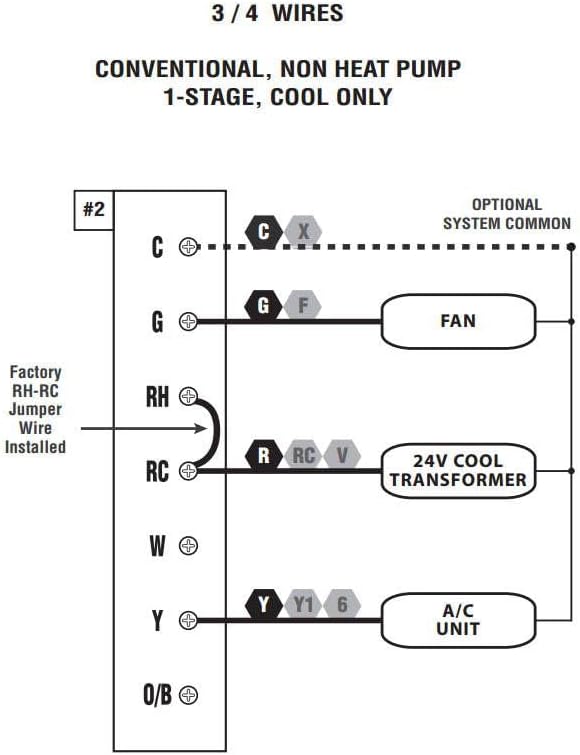
Figure 5: Wiring diagram for 4/5 wire conventional, non-heat pump, 1-stage heat and 1-stage cool systems. Shows connections for C, G, RH, RC, W, Y, O/B terminals.

Figure 6: Wiring diagram for 5/6 wire conventional, non-heat pump, 1-heat / 1-cool systems with two transformers. Shows connections for C, G, RH, RC, W, Y, O/B terminals, and the removal of the factory RH-RC jumper wire.
- Insert Batteries: If using battery power, insert the 2 AA alkaline batteries into the battery compartment.
- Attach Thermostat Cover: Carefully align the thermostat cover with the base and snap it into place.
- Restore Power: Return to the circuit breaker or fuse box and restore power to your heating and cooling system.
4. Initial Setup and Configuration
4.1. Setting Time and Day
Upon initial power-up or after a battery change, the display will show a flashing time and day. Use the SET button to navigate through the time and day settings, and the UP and DOWN buttons to adjust the values. Press NEXT to confirm each setting.
4.2. Programming Modes
The P711 offers three programming options: 7-day, 5/2-day, or non-programmable. You can select your preferred mode during the initial setup or by accessing the system settings. Refer to the detailed programming instructions in the full manual for specific steps on setting schedules for each day or period.
4.3. Display Options (Fahrenheit/Celsius)
You can switch between Fahrenheit (°F) and Celsius (°C) display modes. This setting is typically found within the advanced setup menu. Consult the full manual for instructions on accessing and changing this option.
4.4. Keypad Lock
The keypad lock feature prevents unauthorized access or accidental changes to your thermostat settings. To activate or deactivate the keypad lock, follow the instructions provided in the comprehensive manual.
5. Operation
5.1. Adjusting Temperature
In normal operating mode, use the UP or DOWN buttons to adjust the desired temperature setpoint. The new setpoint will be displayed, and the thermostat will adjust the system to reach it.
5.2. Fan Settings
The fan mode switch allows you to select between two settings:
- AUTO: The fan runs only when the heating or cooling system is actively operating. This is the most energy-efficient setting.
- ON: The fan runs continuously, regardless of whether the heating or cooling system is active.
5.3. System Mode
The system mode switch allows you to select the operating mode for your HVAC system:
- HEAT: The thermostat will control your heating system to maintain the set temperature.
- OFF: Both heating and cooling systems are turned off.
- COOL: The thermostat will control your cooling system to maintain the set temperature.
5.4. Hold Function
The HOLD button allows you to temporarily or permanently override the programmed schedule. When activated, the thermostat will maintain the current temperature setpoint until the HOLD function is canceled or a new schedule period begins (for temporary hold).
5.5. Temporary Override
Adjusting the temperature using the UP or DOWN buttons during a programmed period will initiate a temporary override. The thermostat will maintain this new temperature until the next scheduled program period begins.
6. Maintenance
6.1. Battery Replacement
The thermostat uses 2 AA alkaline batteries. When the battery indicator appears on the display, replace the batteries promptly to ensure continuous operation. Open the battery compartment, remove old batteries, and insert new ones, observing polarity (+/-). The thermostat has battery-free memory, so programming should not be lost during battery replacement.
6.2. Cleaning
Clean the thermostat's exterior with a soft, damp cloth. Do not use abrasive cleaners or solvents, as these can damage the finish or internal components.
7. Troubleshooting
If you experience issues with your Lux Pro P711 thermostat, refer to the common troubleshooting steps below. For more complex problems, contact customer support.
| Problem | Possible Cause | Solution |
|---|---|---|
| Display is blank or dim | Low or dead batteries; No 24V power (if wired); Loose connections. | Replace batteries. Check circuit breaker for HVAC system. Verify wiring connections are secure. |
| System (Heat/Cool) does not turn on | System switch in OFF position; Incorrect wiring; Blown fuse in HVAC system; Temperature setpoint not calling for heat/cool. | Ensure system switch is set to HEAT or COOL. Recheck wiring against diagrams. Check HVAC system fuse. Adjust setpoint to be above (for heat) or below (for cool) current room temperature. |
| Fan does not operate | Fan switch in AUTO; Incorrect wiring. | Set fan switch to ON to test continuous operation. Verify fan wiring (G terminal). |
| Inaccurate temperature reading | Thermostat exposed to direct sunlight or drafts; Needs calibration. | Relocate thermostat if possible. Access user temperature calibration setting (refer to full manual). |
| Programming issues | Incorrect programming steps; Keypad locked. | Review programming instructions carefully. Unlock keypad if activated. |
8. Specifications
| Feature | Specification |
|---|---|
| Brand | LUX |
| Model Name | P711-010 |
| Controller Type | Push Button |
| Special Feature | Low Voltage |
| Color | White |
| Temperature Control Type | Manual, Programmable |
| Connectivity Technology | N/A (Note: Product specifications list Wi-Fi, but this model is typically non-Wi-Fi. Refer to specific product packaging for confirmation.) |
| Included Components | P711-010 Programmable 7 Day Thermostat, 2 AA LR6 batteries, 2 ST screws, 2 wall anchors, wire labels, instruction manual |
| Power Source | Battery Powered (2 AA included), 24 Volts (system power) |
| Item Weight | 1.6 ounces |
| Voltage | 24 Volts |
| Material | Plastic |
| Shape | Rectangular |
| Display Type | LCD with Backlight |
| Control Type | Button Control |
| Mounting Type | Wall Mount |
| Style | Programmable: 1 heat & 1 cool Stage |
| Backlight | Yes |
| Certification | UL (Underwriters Laboratories) Low Voltage Certification |
| Product Dimensions | 1.25 x 3.38 x 5.38 inches |
| UPC | 021079147113 |
9. Warranty and Support
9.1. Warranty Information
The Lux Pro P711 Thermostat typically comes with a 5-year limited warranty from the date of purchase. This warranty covers defects in materials and workmanship under normal use and service. Please retain your proof of purchase for warranty claims.
9.2. Customer Support
For technical assistance, troubleshooting not covered in this manual, or warranty inquiries, please contact LUX customer support. Refer to the contact information provided on the product packaging or the official LUX website (www.luxproducts.com) for the most up-to-date support options.
Related documentsP711-010


Ask a question about this manual
Ask about setup, troubleshooting, compatibility, parts, safety, or missing instructions. Manuals+ will review the question and use this page’s manual context to help answer it.