1. Introduction
This manual provides essential information for the proper installation, operation, and maintenance of your Sonero IMS060 Infrared Motion Detector. This device is designed to automatically control lighting circuits based on detected movement, contributing to energy cost reduction. It is suitable for indoor use.
- Model: Sonero IMS060
- Detection Angle: 120°
- Detection Range: Up to 9 meters
- Protection Class: IP20 (for indoor use only)
- Adjustable Settings: Light sensitivity (3-2000 lux) and time delay (10 seconds - 7 minutes)
2. Safety Instructions
Please read and understand all safety instructions before installing or operating the device. Failure to follow these instructions may result in electric shock, fire, or serious injury.
- This device is designed for indoor use only. Do not expose it to moisture, rain, or extreme temperatures.
- Ensure the power supply is disconnected before installation or maintenance.
- Do not disassemble or modify the device. Refer all servicing to qualified personnel.
- Keep out of reach of children.
- Ensure the electrical outlet used is compatible with the device's plug type.
3. Product Overview
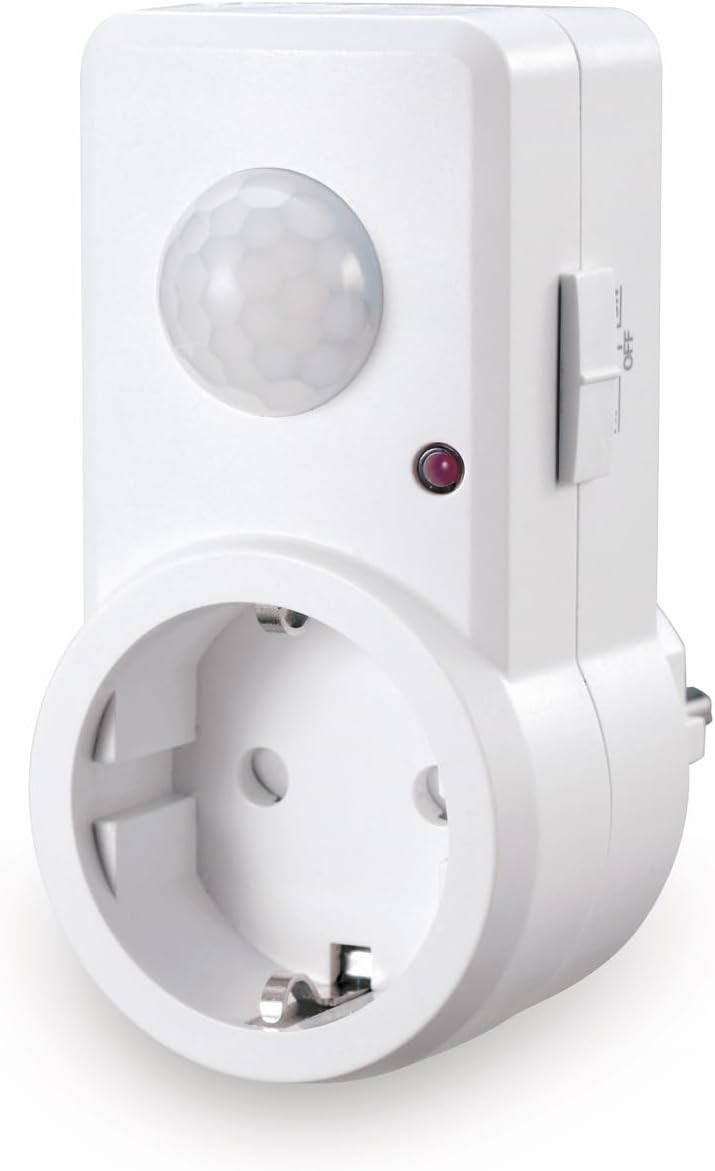
The Sonero IMS060 is a compact plug-in motion detector. It features an infrared sensor on the front to detect movement and a standard electrical socket for connecting a load. The back of the device has the electrical plug for insertion into a wall outlet.

4. Setup
- Unpack: Carefully remove the Sonero IMS060 from its packaging.
- Select Location: Choose an indoor electrical outlet that is within the desired detection range (up to 9 meters) and angle (120°) of the area where motion detection is required. Avoid placing the detector near heat sources, direct sunlight, or areas with strong air currents, as these can cause false triggers.
- Plug In: Insert the Sonero IMS060 directly into a compatible wall electrical outlet. Ensure a secure connection. Note: This device features a European-style plug. Verify compatibility with your local electrical outlets before use.
- Connect Load: Plug the electrical appliance or light fixture you wish to control into the socket on the front of the Sonero IMS060.
5. Operating Instructions
The Sonero IMS060 features adjustable settings for optimal performance:
- Light Sensitivity (LUX): This setting determines the ambient light level at which the motion detector will activate. You can adjust it continuously from 3 lux (darkness) to 2000 lux (daylight). For example, set it to a lower lux value if you only want the light to turn on when it's dark, or to a higher value if you want it to activate even in brighter conditions.
- Time Delay (TIME): This setting controls how long the connected appliance or light remains on after motion is last detected. It is continuously adjustable from 10 seconds to 7 minutes. Set a shorter time for quick passages or a longer time for areas where prolonged illumination is needed.
Refer to the adjustment dials or switches on the device for specific control points. Test the settings after adjustment to ensure they meet your requirements.
6. Maintenance
To ensure the longevity and proper functioning of your Sonero IMS060, follow these simple maintenance guidelines:
- Cleaning: Disconnect the device from the power outlet before cleaning. Use a soft, dry cloth to wipe the exterior. Do not use abrasive cleaners, solvents, or excessive moisture.
- Inspection: Periodically check the device and its connections for any signs of damage or wear.
- Environment: Maintain the device in a clean, dry indoor environment within its specified temperature range.
7. Troubleshooting
- Device does not power on:
- Ensure the device is securely plugged into a functioning electrical outlet.
- Verify that the electrical outlet itself has power.
- Light does not turn on with motion:
- Check the light sensitivity (LUX) setting. If set too high, the detector may not activate in bright conditions.
- Ensure the connected light bulb or appliance is working correctly.
- Verify that the motion sensor is not obstructed.
- Confirm that the motion is within the detection range and angle.
- Light stays on continuously or triggers falsely:
- Adjust the time delay (TIME) setting to a shorter duration.
- Check for environmental factors like heat sources (heaters, direct sunlight), strong air currents, or pets that might be causing false triggers.
- Ensure the sensor lens is clean.
- Plug Incompatibility: This device uses a European-style plug. If your local outlets are different (e.g., UK, US, Belgian), an appropriate adapter is required. Ensure any adapter used is rated for the device's power requirements and is certified for safety.
8. Specifications
| Feature | Specification |
|---|---|
| Brand | Sonero |
| Model Number | X-IMS060 |
| Product Dimensions (L x W x H) | 9.83 x 4.5 x 8.15 cm |
| Weight | 149.69 grams |
| Color | White |
| Style | Plug-in (for electrical outlet) |
| Power Source | Electric Cable |
| Detection Angle | 120° |
| Detection Range | Up to 9 meters |
| Protection Class | IP20 |
| Adjustable Light Sensitivity | 3 – 2000 lux |
| Adjustable Time Delay | 10 seconds – 7 minutes |
| Operating Temperature Range | 25 Degrees Celsius (typical) |
| Batteries Required | No |
| Included Components | 1 Sonero IMS060 unit |
9. Warranty and Support
Sonero products are designed for reliability and performance. For warranty information, technical support, or service inquiries, please refer to the contact details provided with your purchase or visit the official Sonero website. Keep your proof of purchase for warranty claims.


