
1. Introduction
The Jebao PP-8 Wavemaker with Controller is designed to create adjustable water flow and wave patterns in freshwater and saltwater aquariums. This device enhances water circulation, which is crucial for the health of aquatic life and the overall ecosystem of your tank. The PP-8 model features a unique control system, wireless capabilities for synchronizing multiple units, and a variable frequency DC electronic pump for safe and efficient operation.
This manual provides detailed instructions for the safe installation, operation, and maintenance of your Jebao PP-8 Wavemaker. Please read it thoroughly before use to ensure optimal performance and longevity of the product.
2. Safety Information
- Always disconnect power before performing any maintenance or installation.
- Ensure hands are dry when handling electrical components.
- Do not operate the pump out of water.
- Keep the controller and power adapter away from water.
- This product is designed for indoor use only.
- Do not modify the product or use non-original parts.
- Keep out of reach of children.
3. Package Contents
Verify that all components are present in the package:
- Jebao PP-8 Wavemaker Pump
- Controller
- AC Adapter
- Magnetic Mounting Base

Image: The Jebao PP-8 Wavemaker controller and its accompanying AC adapter.
4. Setup Instructions
- Mounting the Wavemaker:
- Identify the desired location for the wavemaker inside your aquarium. Ensure it is submerged and positioned to create optimal flow without disturbing substrate or corals excessively.
- Place the wavemaker pump inside the aquarium and align the external magnetic base on the outside of the glass/acrylic. The strong magnet will secure the pump in place.
- The mounting bracket allows for a full 360-degree rotation, enabling precise placement and direction of water flow. Adjust the pump's angle as needed.
- Connecting the Controller:
- Connect the wavemaker pump's cable to the designated port on the controller.
- Connect the AC adapter to the controller and then plug the adapter into a power outlet.
- Ensure all connections are secure before powering on the unit.
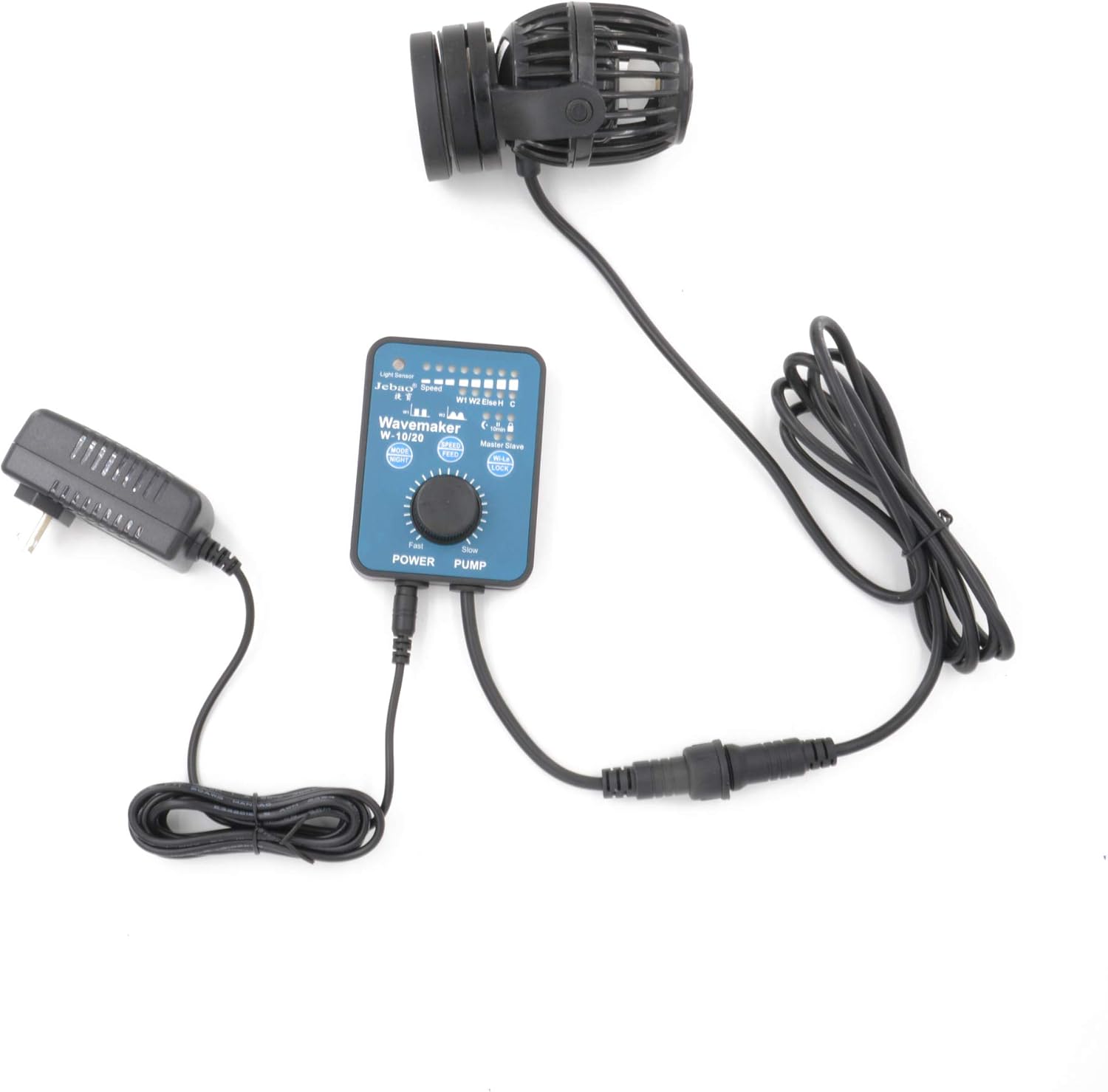
Image: The Jebao PP-8 Wavemaker pump, ready for magnetic mounting.

Image: Close-up of the Jebao PP-8 Propeller Pump showing model and specification details.
5. Operating Instructions
The controller allows for various modes and adjustments to customize water flow.
Controller Overview:
- POWER Dial: Adjusts the pump's output power/speed (Slow to Fast).
- MODE/NIGHT Button: Cycles through different wave modes and activates night mode.
- SPEED/FEED Button: Adjusts the speed within a selected mode and activates feed mode.
- WI-LE/LOCK Button: Used for wireless synchronization (Master/Slave) and locking settings.
- Light Sensor: Automatically reduces pump speed during low light conditions (night mode).
Operating Modes:
Press the MODE/NIGHT button to cycle through the following modes:
- W1 (Wave Mode 1): Creates a regular wave pattern. Adjust wave intensity with the POWER dial and wave frequency with the SPEED/FEED button.
- W2 (Wave Mode 2): A different wave pattern, often more random or turbulent. Adjust intensity and frequency as in W1.
- ELSE (Random Flow Mode): Generates a random flow pattern, simulating natural ocean currents. The pump speed varies unpredictably.
- C (Constant Flow Mode): Provides a steady, continuous flow. The speed is controlled by the POWER dial.
Special Functions:
- Night Mode: Press and hold the MODE/NIGHT button until the 'Night' indicator lights up. The light sensor will detect low light and automatically reduce pump speed to a gentler flow, preventing stress to nocturnal inhabitants.
- Feed Mode: Press the SPEED/FEED button once. The pump will pause for 10 minutes (indicated by '10min' light), allowing fish to feed without food being swept away. The pump will resume normal operation automatically after 10 minutes.
- Master/Slave Synchronization: If using multiple Jebao wavemakers, one can be set as a Master and others as Slaves to synchronize their operation wirelessly. Refer to the specific instructions for pairing in the full PDF manual for detailed steps.
- Lock Function: Press and hold the WI-LE/LOCK button to lock the current settings, preventing accidental changes. Repeat to unlock.
6. Maintenance
Regular maintenance ensures the longevity and efficient operation of your wavemaker.
- Regular Cleaning:
- Disconnect power before cleaning.
- Carefully remove the wavemaker from the aquarium.
- Disassemble the pump housing and remove the impeller.
- Clean the impeller, impeller shaft, and pump housing thoroughly with a soft brush and clean water to remove any debris, algae, or mineral deposits.
- For stubborn deposits like coralline algae, a mild vinegar solution can be used, followed by a thorough rinse with clean water.
- Reassemble the pump, ensuring all parts are correctly seated.
- Impeller Inspection: Periodically check the impeller for any signs of wear or damage. A worn impeller can lead to reduced performance or increased noise.
- Cable Inspection: Regularly inspect the power cable for any signs of damage or fraying. Replace if necessary.
7. Troubleshooting
| Problem | Possible Cause | Solution |
|---|---|---|
| Pump not starting or intermittent operation | Power supply issue, impeller jammed by debris, worn impeller, motor failure. |
|
| Reduced flow rate | Debris in pump, clogged impeller, incorrect speed setting. |
|
| Excessive noise or vibration | Debris in pump, worn impeller, improper mounting. |
|
8. Specifications
| Feature | Detail |
|---|---|
| Model | PP-8 |
| Brand | Jebao |
| Product Dimensions | 4 x 9.4 x 6.4 inches |
| Item Weight | 0.01 ounces (0.27 g) |
| Material | Polypropylene (PP) |
| Power Source | Corded Electric |
| Maximum Flow Rate | 2100 GPH (gallons per hour) |
| Included Components | Wavemaker, AC adapter, controller |
| Specific Uses | Indoor aquarium circulation |
9. Warranty and Support
The Jebao PP-8 Wavemaker comes with a 180-day warranty from the date of purchase. This warranty covers manufacturing defects under normal use conditions.
For warranty claims, technical assistance, or any questions regarding your product, please contact Jebao customer support through their official website or the retailer from whom you purchased the product. Please have your purchase receipt and product model number (PP-8) available when contacting support.