
1. Product Overview
The PChero USB DC Charging Cable is designed to provide a convenient charging solution for various small electronic devices, including Mini S530 Bluetooth earbuds, older Nokia mobile phones, G pens, and Bluetooth shower speakers. This cable features a standard USB-A connector on one end and a 2.0mm x 11.0mm DC barrel connector on the other, ensuring compatibility with devices requiring this specific tip size.

Image 1: The PChero USB DC Charging Cable, featuring a USB-A connector and a 2.0mm x 11.0mm DC barrel connector.
2. Setup and Compatibility
2.1 Verifying DC Tip Size
It is crucial to verify that your device requires a 2.0mm diameter and 11.0mm length DC charging tip. This cable features an upgraded, longer DC tip (11.0mm) compared to older versions (7.0mm) to ensure a secure connection for various devices.

Image 2: Comparison illustrating the upgraded 2.0mm x 11.0mm DC tip versus an older 2.0mm x 7.0mm version.
2.2 Compatible Devices
- Mini S530 Bluetooth Earbuds/Headphones
- Various older Nokia mobile phone models (e.g., N72, N80, 7310s, N90, N70, E63)
- G Pens
- Bluetooth Shower Speakers
- Other small electronic devices requiring a 2.0mm x 11.0mm DC charging tip.
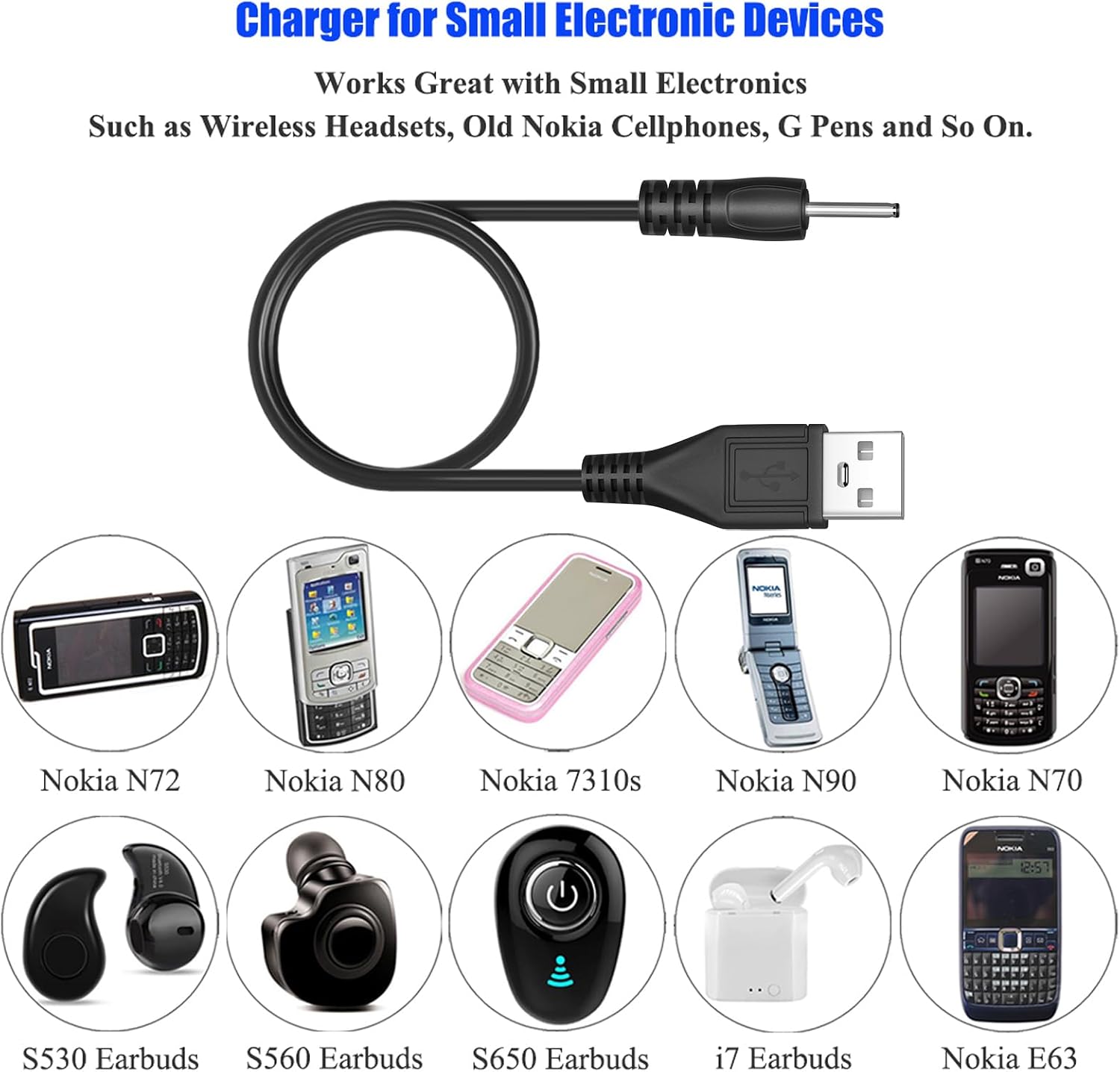
Image 3: Visual examples of devices compatible with this charging cable, including various Nokia phones and Bluetooth earbuds.
2.3 Incompatible Devices
- B&O Earset 2
- Blue Parrot Headset
If your device is not listed and you are unsure about compatibility, please measure your device's charging port or consult its user manual for the required DC tip dimensions.
3. Operating Instructions
3.1 Charging Your Device
- Connect to Power Source: Insert the USB-A end of the charging cable into a compatible USB power source. This can be a wall adapter, a USB port on a laptop or PC, a power bank, or a car charger. Ensure the power source provides 5 Volts.
- Connect to Device: Carefully insert the 2.0mm x 11.0mm DC barrel connector into the charging port of your electronic device. Ensure a snug and secure fit. Do not force the connector.
- Monitor Charging: Most devices will indicate charging status (e.g., an LED light). Refer to your device's manual for specific charging indicators.
- Disconnect: Once your device is fully charged, gently remove the DC connector from your device and then the USB-A connector from the power source.
Video 1: An instructional video demonstrating the use of the PChero USB Charging Cable for various devices.
4. Maintenance
To ensure the longevity and optimal performance of your PChero USB DC Charging Cable, follow these maintenance guidelines:
- Storage: Store the cable in a cool, dry place away from direct sunlight and extreme temperatures. Avoid tightly coiling or bending the cable, especially near the connectors, to prevent internal wire damage.
- Cleaning: If necessary, gently wipe the cable and connectors with a dry, soft cloth. Do not use liquid cleaners or abrasive materials.
- Handling: Always grasp the connector ends when plugging or unplugging the cable. Avoid pulling on the cable itself, as this can strain the connections and lead to damage.
- Inspection: Periodically inspect the cable for any signs of wear, fraying, or damage to the insulation or connectors. Discontinue use if any damage is observed.
5. Troubleshooting
5.1 Device Not Charging
- Check Connections: Ensure both the USB-A end and the DC barrel connector are fully and securely plugged into their respective ports.
- Verify Power Source: Confirm that the USB power source (wall adapter, PC port, power bank) is active and functioning correctly. Try a different USB port or power source.
- Confirm Compatibility: Double-check that your device's charging port matches the 2.0mm x 11.0mm DC tip of this cable. Refer to your device's manual.
- Inspect Cable: Examine the cable for any visible damage, such as cuts, kinks, or bent pins on the connectors. A damaged cable should not be used.
- Test with Another Device: If possible, test the cable with another compatible device to determine if the issue lies with the cable or the original device.
5.2 Cable Not Fitting
- Re-measure: Carefully re-measure the diameter and length of your device's charging port to ensure it precisely matches the 2.0mm x 11.0mm dimensions of this cable.
- Avoid Force: Never force the connector into a port. Forcing can damage both the cable and your device.
6. Specifications
| Feature | Specification |
|---|---|
| Brand | PChero |
| Model Number | 7545907145 |
| DC Tip Dimensions | 2.0mm (Diameter) x 11.0mm (Length) |
| Cable Length | 30 cm (11.8 inches) |
| Connector Type (Input) | USB-A Male |
| Connector Type (Output) | DC Barrel Connector (2.0mm x 11.0mm) |
| Maximum Voltage | 5 Volts |
| Color | Black |
| Item Weight | 0.317 ounces |

Image 4: Detailed view of the cable length and DC tip dimensions.
7. Warranty Information
Specific warranty details for this product are not provided in the available product information. For warranty inquiries, please refer to the product packaging or contact PChero customer support directly.
8. Support
If you encounter any issues or have questions not covered in this manual, please contact PChero customer support for assistance. When contacting support, please provide your product model number (7545907145) and a detailed description of your issue.