
Introduction
Thank you for choosing the Perixx PERIMICE-608II Wireless Vertical Mouse. This manual provides essential information for setting up, operating, and maintaining your new ergonomic mouse. Designed for right-handed users, this mouse promotes a natural hand position to enhance comfort during extended use. Please read this manual thoroughly before using the product.
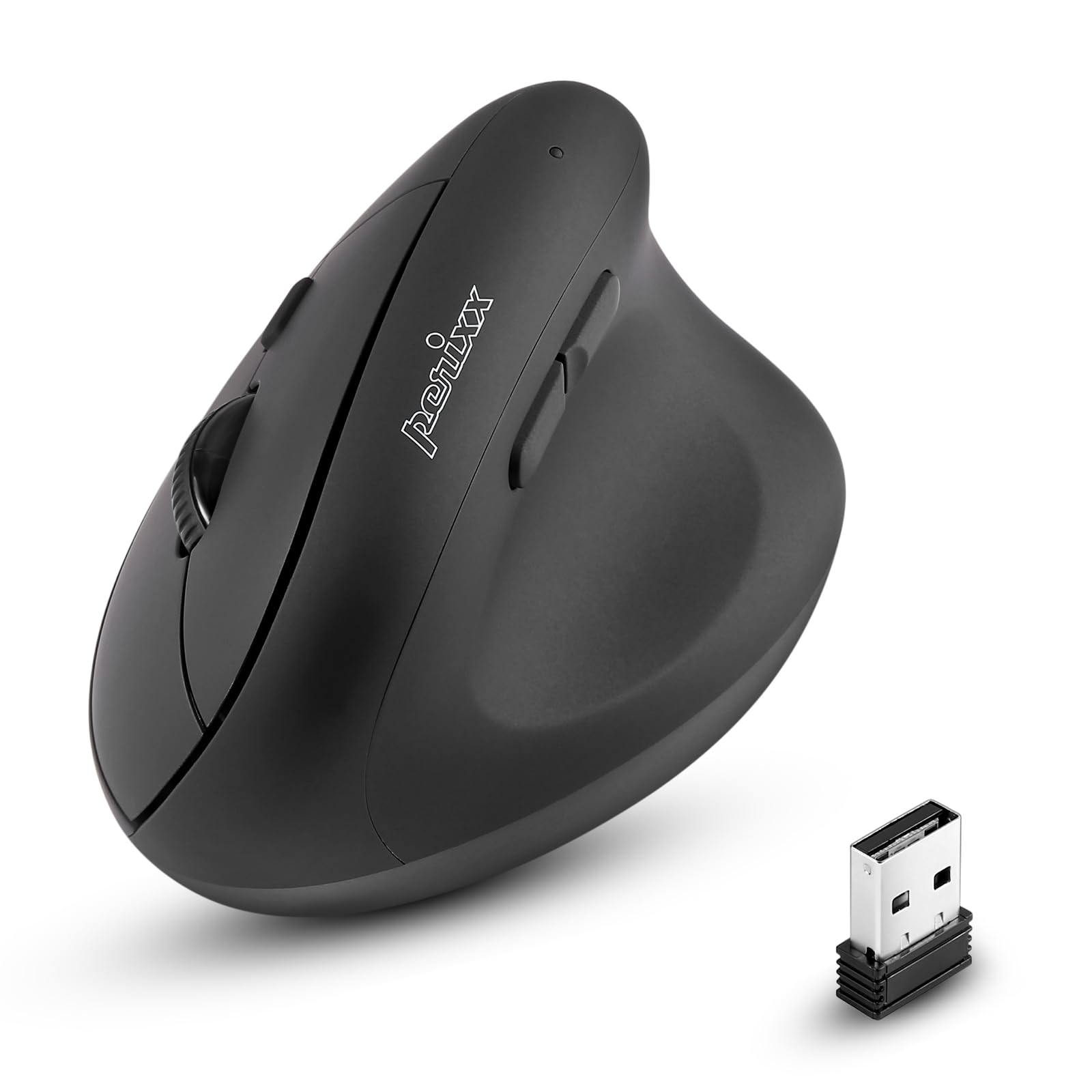
Front view of the Perixx PERIMICE-608II Wireless Vertical Mouse.
What's in the Box
Verify that all items are present in your package:
- 1 x Perixx PERIMICE-608II Wireless Vertical Mouse
- 1 x USB Receiver
- 1 x User Manual (this document)
Setup Instructions
- Install Battery: Locate the battery compartment on the underside of the mouse. Insert one AA battery (not included) according to the polarity indicators.
- Insert USB Receiver: Remove the USB receiver from its storage slot on the mouse's underside. Plug the USB receiver into an available USB port on your computer.
- Power On: Slide the ON/OFF switch on the bottom of the mouse to the "ON" position. The mouse should now be recognized by your computer and ready for use.

Underside of the mouse, illustrating the battery compartment and ON/OFF switch.

The mouse positioned next to a laptop, demonstrating the USB receiver plugged into a port.
Operating Instructions
Ergonomic Design
The PERIMICE-608II features a vertical design that positions your hand in a natural handshake posture, reducing wrist strain and promoting comfort.

Demonstration of a relaxed, neutral grip on the vertical mouse.
Button Functions
- Left Click: Standard selection and activation.
- Right Click: Accesses context menus.
- Scroll Wheel: Scrolls documents and web pages vertically. Can also be pressed for middle-click functionality.
- Forward/Backward Buttons: Located on the side for convenient web browsing and navigation.
DPI Adjustment
The mouse features a DPI (Dots Per Inch) button to adjust cursor sensitivity. Press the DPI button located on the top of the mouse to cycle through the available settings: 800, 1200, 1600, and 2400 DPI. An LED indicator will briefly light up to confirm the change.

The DPI switch on the mouse, allowing for quick sensitivity adjustments.
Maintenance
Cleaning
To clean your mouse, gently wipe the surface with a soft, damp cloth. Avoid using harsh chemicals or abrasive materials, as these can damage the finish. Ensure no liquid enters the mouse's internal components.
Battery Replacement
When the mouse performance degrades or it stops responding, it may be time to replace the AA battery. Follow the battery installation steps in the Setup section.
Troubleshooting
- Mouse not responding:
- Ensure the mouse is switched to the "ON" position on its underside.
- Check if the USB receiver is securely plugged into a working USB port on your computer.
- Replace the AA battery with a fresh one.
- Try plugging the USB receiver into a different USB port.
- Erratic cursor movement:
- Ensure the mouse is used on a clean, non-reflective surface.
- Adjust the DPI setting using the DPI button to find a suitable sensitivity.
- Connectivity issues:
- Move the mouse closer to the USB receiver to ensure a strong 2.4GHz wireless connection.
- Avoid using the mouse near other wireless devices that might cause interference.
Specifications
| Brand | Perixx |
| Model Number | 12383 |
| Series | PERIMICE-608 II |
| Connectivity Technology | 2.4GHz Wireless (USB Receiver) |
| DPI Levels | 800 / 1200 / 1600 / 2400 |
| Number of Buttons | 6 |
| Hand Orientation | Right-Handed |
| Power Source | Battery Powered (1 x AA battery required) |
| Average Battery Life | 100 Hours |
| Item Weight | 4.4 ounces (approx. 125 grams) |
| Product Dimensions (LxWxH) | 4.87 x 2.67 x 2.43 inches (approx. 123.7 x 67.8 x 61.7 mm) |
| Operating System Compatibility | Linux, Windows 7, Windows XP (and newer versions) |

Detailed dimensions and weight of the Perixx PERIMICE-608II mouse.
Warranty and Support
For detailed warranty information, technical support, and frequently asked questions, please visit the official Perixx website or contact Perixx customer service. You can find more information at the Perixx Store on Amazon.

