
1. Introduction
This manual provides essential information for the safe and effective use of your DROK Buck Power Converter, Model 200162. This device is a waterproof, non-isolated synchronous buck DC-DC converter designed to step down a higher DC voltage input to a stable 12V DC output. Please read these instructions carefully before installation and operation.
2. Safety Information
- Always ensure the input voltage is within the specified range (DC 30-60V). Exceeding this range can damage the converter and connected devices.
- Observe correct polarity during wiring. Incorrect wiring can cause severe damage to the converter and connected equipment.
- Avoid short circuits on the input or output terminals.
- Ensure proper ventilation if operating at maximum load for extended periods, although the aluminum casing aids heat dissipation.
- Do not attempt to open or modify the converter. This will void the warranty and may lead to electrical hazards.
- Installation should be performed by qualified personnel if you are unsure about electrical wiring procedures.
3. Product Overview
The DROK Buck Power Converter is designed for applications requiring a stable 12V output from a 30-60V DC source. Its robust aluminum shell and embedding technology provide waterproof and shockproof features, making it suitable for various challenging environments. It is commonly used in automotive systems, audio equipment, GPS navigators, air conditioners, and electric fans.

Figure 3.1: Top-down view of the DROK Buck Power Converter, highlighting its durable aluminum casing.
4. Specifications

Figure 4.1: Dimensions of the DROK Buck Power Converter.
| Parameter | Value |
|---|---|
| Input Voltage Range | DC 30-60V (Nominal 36V/48V) |
| Output Voltage | DC 12V ±0.25V |
| Output Current | 25A (Max), recommended below 20A for long-term operation |
| Output Power | 300W |
| Efficiency | Up to 96% |
| Operating Temperature | -40°C to +85°C |
| Protection Features | Over-current, Over-temperature, Short-circuit |
| Dimensions (L x W x H) | 74mm x 74mm x 32mm (approx. 2.9 x 2.9 x 1.3 inches) |
| Weight | Approx. 0.25 kg (8.8 ounces) |
| Enclosure Material | Aluminum |
| Isolation | Non-isolated |
5. Setup and Wiring
Proper wiring is crucial for the safe and correct operation of the converter. Refer to the diagram and instructions below.
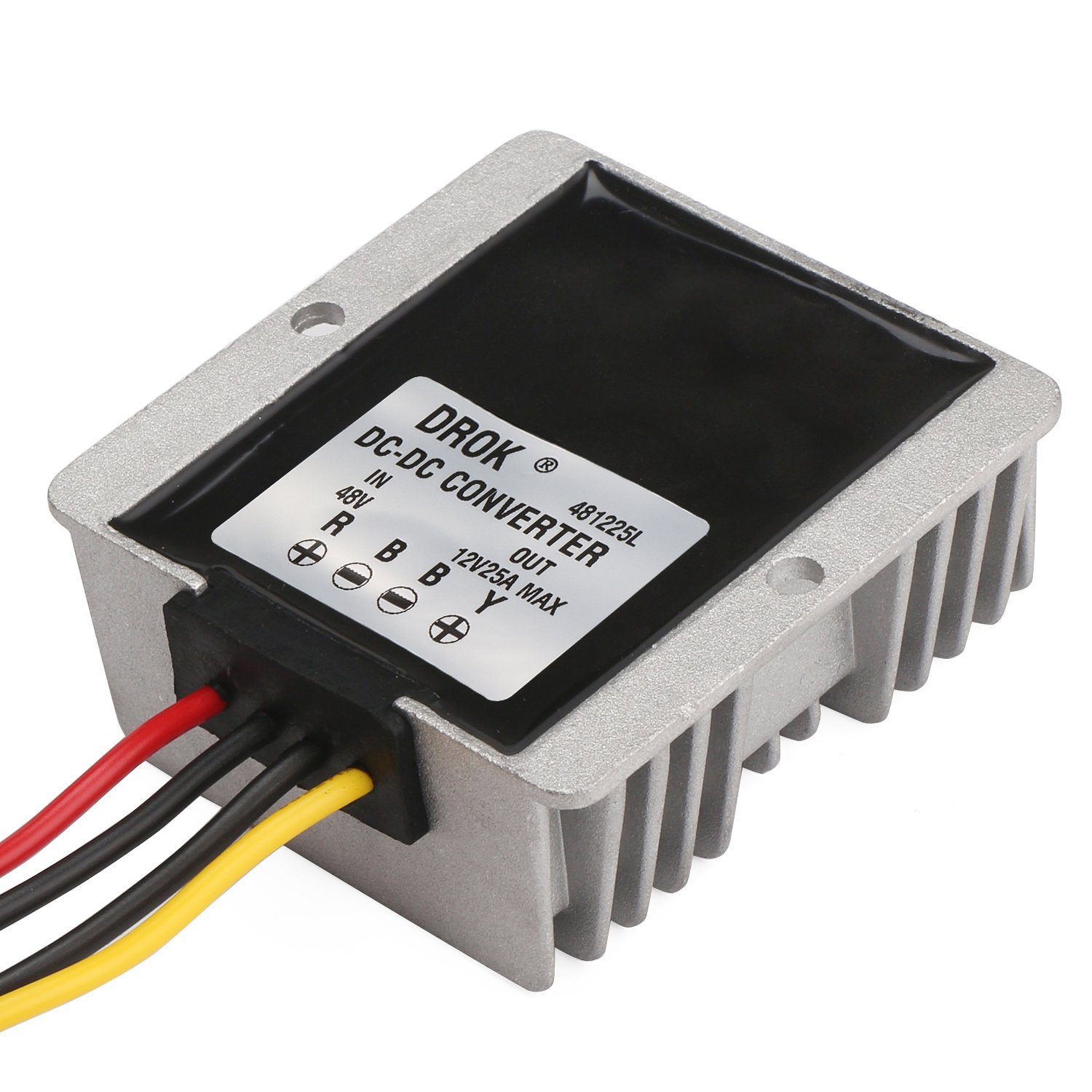
Figure 5.1: Wiring diagram on the converter label.
Wiring Instructions:
- Input Connection:
- Connect the Red wire to the positive (+) terminal of your DC power source (Input+).
- Connect the Black wire (from the input side) to the negative (-) terminal of your DC power source (Input-).
- Output Connection:
- Connect the Yellow wire to the positive (+) terminal of your 12V DC load (Output+).
- Connect the Black wire (from the output side) to the negative (-) terminal of your 12V DC load (Output-).
- Mounting: The converter features mounting holes for secure installation. Ensure it is mounted in a location that allows for adequate air circulation, especially if operating in high-temperature environments or at high loads. The waterproof and shockproof design allows for installation in various conditions.
Important: Double-check all connections for correct polarity and secure fastening before applying power.
6. Operating Instructions
Once properly wired and mounted, the DROK Buck Power Converter operates automatically. When power is supplied to the input terminals within the specified voltage range (DC 30-60V), the converter will regulate the output to a stable 12V DC.
- Ensure the total current draw of your connected devices does not exceed 25A. For continuous, long-term operation, it is recommended to keep the load below 20A to ensure optimal performance and longevity.
- The converter is designed to handle various applications, including electric motors, audio equipment, and fans.
7. Maintenance
The DROK Buck Power Converter is a sealed, low-maintenance device. Regular maintenance is minimal:
- Periodically inspect the wiring connections to ensure they remain secure and free from corrosion.
- Keep the exterior of the converter clean and free from excessive dust or debris, especially around the heat sink fins, to ensure efficient heat dissipation.
- Avoid exposing the unit to harsh chemicals or extreme physical impact.
8. Troubleshooting
If you encounter issues with your DROK Buck Power Converter, consider the following troubleshooting steps:
- No Output Voltage:
- Verify that the input power source is active and providing voltage within the 30-60V DC range.
- Check all input and output wiring connections for correct polarity and secure contact. Loose or incorrect connections are a common cause of failure.
- Ensure no short circuit exists on the output side, which could trigger internal protection mechanisms.
- Incorrect Output Voltage (Lower than 12V):
- Confirm the input voltage is stable and within the specified range. Fluctuations in input voltage can affect output stability.
- Check if the load connected to the output exceeds the maximum recommended current (20A for continuous use, 25A peak). Overloading can cause voltage sag.
- Ensure the load is not drawing excessive current, which might indicate a fault in the connected device.
- Converter Overheating:
- Reduce the load if it is consistently near or above the recommended 20A for continuous operation.
- Ensure the converter is installed in a location with adequate airflow and not enclosed in a confined space without ventilation.
- Verify that the ambient temperature is within the specified operating range.
- Arcing During Connection: A brief arc upon initial connection to a high-voltage DC supply is not uncommon due to capacitor charging. However, if arcing is significant or persistent, immediately disconnect power and re-verify all wiring for correct polarity and secure connections before attempting to reconnect.
If problems persist after following these steps, contact DROK customer support for further assistance.
9. Warranty and Support
For warranty information and technical support regarding your DROK Buck Power Converter Model 200162, please refer to the documentation provided at the time of purchase or visit the official DROK website. When contacting support, please have your product model number (200162) and purchase details readily available.
You can typically find support contact information on the manufacturer's website or through your retailer.


