
Introduction
This manual provides comprehensive instructions for the safe and efficient operation of your Eheim Pro4+ 2271020 external aquarium filter. Please read these instructions carefully before initial use and retain them for future reference. This filter is designed for aquariums ranging from 120 to 250 liters.
Product Overview
The Eheim Pro4+ 2271020 is an advanced external filter system engineered for optimal water purification in freshwater and marine aquariums. Its design focuses on efficiency, ease of use, and quiet operation.
- External filter suitable for aquariums from 120 to 250 liters.
- Features a square base shape for stable placement.
- Modern, anthracite grey design.
- High flow rate of 950 liters per hour.

Figure 1: Front view of the Eheim Pro4+ 2271020 external aquarium filter. This image displays the compact and modern design of the filter unit.
Safety Instructions
- Always disconnect the power supply to the filter and all other aquarium equipment before performing any maintenance, cleaning, or installation.
- Ensure all hose connections and clamps are securely fastened to prevent leaks.
- Do not operate the filter if any part of the unit, including the power cable, is damaged. Contact customer support for replacement parts.
- This appliance is intended for indoor use with aquariums only. Do not use for any other purpose.
- Keep the filter and its electrical components away from children and pets.
- Ensure the filter is placed on a stable, level surface below the aquarium water level to facilitate proper operation and priming.
Components and Parts
The Eheim Pro4+ filter system consists of several key components designed for efficient filtration. Familiarize yourself with these parts before assembly.
- Filter Head: Contains the pump, impeller, and electrical connections.
- Filter Canister: The main body that holds the filter media baskets.
- Filter Media Baskets: Stackable trays for different types of filter media (mechanical, biological, chemical).
- Inlet/Outlet Hoses: Connect the filter to the aquarium.
- Inlet Pipe with Strainer: Draws water from the aquarium.
- Outlet Pipe (Spray Bar): Returns filtered water to the aquarium.
- Quick Release Valve: For easy disconnection of hoses from the filter head.
- Priming Button: Assists in filling the filter with water during setup.

Figure 2: Exploded view showing the main components of the Eheim Pro4+ filter, including the filter head, canister, and media baskets.
Setup Instructions
- Unpack and Inspect: Carefully remove all components from the packaging. Inspect for any signs of damage.
- Prepare Filter Media: Rinse all filter media (sponges, biological media, etc.) thoroughly under running water to remove any dust or debris. Arrange the media into the filter baskets according to the manufacturer's recommended layering (typically coarse mechanical media at the bottom, followed by biological and then fine mechanical media).
- Assemble Filter Baskets: Stack the filled filter baskets into the filter canister. Ensure they are seated correctly.
- Attach Filter Head: Place the filter head onto the canister, ensuring the O-ring is properly seated and lubricated. Secure the filter head using the locking clamps on the sides of the canister.
- Connect Hoses: Attach the inlet and outlet hoses to the quick-release valve on the filter head. Connect the other ends of the hoses to the respective inlet pipe (with strainer) and outlet pipe (spray bar) inside the aquarium. Ensure hoses are cut to the appropriate length and secured with hose clamps.
- Position Filter: Place the filter canister on a stable surface below the aquarium water level. This is crucial for proper water flow and priming.
- Prime the Filter: Open the quick-release valve. Press the priming button on the filter head repeatedly until water begins to flow into the filter canister and air is expelled. Continue until the filter is full of water and no more air bubbles are visible.
- Connect Power: Once the filter is primed and all connections are secure, plug the filter into a grounded electrical outlet. The filter should start operating immediately.
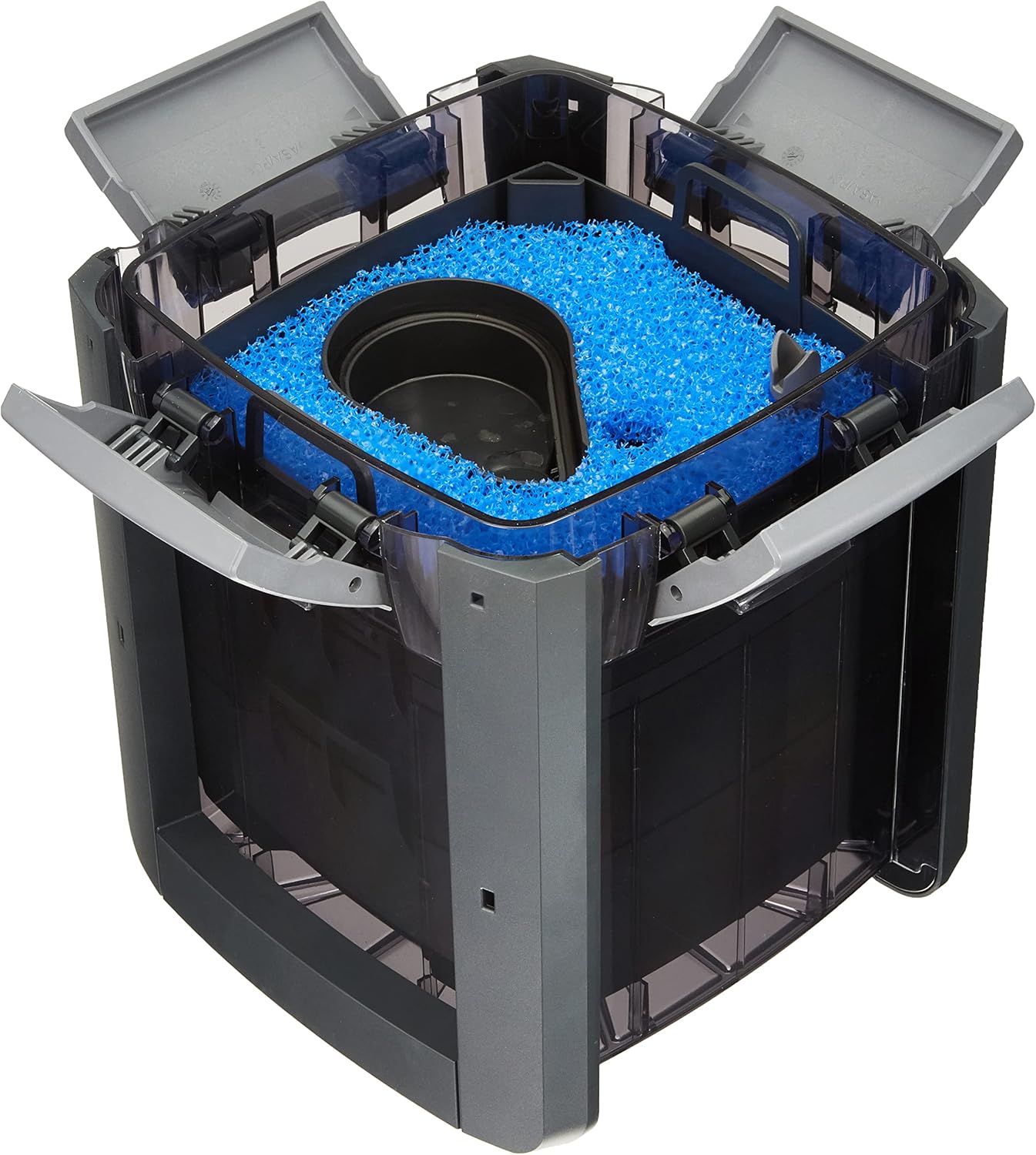
Figure 3: View of the Eheim Pro4+ filter with the filter head removed, showing the internal media baskets ready for media placement.
Operating Instructions
After successful setup and priming, the Eheim Pro4+ filter is designed for continuous operation. It will automatically start filtering water once connected to power.
- Continuous Operation: For optimal water quality, the filter should run 24 hours a day, 7 days a week.
- Monitoring Flow: Periodically check the water flow from the outlet pipe. A noticeable reduction in flow indicates that the filter media may be clogged and requires cleaning.
- Noise Level: The filter is designed to operate quietly. Excessive noise may indicate air trapped inside the filter or a dirty/damaged impeller. Refer to the Troubleshooting section.

Figure 4: Top view of the Eheim Pro4+ filter head, showing the quick-release valve and hose connection points.
Maintenance
Regular maintenance is essential to ensure the longevity and efficiency of your Eheim Pro4+ filter and to maintain healthy aquarium conditions.
- Pre-filter Cleaning (Every 2-4 Weeks): The coarse filter sponges (pre-filter) should be cleaned regularly. Disconnect power, close the quick-release valve, and remove the filter head. Rinse the sponges thoroughly with old aquarium water (from a water change) to preserve beneficial bacteria. Do not use tap water directly as chlorine can harm bacteria.
- Fine Filter Pad Replacement (Every 1-3 Months): The fine filter pads will eventually become clogged and should be replaced. Replace only one pad at a time if multiple are used, or replace the single fine pad as needed.
- Biological Media Maintenance (Every 6-12 Months): Biological media rarely needs full replacement. If cleaning is necessary, rinse gently with old aquarium water. Only replace a small portion of biological media at a time to avoid disrupting the nitrogen cycle.
- Impeller Cleaning (Every 3-6 Months): Disassemble the impeller housing in the filter head and clean the impeller and its shaft. Remove any debris or mineral buildup that could impede its rotation.
- Hose Cleaning (As Needed): Over time, algae and debris can build up inside the hoses, reducing flow. Use a flexible brush to clean the inside of the hoses.
- O-Ring Lubrication: Periodically inspect and lubricate the O-ring on the filter head with silicone grease to ensure a watertight seal.

Figure 5: Close-up view of the filter media, including blue coarse foam and black biological media, within the Eheim Pro4+ filter baskets.
Troubleshooting
Refer to this section for common issues and their potential solutions.
| Problem | Possible Cause | Solution |
|---|---|---|
| Reduced Water Flow | Clogged filter media, kinked hoses, dirty impeller, air in filter. | Clean pre-filter media. Check and straighten hoses. Clean impeller. Re-prime the filter. |
| Excessive Noise | Air trapped in filter, dirty/damaged impeller, filter not level. | Re-prime the filter to remove air. Clean or replace impeller. Ensure filter is on a stable, level surface. |
| Water Leakage | Improperly seated O-ring, loose hose connections, damaged canister. | Check and lubricate O-ring. Tighten hose clamps. Inspect canister for cracks. |
| Filter Not Starting | No power, jammed impeller, airlock. | Check power connection. Clean impeller. Re-prime the filter. |
Specifications
Technical details for the Eheim Pro4+ 2271020 external aquarium filter.
| Specification | Detail |
|---|---|
| Model Number | 2271020 |
| Aquarium Volume | 120 to 250 liters |
| Pump Output | 950 L/h |
| Filter Volume | Not specified, but includes multiple media baskets. |
| Dimensions (Approx. Height) | 38 cm (15 inches) |
| Weight | 5.7 kg |
| GTIN (EAN/UPC) | 04011708224960, 04011708225035 |
| First Available Date | 26 November 2015 |
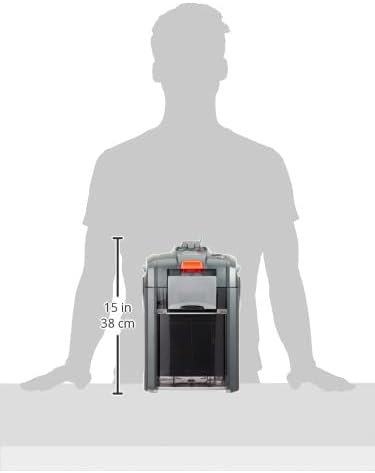
Figure 6: Side view of the Eheim Pro4+ filter illustrating its approximate height of 15 inches (38 cm).
Warranty and Support
Warranty Information: This product is typically covered by a manufacturer's warranty against defects in materials and workmanship. For specific warranty terms and conditions, please refer to the documentation provided with your purchase or contact the retailer. A 30-day return policy from the date of receipt is generally available for products returned due to a change of mind. For defective or damaged products, please consult the retailer's specific return and exchange policies.
Manufacturer Support: For technical assistance, troubleshooting beyond this manual, or inquiries regarding replacement parts, please contact Eheim customer support directly. Visit the official Eheim website for contact information and additional resources.


