1. Introduction
This manual provides comprehensive instructions for the safe and effective use of the Aures 3S-430 device. Please read this manual thoroughly before installation, operation, or maintenance. Keep this document in a safe place for future reference.
The Aures 3S-430 is a specialized component designed for integration into specific systems, such as those used in nail art applications. It operates at 24V and consists of 8 pieces with 8 notes.
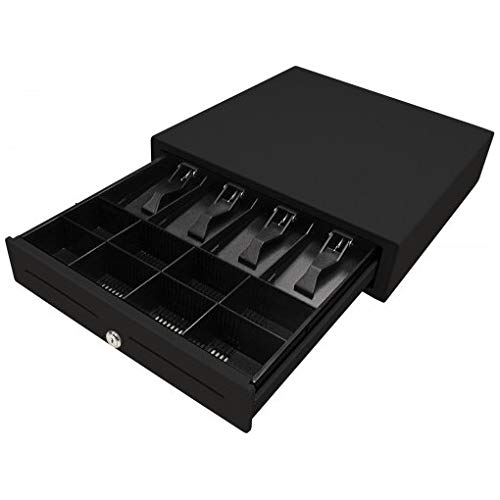
Figure 1: The Aures 3S-430 device. This image displays the compact, black unit, which is a key component for specialized applications.
2. Important Safety Information
- Electrical Safety: This device operates on 24V. Ensure that the power supply used is compatible and provides the correct voltage and current. Incorrect power supply can damage the device and pose a safety hazard.
- Installation: Installation should be performed by qualified personnel familiar with electronic components and system integration.
- Environment: Do not expose the device to moisture, extreme temperatures, or direct sunlight. Operate in a clean, dry environment.
- Handling: Handle the device with care. Avoid dropping or subjecting it to strong impacts.
- Modifications: Do not attempt to modify or disassemble the device. Unauthorized modifications will void the warranty and may lead to malfunction or injury.
3. Package Contents
Verify that all items are present and undamaged upon opening the package. If any items are missing or damaged, contact your supplier immediately.
- Aures 3S-430 Device (8 pieces, 8 notes)
- Instruction Manual (this document)
- Note: Power supply and connecting cables are typically sold separately or are part of the larger system.
4. Setup and Installation
The Aures 3S-430 is designed for integration into a larger system. Follow these general steps for proper setup:
- System Integration: Carefully integrate the Aures 3S-430 into its intended system according to the system's design specifications. Ensure proper mounting and secure connections.
- Power Connection: Connect the device to a compatible 24V DC power source. Observe correct polarity to prevent damage. Refer to the system's wiring diagram for specific connection points.
- Data/Control Connections: If applicable, connect any data or control cables from the Aures 3S-430 to the main control unit of the system.
- Initial Power-On: Once all connections are secure, power on the main system. Observe the Aures 3S-430 for any indicator lights or initial operational signs.
Consult the documentation of the primary system for detailed integration instructions.
5. Operation
The Aures 3S-430 functions as a component within a larger system. Its operation is typically controlled by the main system's interface or software.
- System Control: Refer to the user manual of the primary system for instructions on how to activate, configure, and utilize the functions provided by the Aures 3S-430.
- Functionality: The "8 notes" mentioned in the product description suggest specific output or input capabilities. These will be managed through the overarching system.
- Monitoring: During operation, monitor the device and the overall system for any unusual behavior, sounds, or error indicators.
6. Maintenance and Care
Proper maintenance ensures the longevity and optimal performance of your Aures 3S-430 device.
- Cleaning: Disconnect power before cleaning. Use a soft, dry cloth to wipe the exterior of the device. Do not use liquid cleaners, solvents, or abrasive materials.
- Inspection: Periodically inspect all connections for looseness or signs of wear.
- Storage: If storing the device for an extended period, ensure it is kept in a cool, dry place, away from direct sunlight and extreme temperatures.
7. Troubleshooting
If you encounter issues with your Aures 3S-430, refer to the following common troubleshooting steps. For complex problems, consult the primary system's manual or contact technical support.
| Problem | Possible Cause | Solution |
|---|---|---|
| Device not powering on. | Incorrect or no power supply connection. | Verify that the 24V power supply is correctly connected and functioning. Check polarity. |
| Device not responding to system commands. | Loose data/control cable connection; software issue in primary system. | Check all data/control cable connections. Consult the primary system's manual for software troubleshooting. |
| Unusual noise or smell. | Internal component failure; overheating. | Immediately disconnect power. Do not attempt to repair. Contact qualified service personnel. |
8. Specifications
| Feature | Detail |
|---|---|
| Model Number | ART-00051 (Aures 3S-430) |
| Manufacturer | Aures |
| Power Requirement | 24V DC |
| Quantity of Items | 1 (containing 8 pieces, 8 notes) |
| Package Dimensions | 46.6 x 45.6 x 15.2 cm |
| Package Weight | 4.95 kg (10.91 lbs) |
| ASIN | B018J9RGJG |
9. Warranty and Support
Warranty Information: Specific warranty terms and conditions for the Aures 3S-430 are typically provided at the point of purchase or with the original product packaging. Please refer to those documents for details regarding warranty coverage, duration, and claims procedures. The manufacturer's warranty generally covers defects in materials and workmanship under normal use.
Technical Support: For technical assistance, troubleshooting beyond the scope of this manual, or inquiries regarding spare parts, please contact your authorized Aures dealer or the manufacturer directly. When contacting support, please have your product model number (3S-430 / ART-00051) and purchase information readily available.
Manufacturer: Aures


