
Creliver 11-HW
Creliver Oxygen Concentrator
Model 11-HW User Manual
Brand: Creliver
1. Introduction
This manual provides essential information for the safe and effective operation, maintenance, and troubleshooting of your Creliver Oxygen Concentrator Model 11-HW. Please read this manual thoroughly before using the device. Keep it for future reference.
Important: This device is intended for supplemental oxygen. Consult your physician for medical advice regarding oxygen therapy. Always follow your doctor's instructions for usage duration and flow settings.
2. Product Overview
The Creliver Oxygen Concentrator Model 11-HW is designed to provide a continuous supply of oxygen. It features an advanced high-performance compressor and a multi-stage filtration system to deliver high-purity oxygen. The device also supports an atomization function for dual use.
Key Features:
- Adjustable Oxygen Flow: 1 to 7 liters per minute (L/min)
- High Oxygen Concentration: Up to 93% at 1 L/min
- 24-hour Continuous Operation
- Low Noise Level: Below 45 decibels
- Infrared Remote Control and Touch Screen Operation
- Integrated Humidification Cup
- 5-layer Filtration System
- Dual-Use Functionality: Oxygen Inhalation and Atomization
Components:
The package includes the main unit, power cable, filter plugs, conversion plug, remote control, oxygen tube, and this user manual.
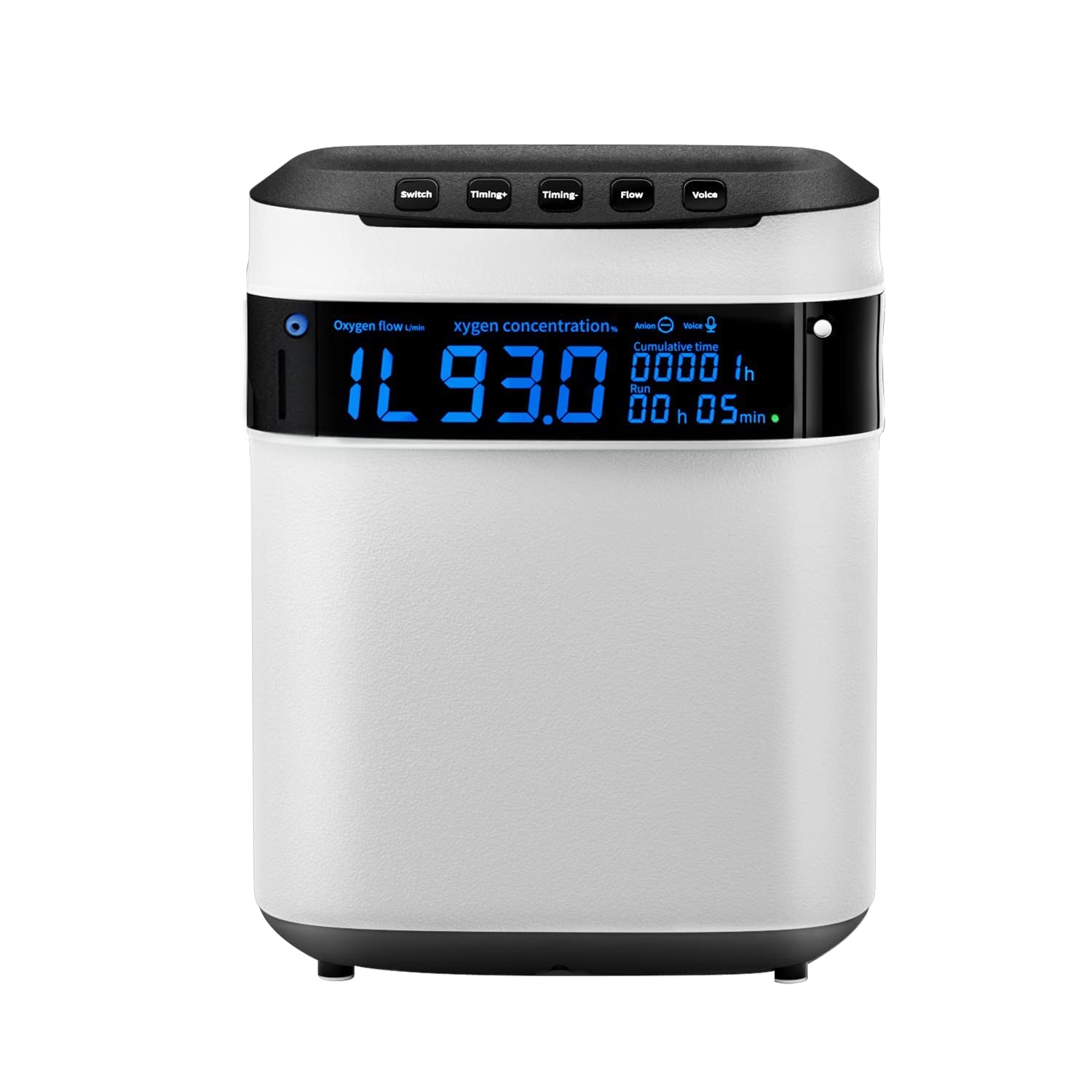
Image: Creliver Oxygen Concentrator main unit with its accessories, including the oxygen tube and remote control.

Image: The Creliver Oxygen Concentrator demonstrating its dual functionality for oxygen inhalation and atomization, which can be used simultaneously.

Image: A diagram illustrating the 8-stage filtration system within the oxygen concentrator, showing how air is purified to produce oxygen.
3. Setup
- Unpack the Device: Carefully remove the oxygen concentrator and all accessories from the packaging. Inspect for any damage.
- Positioning: Place the device on a flat, stable surface in a well-ventilated area. Ensure there is at least 10 cm (4 inches) of space around all sides for proper airflow. Avoid placing it near heat sources or in direct sunlight.
- Connect Power: Connect the power cable directly to the device and then to a wall outlet. Do not use extension cords.
- Fill Humidifier Bottle (Optional): If using humidified oxygen, fill the humidifier bottle with distilled water up to the indicated level. Attach the humidifier bottle to the designated port on the device.
- Connect Oxygen Tube: Attach one end of the oxygen tube to the oxygen outlet nozzle on the device (or humidifier bottle, if used). Connect the other end to your nasal cannula or oxygen mask.
4. Operating Instructions
4.1 Power On/Off
- To Power On: Press the 'Switch' button on the control panel or the power button on the remote control. The display will illuminate, and the device will begin operation.
- To Power Off: Press the 'Switch' button or the power button on the remote control again. The device will shut down.
4.2 Adjusting Oxygen Flow
- Use the 'Flow' button on the control panel or the remote control to adjust the oxygen flow rate from 1 L/min to 7 L/min.
- The current flow rate will be displayed on the screen.

Image: A table illustrating the relationship between oxygen flow rate (1L to 7L) and the resulting oxygen concentration percentage.
4.3 Timer Function
- Press the 'Timing+' or 'Timing-' buttons on the control panel or remote control to set the operating time.
- The device will automatically shut off after the set time expires.
4.4 Voice Function
- The device has a voice broadcast function. Press the 'Voice' button to turn the voice prompts on or off.
4.5 Atomization Function
- To use the atomization function, connect the atomization kit (not included with all models, refer to your specific package contents) to the designated port.
- Follow your physician's instructions for atomization solution and duration.

Image: The oxygen concentrator's control panel highlighting the intelligent touch interface and the infrared remote control for convenient operation.
5. Maintenance
Regular maintenance ensures optimal performance and longevity of your oxygen concentrator.
5.1 Cleaning the Exterior
- Wipe the exterior of the device with a soft, damp cloth. Do not use abrasive cleaners or solvents.
- Ensure the device is unplugged before cleaning.
5.2 Filter Maintenance
The device uses a 5-layer filtration system. Regular cleaning or replacement of filters is crucial.
- Air Inlet Filter: Check and clean the air inlet filter weekly. Remove the filter cover, take out the filter pad, wash it with mild soap and water, rinse thoroughly, and air dry completely before reinserting.
- Replacement Filter Pads: The device comes with spare filter pads. Replace them as needed, or if the original filter shows signs of wear or damage.

Image: A visual representation of the original molecular sieve technology, illustrating the fine nitrogen and oxygen separation process within the device.
5.3 Humidifier Bottle Cleaning
- Clean the humidifier bottle daily with mild soap and water. Rinse thoroughly and allow it to air dry.
- Refill with distilled water only.
6. Troubleshooting
If you encounter any issues, refer to the following common problems and solutions:
| Problem | Possible Cause | Solution |
|---|---|---|
| Device does not power on | No power supply | Check if the power cable is securely connected to the device and the wall outlet. Ensure the outlet has power. |
| Low oxygen flow | Blocked oxygen tube or dirty filter | Check the oxygen tube for kinks or blockages. Clean or replace the air inlet filter. |
| Unusual noise | Device not on a flat surface or internal issue | Ensure the device is on a stable, flat surface. If noise persists, contact customer support. |
| No oxygen output | Oxygen tube disconnected or internal fault | Verify the oxygen tube connection. If the issue persists, contact customer support. |
If the problem is not listed or persists after attempting the solutions, please contact Creliver customer support.
7. Specifications
| Feature | Specification |
|---|---|
| Model Number | 11-HW |
| Dimensions (L x W x H) | 19.5 x 34.5 x 28.8 cm (7.68 x 13.58 x 11.34 inches) |
| Weight | 6.5 kg (14.3 lbs) |
| Oxygen Flow | 1-7 L/min adjustable |
| Oxygen Concentration | Up to 93% (at 1 L/min) |
| Working Principle | PSA (Pressure Swing Adsorption) |
| Working Noise | Less than 45 dB |
| Continuous Operation | 24 hours |

Image: Visual representation of the oxygen concentrator's dimensions (length, width, height) and key technical specifications.
8. Warranty and Support
Creliver offers a two-year warranty for this oxygen concentrator. This warranty covers manufacturing defects and ensures reliable operation under normal use conditions.
For warranty claims, technical support, or any questions regarding your device, please contact Creliver customer service at: creliver_service@163.com.
Please provide your model number (11-HW) and purchase details when contacting support to facilitate a quicker resolution.
Ask a question about this manual
Ask about setup, troubleshooting, compatibility, parts, safety, or missing instructions. Manuals+ will review the question and use this page’s manual context to help answer it.