
Greenlee DVM-80UVK
Greenlee HD Electric DVM-80UVK DigiVolt Universal Digital Voltmeter and Kit User Manual
Model: DVM-80UVK | Brand: Greenlee
1. Introduction
The Greenlee HD Electric DVM-80UVK DigiVolt Universal Digital Voltmeter and Kit is a professional-grade instrument designed for accurate voltage measurements and phasing applications across a wide range of system voltages, up to 80kV. This comprehensive kit provides all necessary components for both overhead and underground electrical testing, ensuring safety and precision in various field conditions.
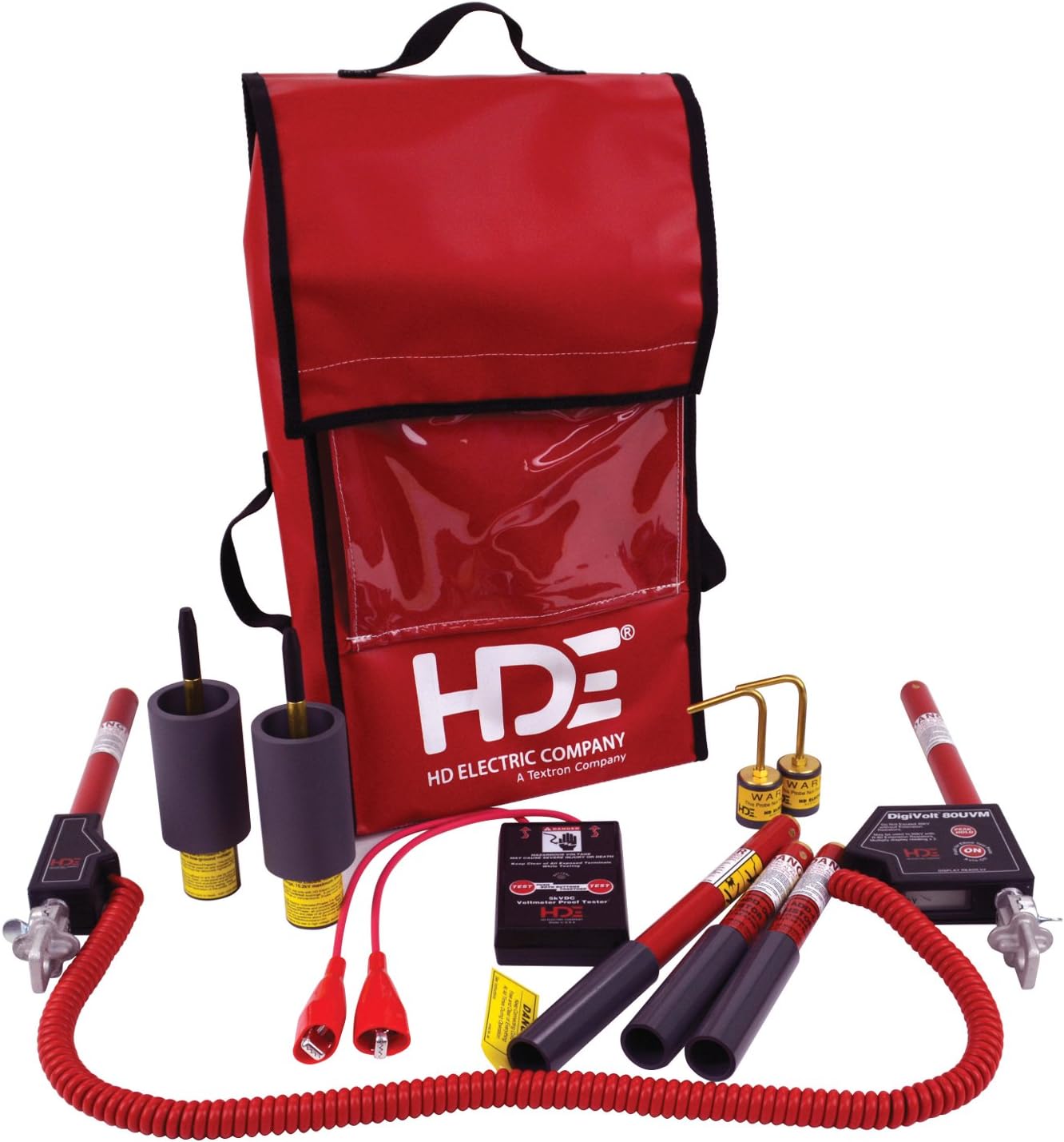
Figure 1: Complete DVM-80UVK Kit with Voltmeter, Probes, and Carrying Bag.
2. Key Features
- Peak Hold Mode: Allows for capturing and displaying the highest voltage reading, useful for transient voltage analysis.
- AC and DC Voltage Measurement: Capable of measuring both alternating current and direct current voltages.
- Triple Auto Ranging 3.5 Digit Display: Provides clear and precise readings in kilovolts, ranging from 5 Volts to 80kV.
- High Accuracy: Maintains accuracy within 1% of the reading, ensuring reliable measurements.
- Elbow Test Point Measurement: Specifically designed to measure voltage on elbow test points, displaying the system voltage directly.
- Easy Battery Access: Powered by a 9V lithium or alkaline battery, with an easy-to-change battery case that requires no tools.
3. Setup and Assembly
3.1 Battery Installation
- Locate the battery compartment on the DVM-80UVM voltmeter unit.
- Open the battery case cover. No tools are required for this step.
- Insert a fresh 9V lithium or alkaline battery, ensuring correct polarity.
- Close the battery case cover securely.
3.2 Probe Connection
- Identify the appropriate probes for your application (overhead hook probes, underground bushing probes, or add-on resistor sticks).
- Connect the probes firmly to the DVM-80UVM voltmeter unit. Ensure a secure electrical and mechanical connection.
- For measurements above 15kV, attach the add-on resistor sticks as instructed in the specific application guide.
4. Operating Instructions
4.1 Powering On and Self-Test
Press the power button to turn on the DVM-80UVM. The unit will perform a brief self-test, and the display will illuminate, showing '0.00' or a similar ready state.
4.2 Voltage Measurement
- Ensure the correct probes are attached for the voltage range and application.
- Carefully apply the probes to the circuit or conductor to be measured.
- Read the voltage value displayed on the 3.5 digit display. The unit automatically ranges for optimal reading.
4.3 Peak Hold Feature
To activate the Peak Hold feature, press the dedicated Peak Hold button. The display will then show and hold the highest voltage detected during the measurement period. Press the button again to exit Peak Hold mode.
4.4 Test Point Feature
When measuring voltage on elbow test points, the DVM-80UVM will automatically detect and display the system voltage, simplifying the measurement process for these specific applications.
4.5 Cable Fault Testing
Utilize the included Cable Fault Tester in conjunction with the DVM-80UVM to perform underground cable fault testing. Refer to the specific instructions provided with the Cable Fault Tester for detailed procedures.
4.6 Voltmeter Proof Testing
Before and after each use, it is recommended to test the voltmeter with the Voltmeter Proof Tester. This ensures the accuracy and proper functioning of the DVM-80UVM. Connect the voltmeter to the proof tester and verify the reading as per the proof tester's instructions.
5. Maintenance
5.1 Cleaning
Regularly clean the exterior of the voltmeter and probes with a soft, dry cloth. Do not use abrasive cleaners or solvents. Ensure all components are dry before storage or next use.
5.2 Battery Replacement
Replace the 9V battery when the low battery indicator appears on the display or if the unit fails to power on. Always use a fresh lithium or alkaline battery for optimal performance.
5.3 Storage
Store the DVM-80UVK kit in its provided soft-sided carrying bag in a cool, dry place, away from direct sunlight and extreme temperatures. Ensure all probes and accessories are properly secured within the bag.
6. Troubleshooting
| Problem | Possible Cause | Solution |
|---|---|---|
| Unit does not power on | Dead or improperly installed battery | Replace battery with a fresh 9V lithium or alkaline battery, ensuring correct polarity. |
| Inaccurate readings | Loose probe connection; environmental interference; unit malfunction | Ensure probes are securely connected. Move away from strong electromagnetic fields. Perform a voltmeter proof test. If problem persists, contact Greenlee support. |
| Display is dim or flickering | Low battery | Replace the 9V battery. |
7. Specifications
| Specification | Value |
|---|---|
| Manufacturer | Greenlee Textron |
| Part Number | DVM-80UVK |
| Item Weight | 13.72 pounds |
| Product Dimensions | 28 x 16.5 x 13 inches |
| Item Model Number | DVM-80UVK |
| Style | Digital |
| Material | Brass |
| Power Source | Battery Powered (9V) |
| Measurement Accuracy | Within 1% of reading +/- 3 counts (line-to-ground and line-to-line measurements) |
8. Warranty and Support
For detailed warranty information and technical support, please refer to the documentation included with your product or visit the official Greenlee website. You can also visit the Greenlee Store on Amazon for additional resources.

Figure 2: Greenlee's commitment to professionalism.
Ask a question about this manual
Ask about setup, troubleshooting, compatibility, parts, safety, or missing instructions. Manuals+ will review the question and use this page’s manual context to help answer it.