
Pure Acoustics MCP-75BY
Pure Acoustics MCP-75 Suono Karaoke Machine User Manual
Model: MCP-75BY
Introduction
The Pure Acoustics MCP-75 Suono is a versatile portable PA sound system designed for karaoke and music playback. It combines the qualities of a professional speaker with the convenience of a portable music device, featuring wireless microphones, multiple audio inputs, and a rechargeable battery for extended use.
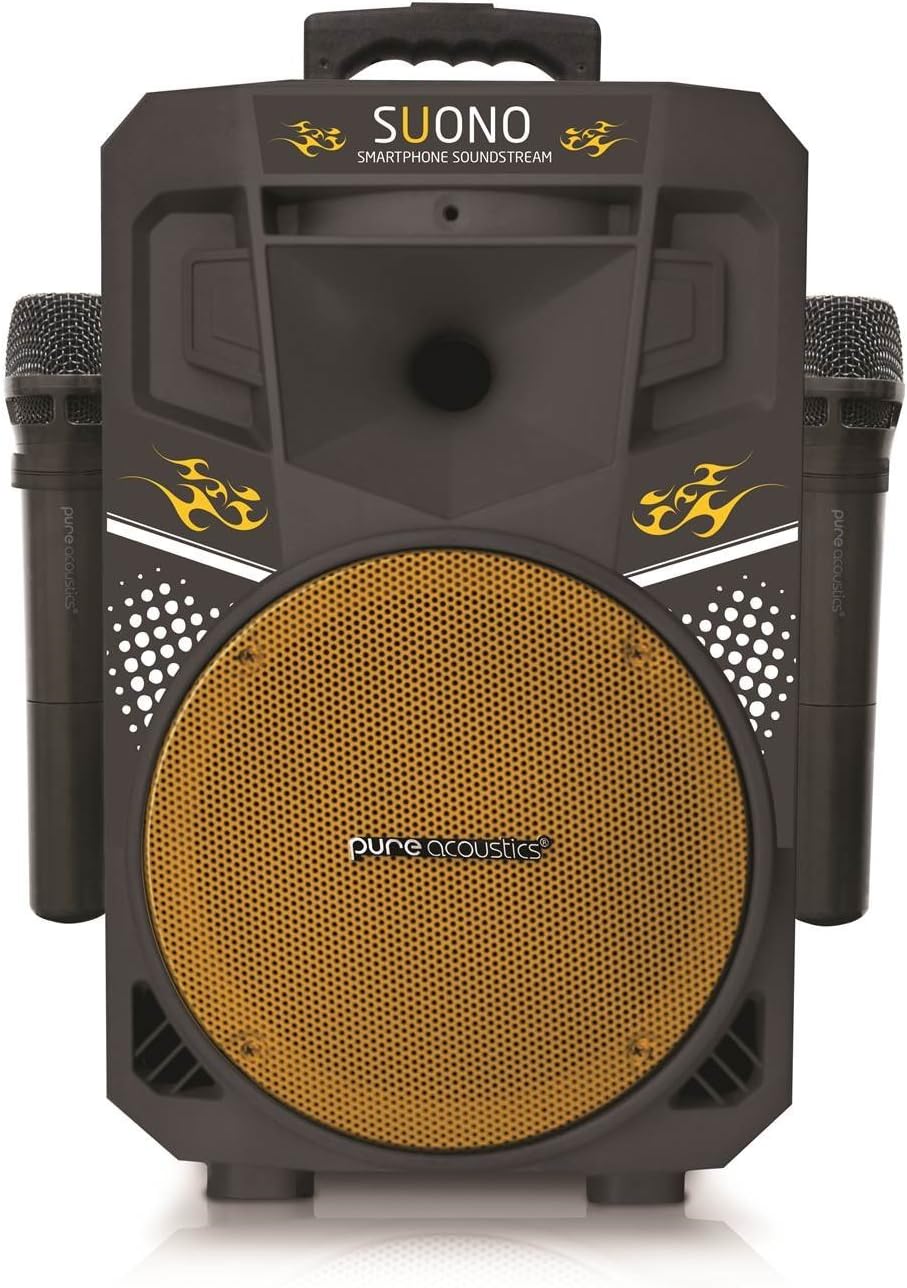
Front view of the Pure Acoustics MCP-75 Suono Karaoke Machine, showcasing its speaker grille and two wireless microphones attached to the sides.
What's in the Box
- MCP-75 Suono Speaker Unit
- 2 Wireless Microphones
- Power Supply Adaptor
- Remote Control
Setup
- Charging the Unit: Before first use, fully charge the MCP-75 Suono using the provided power supply adaptor. Connect the adaptor to the DC 12V input port on the back of the unit and plug it into a standard AC outlet. The unit features a rechargeable battery for up to 10 hours of listening pleasure.
- Microphone Batteries: Insert appropriate batteries into the two wireless microphones. Ensure correct polarity.
- Placement: Place the speaker on a stable, flat surface. The unit is designed for easy mobility with built-in wheels and a retractable handle.

Detail of the speaker's base, highlighting the integrated wheels for easy transport and the DC power input port.

Close-up view of the retractable handle on top of the speaker, designed for comfortable carrying.
Operating Instructions
The MCP-75 Suono features a 1.5" LCD display that indicates the current mode and relevant track information.
Power On/Off
Locate the power switch on the control panel and toggle it to the 'ON' position to power on the unit. Toggle to 'OFF' to power down.
Audio Input Modes
The unit supports various audio input methods. Use the 'Mode' button on the control panel or remote control to switch between them.
- Bluetooth: Select Bluetooth mode. On your smartphone, tablet, or MP3 player, search for 'MCP-75 Suono' in your Bluetooth settings and pair.
- USB Input: Insert a USB memory stick into the USB port. The unit will automatically detect and play compatible audio files.
- Micro SD Card Slot: Insert an SD memory card into the Micro SD slot. The unit will automatically detect and play compatible audio files.
- Auxiliary Input: Connect your smartphone, tablet, or MP3 player using a 3.5mm audio cable to the AUX input port.
- Wired Microphone Input: Connect an additional wired microphone to the dedicated input port.
Microphone Usage
The two included wireless microphones will automatically connect to the unit when powered on. Adjust their individual volume using the dedicated microphone volume controls on the control panel.
Recording Function
The MCP-75 Suono allows you to record audio directly onto a connected USB flash drive. Refer to the control panel for recording buttons (typically labeled 'REC').
Volume and Tone Control
Adjust the master volume, bass, and treble using the respective knobs on the control panel to customize your sound experience.

Detailed view of the control panel, showing the LCD display, USB/SD card slots, various input ports, and control knobs for volume, bass, treble, and microphone levels.
Maintenance
- Cleaning: Use a soft, dry cloth to clean the exterior of the unit. Do not use abrasive cleaners or solvents.
- Battery Care: To prolong battery life, avoid fully discharging the unit frequently. If storing for an extended period, charge the battery to approximately 50% and recharge every few months.
- Storage: Store the unit in a cool, dry place away from direct sunlight and extreme temperatures.
Troubleshooting
- No Power: Ensure the power adaptor is securely connected and plugged into a working outlet. Check if the battery is charged.
- No Sound: Check the master volume level. Ensure the correct input mode is selected. If using external devices, verify their volume and connection.
- Microphones Not Working: Check microphone batteries and ensure they are inserted correctly. Verify microphone volume controls are not set to minimum.
- Bluetooth Connectivity Issues: Ensure the unit is in Bluetooth mode and within range of your device. Try unpairing and re-pairing the device.
- Distorted Sound: Reduce the volume level. Check audio source quality.
Technical Specifications
| Feature | Specification |
|---|---|
| Power Output | 45 Watts |
| Frequency Response | 40Hz-22 KHz +/- 3dB |
| S/N Ratio | > 70dB +/- 3dB |
| Primary Power Source | DC 12V 2.6mAh |
| Alternate Power Source | AC 100-230V / 50-60Hz 35W |
| Rechargeable Battery | Up to 10 hours playback |
| Wireless MIC Frequency (Mic A) | 202.2 MHz |
| Wireless MIC Frequency (Mic B) | 185.15 MHz |
| Product Dimensions | 250 x 235 x 410 mm (9.8 x 9.3 x 16.2 inches) |
| Item Weight | 12.87 pounds |
| Connector Type | Aux |
| Audio Input | Auxiliary, Microphone, USB, Micro SD card slot |
| Number of Channels | 2 |
| Impedance | 8 Ohm |
| Compatible Devices | Smartphone, Tablet |
Warranty and Support
For warranty information and technical support, please contact Pure Acoustics customer service. Details can typically be found on the manufacturer's official website or the product packaging.
Related documentsMCP-75BY


Ask a question about this manual
Ask about setup, troubleshooting, compatibility, parts, safety, or missing instructions. Manuals+ will review the question and use this page’s manual context to help answer it.