Introduction
The ZEALOT S1 is a versatile portable Bluetooth speaker designed for outdoor activities. It integrates a Bluetooth speaker, LED flashlight, and power bank functionality into a compact, durable unit. This manual provides detailed instructions for the proper setup, operation, and maintenance of your S1 speaker.
Package Contents
Please check the package for the following items:
- ZEALOT S1 Speaker (1 unit)
- Handlebar Mounting Bracket (1 unit)
- Carabiner Clip (1 unit)
- 3.5mm Audio Cable (1 unit)
- USB Charging Cable (1 unit)
- User Guide (1 unit)
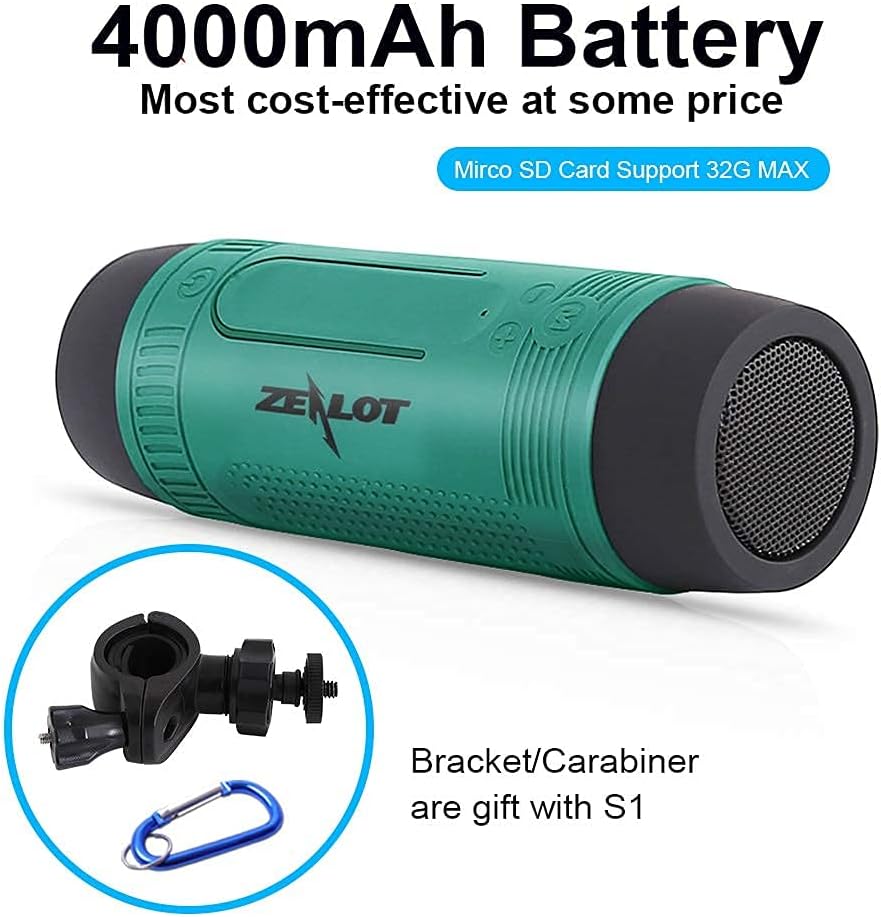
Image: ZEALOT S1 speaker shown with its 4000mAh battery capacity, alongside the included handlebar mounting bracket and carabiner clip.
Product Overview
The ZEALOT S1 features a cylindrical design with controls located on the top surface and ports on the side, protected by a silicone cover. The front houses the LED flashlight, and the side features a speaker grille.

Image: The ZEALOT S1 speaker in green, securely mounted on a bicycle handlebar, highlighting its integrated flashlight and accessible controls.
Setup
1. Charging the Speaker
- Connect the provided USB charging cable to the micro USB port on the S1 speaker.
- Connect the other end of the USB cable to a USB power adapter (not included) or a computer's USB port.
- The charging indicator light will illuminate. A full charge takes approximately 5 hours.
2. Mounting on a Handlebar
- Attach the handlebar mounting bracket to your bicycle handlebar. Ensure it is securely fastened.
- Screw the ZEALOT S1 speaker onto the bracket. Do not overtighten to prevent damage to the hinge pin.
- Adjust the speaker's position for optimal sound direction and flashlight visibility.

Image: The ZEALOT S1 speaker securely mounted on a bicycle handlebar, illustrating its suitability for outdoor activities with splash-proof, dust-proof, and anti-dropping features.
Operating Instructions
1. Power On/Off
- Press and hold the Power button (U) for 3 seconds to turn the speaker on or off.
2. Bluetooth Pairing
- Turn on the S1 speaker. It will automatically enter Bluetooth pairing mode, indicated by a flashing LED.
- On your mobile device, enable Bluetooth and search for available devices.
- Select "ZEALOT S1" from the list. Once paired, the LED indicator will stop flashing.
3. Music Playback
- Bluetooth Mode: After successful pairing, play music from your connected device.
- TF Card Mode: Insert a Micro SD (TF) card (up to 32GB) with MP3 files into the TF card slot. The speaker will automatically switch to TF card mode and begin playback.
- AUX-in Mode: Connect an external audio device using the provided 3.5mm audio cable to the AUX port. The speaker will switch to line-in mode.
- FM Radio Mode: Press the 'M' button to cycle through modes until you reach FM Radio. Connect the USB charging cable as an antenna for better reception.
4. Controls
- Volume Up/Next Track: Short press '+' for volume up; long press '+' for next track.
- Volume Down/Previous Track: Short press '-' for volume down; long press '-' for previous track.
- Play/Pause/Answer Call: Short press the Play/Pause button.
- Mode Switch: Press the 'M' button to switch between Bluetooth, TF Card, AUX-in, and FM Radio modes.
5. LED Flashlight Operation
- Press the flashlight button to cycle through light modes: High, Low, SOS (flashing).
- Press and hold the flashlight button to turn off the light.

Image: The ZEALOT S1 speaker's LED torch light in action, providing illumination on a path at night, with indicators for High, Low, and SOS light modes.
6. Hands-Free Calling
- When a call comes in, press the Play/Pause button to answer.
- Press the Play/Pause button again to end the call.
7. Power Bank Function
- The S1 speaker can be used as an emergency power bank. Open the silicone cover on the side.
- Connect your mobile device to the USB-A output port using your device's charging cable.
- The S1's 4000mAh battery can provide a charge to your devices.

Image: A blue ZEALOT S1 speaker acting as a power bank, charging a smartphone via a USB cable, illustrating its external battery function.
Maintenance
- The S1 speaker is IPX5 waterproof (splash-proof), dust-proof, and shockproof. Avoid submerging it in water.
- Clean the speaker with a soft, dry cloth. Do not use harsh chemicals or abrasive cleaners.
- Store the speaker in a cool, dry place when not in use.
- Charge the battery at least once every three months to maintain battery health if not used regularly.
Troubleshooting
| Problem | Solution |
|---|---|
| Speaker does not turn on. | Ensure the battery is charged. Connect to a power source using the USB cable. |
| Cannot pair via Bluetooth. | Ensure the speaker is in pairing mode. Turn off and on your device's Bluetooth. Move closer to the speaker. |
| No sound. | Check volume levels on both the speaker and your connected device. Ensure the correct mode (Bluetooth, TF card, AUX) is selected. |
| FM radio reception is poor. | Connect the USB charging cable to the micro USB port; it acts as an antenna. Adjust the speaker's position. |
| Power bank not charging device. | Ensure the S1 speaker has sufficient charge. Check the connection cable. |
Specifications
- Model Name: S1
- Brand: ZEALOT
- Connectivity: Bluetooth 5.0, USB, 3.5mm AUX
- Speaker Type: Outdoor, Portable
- Special Features: Built-in Microphone, LED Light, Power Bank
- Battery Capacity: 4000mAh (2 Lithium Ion batteries)
- Playtime: Up to 24 hours (TF card playback)
- Charging Time: Approximately 5 hours
- Waterproof Rating: IPX5 (Splash-proof)
- Wireless Range: Up to 10 meters (33 feet)
- Speaker Output Power: 5 Watts
- Frequency Response: 20 KHz
- Dimensions: 2.01"D x 2.01"W x 6.14"H
- Weight: 260 Grams (9.2 ounces)
- Compatible Devices: iPhone, Android phones, etc.
Warranty and Support
The ZEALOT S1 comes with a limited warranty. For detailed warranty information or technical support, please refer to the official ZEALOT website or contact customer service through your purchase platform. Please retain your proof of purchase for warranty claims.
For further assistance, you may visit the ZEALOT Store on Amazon.


