
1. Introduction
This manual provides instructions for the safe operation, maintenance, and setup of your DEWALT 20V MAX XR Impact Driver, model DCF887B. This compact and lightweight tool is designed for driving fasteners efficiently in various applications. It features a brushless motor for extended runtime and durability, along with a 3-speed setting for application versatility. Please read this manual thoroughly before using the tool.
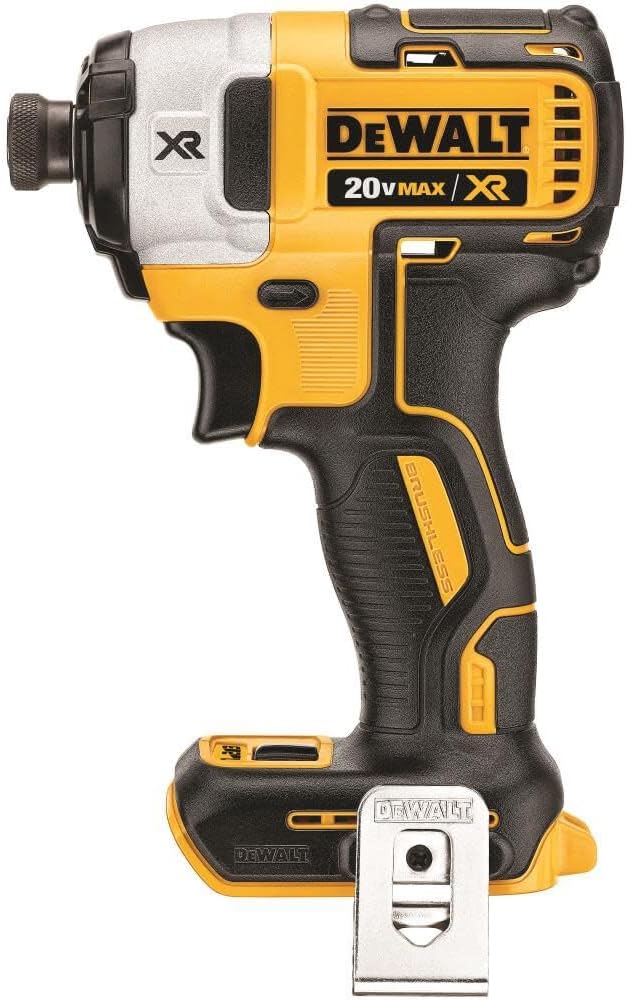
Figure 1: DEWALT 20V MAX XR Impact Driver (DCF887B). This image shows the main unit of the impact driver, highlighting its compact design and yellow and black color scheme. Note that the battery and charger are sold separately.
2. Safety Information
Always follow basic safety precautions to reduce the risk of fire, electric shock, and personal injury when using power tools. Keep this manual for future reference.
General Power Tool Safety Warnings:
- Work Area Safety: Keep your work area clean and well-lit. Cluttered or dark areas invite accidents. Do not operate power tools in explosive atmospheres, such as in the presence of flammable liquids, gases, or dust.
- Electrical Safety: Avoid body contact with earthed or grounded surfaces such as pipes, radiators, ranges, and refrigerators. There is an increased risk of electric shock if your body is earthed or grounded.
- Personal Safety: Always wear eye protection. Use hearing protection when operating the tool for extended periods. Dress properly; do not wear loose clothing or jewelry. Keep hair, clothing, and gloves away from moving parts.
- Tool Use and Care: Do not force the power tool. Use the correct power tool for your application. Do not use the power tool if the switch does not turn it on and off. Disconnect the battery pack from the power tool before making any adjustments, changing accessories, or storing power tools.
- Battery Tool Use and Care: Recharge only with the charger specified by the manufacturer. Use power tools only with specifically designated battery packs.
Specific Impact Driver Safety Warnings:
- Hold power tool by insulated gripping surfaces when performing an operation where the fastener may contact hidden wiring.
- Always wear safety glasses or side shields.
- Secure the workpiece. Use clamps or a vise to hold the workpiece.
Proposition 65 Warning: This product can expose you to chemicals including lead, which is known to the State of California to cause cancer and birth defects or other reproductive harm. For more information go to www.P65Warnings.ca.gov.
3. Components Overview
Familiarize yourself with the various parts of your DEWALT Impact Driver for proper and safe operation.

Figure 2: Key features of the DEWALT Impact Driver. This image highlights the 3 bright LEDs for illuminating the work area, the Precision Drive™ setting for added control, and the 3-speed settings for versatility.
- 1/4-inch Hex Chuck: For quick and easy bit changes.
- Trigger Switch: Activates the tool and controls variable speed.
- Forward/Reverse Button: Changes the direction of rotation.
- Speed Selector: Allows selection between 3 speed settings for different applications.
- LED Work Lights: Three integrated LEDs illuminate the work area with a 20-second delay after trigger release.
- Belt Hook: For convenient temporary storage of the tool.
4. Setup
4.1 Battery Installation and Removal
The DCF887B is a bare tool and requires a DEWALT 20V MAX XR battery pack (sold separately).
- To Install: Align the battery pack with the rails inside the tool's handle. Slide the battery pack firmly into the tool until it latches into place.
- To Remove: Press the battery release button and pull the battery pack out of the tool handle.
Ensure the battery is fully charged before use. Refer to your battery charger's manual for charging instructions.
4.2 Bit Installation and Removal
The impact driver features a 1/4-inch hex chuck for quick and easy bit changes.

Figure 3: One-handed bit loading 1/4-inch hex chuck. This image illustrates the chuck mechanism designed for easy insertion and removal of 1-inch bit tips.
- To Install: Push the desired 1/4-inch hex shank accessory (e.g., screwdriver bit) directly into the chuck. The chuck will automatically lock the bit in place. Pull on the bit to ensure it is securely seated.
- To Remove: Pull the easy grip sleeve forward away from the tool body. The bit will release.
4.3 Attaching the Belt Hook
A belt hook is included for convenient temporary storage.

Figure 4: DEWALT Impact Driver with included belt hook. This image shows the impact driver and the separate belt hook accessory, indicating it is included with the tool.
The belt hook can be attached to either side of the tool using the provided screw. Choose the side that is most comfortable for your use.
5. Operating Instructions
5.1 Powering On/Off and Variable Speed
To turn the tool on, depress the trigger switch. To turn the tool off, release the trigger switch. The tool features variable speed, meaning the speed increases as you depress the trigger further.
5.2 Forward/Reverse Control
The forward/reverse button is located above the trigger. Push the button to the left for forward rotation (driving fasteners) and to the right for reverse rotation (removing fasteners). The center position locks the trigger, preventing accidental startup.
5.3 Speed Settings and Precision Drive™
The DCF887B offers three speed settings for optimized application versatility. Use the speed selector button, typically located near the base of the handle, to cycle through the settings.
- Speed 1 (Precision Drive™): This setting provides lower speed and torque, ideal for delicate applications or when starting fasteners to prevent stripping or over-driving. It offers enhanced control.
- Speed 2: Medium speed and torque for general fastening tasks.
- Speed 3: High speed and maximum torque for demanding applications and driving larger fasteners.
5.4 LED Work Light
The three integrated LED lights activate when the trigger is depressed, illuminating the work area. They remain on for approximately 20 seconds after the trigger is released, providing continued visibility without shadows.
5.5 Driving Fasteners

Figure 5: DEWALT Impact Driver driving a screw into wood. This image shows the tool being used to drive a fastener into a wooden board, demonstrating its application.
Position the bit on the fastener head. Apply firm, steady pressure to the tool and depress the trigger. The impact mechanism will engage as resistance increases, providing additional torque to drive the fastener. Select the appropriate speed setting for the material and fastener type.

Figure 6: Impact Driver applications in masonry and lumber. This image illustrates the versatility of the tool for driving fasteners into both wood and stone/masonry materials.
6. Maintenance
Your DEWALT power tool is designed to operate over a long period with minimal maintenance. Continuous satisfactory operation depends upon proper tool care and regular cleaning.
6.1 Cleaning
- Blow dirt and dust out of all air vents with dry air at least once a week.
- Do not use solvents or harsh chemicals for cleaning non-metallic parts of the tool. These chemicals can weaken the plastic materials used in these parts.
6.2 General Inspection
- Before each use, inspect the tool for any damaged parts, loose screws, or worn components.
- Ensure the chuck operates smoothly and securely holds bits.
- If any part is damaged or missing, do not operate the tool until it has been repaired or replaced.
7. Troubleshooting
This section addresses common issues you might encounter with your impact driver.
| Problem | Possible Cause | Solution |
|---|---|---|
| Tool does not start. | Battery not charged or improperly installed. Trigger lock engaged. | Ensure battery is fully charged and correctly inserted. Disengage the trigger lock by pushing the forward/reverse button to the left or right. |
| Reduced power or performance. | Low battery charge. Incorrect speed setting for the task. | Recharge the battery. Select a higher speed setting (Speed 2 or 3) for more demanding tasks. |
| Bit not holding securely in chuck. | Bit not fully inserted. Chuck mechanism dirty or damaged. | Push the bit firmly into the chuck until it locks. Clean the chuck mechanism. If the problem persists, contact DEWALT service. |
| Tool overheating. | Continuous heavy use. Blocked air vents. | Allow the tool to cool down. Clear any obstructions from the air vents. Avoid prolonged heavy-duty operation. |
8. Specifications
Technical specifications for the DEWALT 20V MAX XR Impact Driver DCF887B.

Figure 7: Dimensions and weight of the DEWALT Impact Driver. This image provides a visual representation of the tool's length (8 inches), height (5.88 inches), and weight (2.9 lbs).
| Feature | Detail |
|---|---|
| Model Number | DCF887B |
| Voltage | 20V MAX |
| Power Source | Battery Powered (Lithium Ion) |
| Motor Type | Brushless |
| Chuck Size | 1/4-inch Hex |
| No Load Speed (RPM) | 0-1000 / 0-2800 / 0-3250 (3-speed settings) |
| Impacts Per Minute (IPM) | 0-3800 |
| Maximum Torque | 2000 in-lbs (226 Nm) |
| Tool Weight (bare tool) | 2 lbs (0.91 kg) |
| Product Dimensions (L x W x H) | 8" x 3" x 5.88" (20.32 cm x 7.62 cm x 14.94 cm) |
| Special Features | Variable Speed, 3 LED Work Lights, Precision Drive™ |
9. Warranty and Support
9.1 Limited Warranty
DEWALT offers a 3-year limited warranty on this product from the date of purchase. This warranty covers defects in material or workmanship. For full warranty details, please refer to the official DEWALT warranty statement or contact DEWALT customer service.
9.2 Service and Support
For any questions regarding the operation, maintenance, or repair of your DEWALT tool, please contact DEWALT customer service or visit an authorized DEWALT service center. Always use identical replacement parts for repairs to ensure product safety and performance.
You can find more information and support on the official DEWALT website: www.dewalt.com


