
1. Product Overview
The DEWALT DCD791D2 20V MAX* XR Li-Ion Brushless Compact Cordless Drill/Driver Kit is designed for efficiency and durability. This lightweight and compact tool is ideal for working in tight spaces over extended periods. Its high-speed transmission offers two-speed variations, allowing users to select the appropriate performance level for diverse applications. The ergonomic comfort grip enhances balance and tool control.
- Brushless Motor: Delivers up to 57% more run time compared to brushed motors.
- XR Li-Ion Batteries: Includes batteries with a fuel gauge for 33% more capacity than standard packs.
- Compact Design: Measures 6.9 inches from front to back and weighs 3.4 lbs, fitting into confined areas.
- High-Speed Transmission: Features two speed settings (0-550/0-2,000 RPM) for up to 30% faster application speeds.
- Ergonomic Comfort Grip: Provides optimal balance and tool control.
- Metal 1/2-inch Ratcheting Chuck: Ensures superior bit gripping strength.
- 3-Mode LED: Illuminates dark or confined spaces up to 20 times brighter than previous models.
- LED Spotlight Mode: Includes a 20-minute shutoff function for extended work time in low-light conditions.

Figure 1: The DEWALT DCD791D2 Drill/Driver Kit, including the drill, two batteries, a charger, and a hard case.
2. General Safety Instructions
Always read and understand all safety warnings and instructions provided with your power tool. Failure to follow these instructions may result in electric shock, fire, and/or serious injury. Save all warnings and instructions for future reference.
- Work Area Safety: Keep your work area clean and well-lit. Cluttered or dark areas invite accidents. Do not operate power tools in explosive atmospheres, such as in the presence of flammable liquids, gases, or dust.
- Electrical Safety: Power tool plugs must match the outlet. Never modify the plug in any way. Do not abuse the cord. Never use the cord for carrying, pulling, or unplugging the power tool. Keep cord away from heat, oil, sharp edges, or moving parts.
- Personal Safety: Always wear eye protection. Use hearing protection when operating the tool for extended periods. Dress properly; do not wear loose clothing or jewelry. Keep your hair, clothing, and gloves away from moving parts. Stay alert, watch what you are doing, and use common sense when operating a power tool.
- Power Tool Use and Care: Do not force the power tool. Use the correct power tool for your application. Disconnect the plug from the power source and/or remove the battery pack before making any adjustments, changing accessories, or storing power tools. Store idle power tools out of the reach of children.
- Battery Tool Use and Care: Recharge only with the charger specified by the manufacturer. Use power tools only with specifically designated battery packs. When battery pack is not in use, keep it away from other metal objects.
3. Package Contents
Your DEWALT DCD791D2 kit includes the following components:
- DCD791 - 20V MAX* XR Li-Ion Brushless Compact Drill/Driver
- (2) DCB203 - XR 2.0AH Battery Packs
- Charger
- Kit Box
- Belt Hook
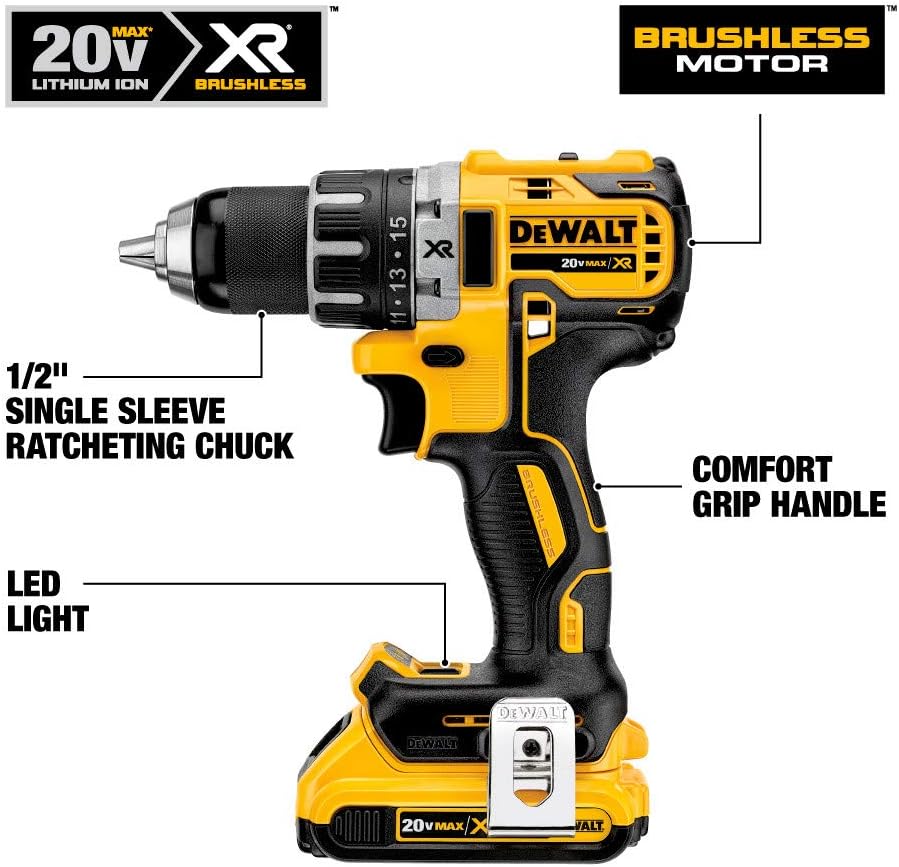
Figure 2: Key features of the DCD791 Drill/Driver.

Figure 3: Compact size and lightweight design of the DCD791 Drill/Driver.
4. Setup and Assembly
4.1 Charging the Battery
Before first use, fully charge the battery pack. Insert the battery pack into the charger. The charger's indicator light will show the charging status. A fully charged battery will provide optimal performance.
Video 1: An overview of the DEWALT 20V MAX Cordless Drill/Driver Kit (DCD791D2), demonstrating its components and basic functionality, including battery charging.
4.2 Attaching/Detaching the Battery Pack
- To Attach: Align the battery pack with the rails inside the tool's handle. Slide the pack firmly into the tool until it latches into place.
- To Detach: Press the battery release button and pull the battery pack out of the tool.
4.3 Inserting/Removing Drill Bits
- To Insert: Twist the chuck counter-clockwise to open the jaws. Insert the drill bit into the chuck. Twist the chuck clockwise to tighten the jaws firmly around the bit. Continue twisting until you hear a click, indicating the bit is securely locked.
- To Remove: Twist the chuck clockwise until you hear a click. Then, twist the chuck counter-clockwise to loosen the jaws and remove the bit.
5. Operating Instructions
5.1 Speed Settings
The drill/driver features a two-speed transmission. Use the sliding switch on top of the tool to select between:
- Speed 1 (Low): For high torque applications, driving screws, or drilling large diameter holes. (0-550 RPM)
- Speed 2 (High): For faster drilling and lighter applications. (0-2,000 RPM)
5.2 Torque Settings (Clutch)
The adjustable clutch allows you to set the torque for driving screws. Rotate the collar to the desired torque setting. The drill will stop driving when the set torque is reached, preventing over-driving or stripping screws. For drilling, set the collar to the drill symbol for maximum torque.
5.3 Forward/Reverse Control
The forward/reverse control button is located above the trigger. Push it left for forward rotation (driving screws, drilling) and right for reverse rotation (removing screws). When the button is centered, the trigger is locked for safety.
5.4 LED Work Light
The drill/driver is equipped with a 3-mode LED work light located at the base of the tool. This light illuminates the work area for improved visibility.
- Low Brightness: Provides general illumination.
- High Brightness: Offers maximum illumination for very dark areas.
- Spotlight Mode: Activates a bright spotlight with a 20-minute shutoff function for extended use as a standalone light source.
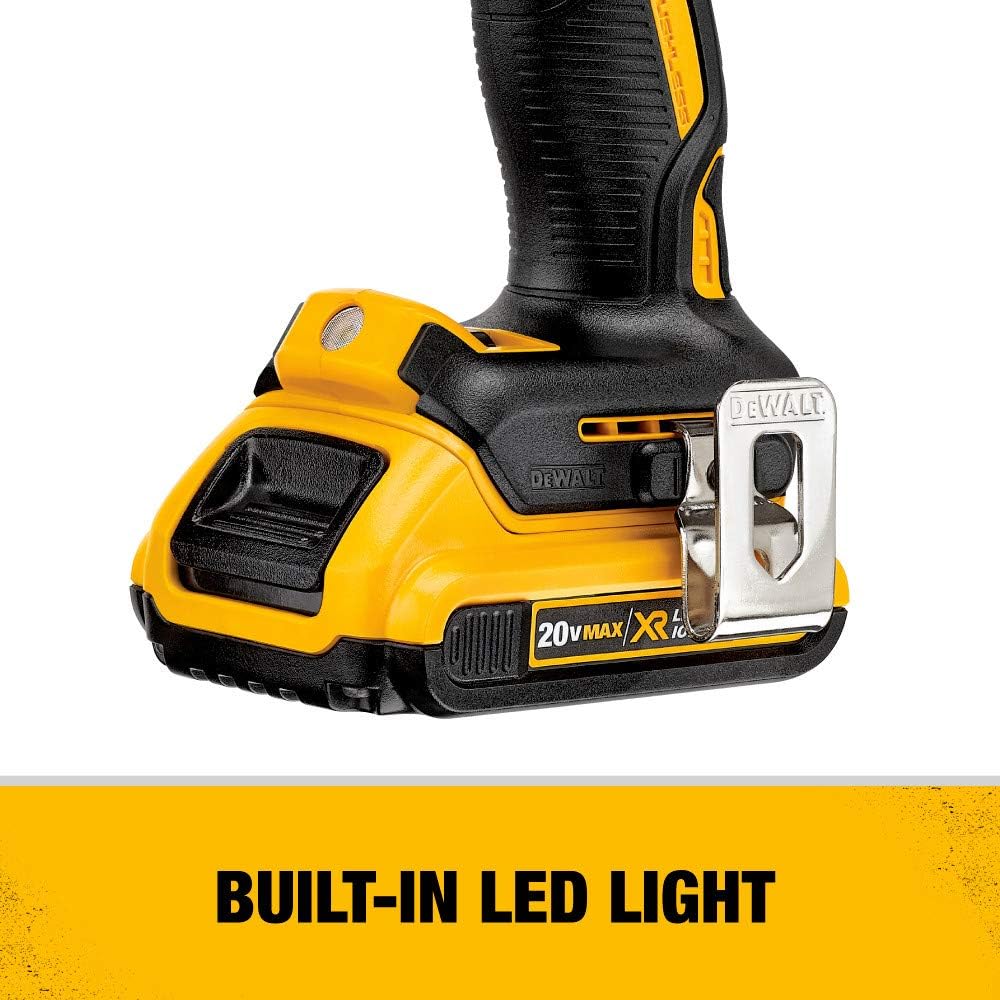
Figure 4: Built-in LED light for illuminating the work area.
6. Maintenance
6.1 Cleaning
Keep the tool's ventilation slots clean to prevent overheating. Use a clean, dry cloth to wipe down the tool. Do not use solvents or harsh chemicals. Clean the chuck jaws regularly to ensure proper bit gripping.
6.2 Battery Care
Store battery packs in a cool, dry place away from direct sunlight and heat. Do not store battery packs in a discharged state. Always charge them fully before storage and periodically during long storage periods.
6.3 Storage
When not in use, store the drill/driver and its accessories in the provided kit box in a secure, dry location, out of reach of children.
7. Troubleshooting
- Drill not starting: Ensure the battery pack is fully charged and properly inserted. Check that the forward/reverse control button is not in the locked (center) position.
- Drill bit slipping or falling out: This often indicates the chuck is not fully tightened. When inserting a bit, twist the chuck clockwise until it is tight, then continue twisting until you hear a distinct click. This click signifies the chuck has engaged its locking mechanism. To release, twist clockwise until a click, then counter-clockwise to loosen.
- Reduced power or run time: The battery pack may need recharging. Ensure the battery is not too hot or too cold, as extreme temperatures can affect performance.
8. Technical Specifications
| Specification | Value |
|---|---|
| Brand | DEWALT |
| Model Number | DCD791D2 |
| Power Source | Battery Powered |
| Voltage | 20 Volts |
| Amperage | 2 Amps |
| Maximum Rotational Speed | 2000 RPM |
| Number of Speeds | 2 |
| Maximum Chuck Size | 13 Millimeters (1/2-inch) |
| Maximum Torque | 70 Newton Meters |
| Item Weight | 3.5 Pounds |
| Product Dimensions | 16.22"L x 4.5"W x 10.1"H |
| Material | Metal, Plastic |
| Battery Cell Type | Lithium Ion |
| Drilling Capacity Wood | 40 Millimeters |
| Drilling Capacity Metal | 13 Millimeters |
9. Warranty and Support
This DEWALT product comes with a 3-year limited warranty. For warranty claims, technical support, or service inquiries, please refer to the contact information provided in your product's original packaging or visit the official DEWALT website.


