Introduction
The Blackburn Central Seatpost Rack is a versatile and durable solution for carrying cargo on your bicycle. Designed for easy installation and compatibility with various bike types, it provides a stable platform for your gear without requiring traditional frame mounts.
Safety Information
General Safety Guidelines
- Always ensure the rack is securely attached to the seatpost before riding.
- Do not exceed the maximum load capacity of 22.1 pounds (10 kg).
- Regularly check all bolts and connections for tightness.
- Avoid using this rack on carbon seatposts, as noted in customer feedback, to prevent potential damage.
- Distribute weight evenly on the rack to maintain bicycle balance.
- Ensure cargo does not interfere with wheel movement, braking, or rider visibility.
What's in the Box
Included Components
- Blackburn Central Seatpost Rack (main assembly)
- Mounting hardware (bolts, spacers, Allen wrenches, small wrench)
- Rear fender (optional installation)
- Bungee cords (for securing cargo)
Product Overview
Key Features
- No Frame Mounts Required: Attaches directly to the seatpost.
- Universal Fit: Designed to fit a wide range of small and large bikes.
- Adjustable Configuration: Can be flipped to better fit different sized bikes and provide optimal clearance.
- Durable Construction: Made from lightweight aluminum.
- Integrated Fender: Includes a rear fender for splash protection.
- Side Brackets: Optional side brackets for pannier bags.
Product Dimensions

Image: A technical drawing of the Blackburn Central Seatpost Rack with key dimensions labeled. The rack measures 517mm (20.375 inches) in length and 120mm (4.75 inches) in width at the top platform, and 120mm (4.72 inches) in height.
Setup and Installation
Step-by-Step Installation
- Unpack Components: Carefully remove all parts from the packaging. Verify all components listed in "What's in the Box" are present.
- Install Fender (Optional):
Attach the included fender to the underside of the main rack body using the provided screws. This step is recommended before mounting the rack to the bike.
Video: Demonstrates the installation of a rear fender onto a bike rack. The user aligns the fender with the rack and secures it with two screws using an Allen wrench. This video is provided by ThreeH Direct.
- Attach Rack to Seatpost:
Position the quick-release clamp of the rack around your bicycle's seatpost. Use the rubber spacer provided to protect the seatpost and ensure a snug fit.
Tighten the quick-release mechanism until the rack is secure, but do not overtighten. The rack should be firm without excessive movement.
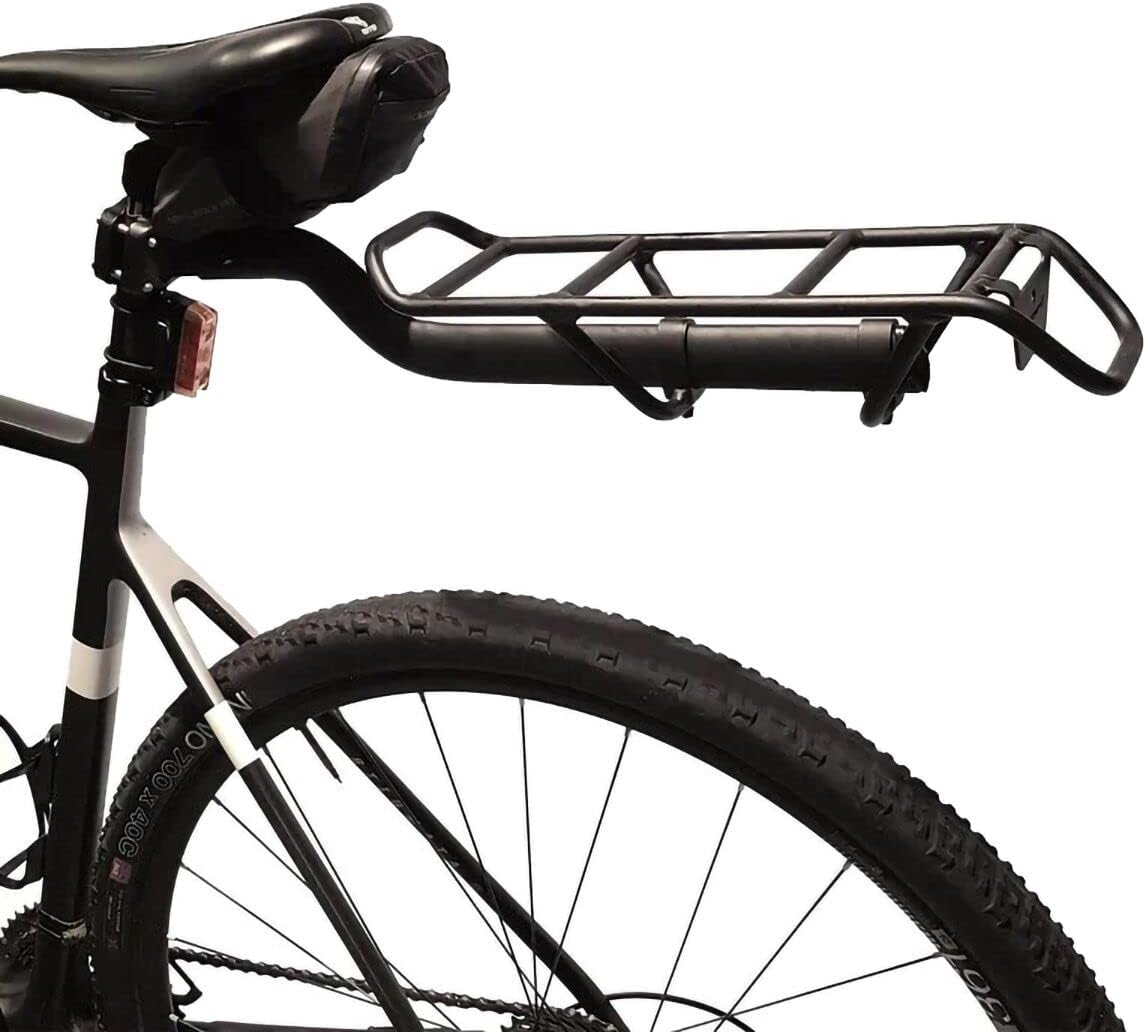
Image: The Blackburn Central Seatpost Rack is shown mounted on a bicycle, attached to the seatpost. The rack extends horizontally over the rear wheel, ready for cargo.
- Adjust Rack Position:
The rack is universal and can be adjusted for optimal positioning. Loosen the two bolts that secure the main rack platform to the seatpost attachment.
Adjust the rack forward or backward, and ensure the rear reflector (if installed) has adequate clearance. Re-tighten the bolts once the desired position is achieved.

Image: A diagram illustrating two possible configurations for the Blackburn Central Seatpost Rack. It shows how the rack can be flipped over to accommodate different bicycle sizes and geometries, ensuring proper fit and clearance.
- Install Side Supports (Optional for Panniers):
If you plan to use pannier bags, attach the side support brackets to the rack and the bicycle frame using the provided hardware and rubber spacers.
Secure these supports to the frame's eyelets near the rear axle. Ensure they are tight but not overtightened.
Video: Demonstrates the installation of side support brackets for a bike rack. The user attaches the brackets to the main rack and then secures them to the bicycle frame near the rear axle using bolts and spacers. This video is provided by Prime Retail Solution.
Final Check
Before your first ride, double-check all bolts and connections to ensure they are secure. Gently shake the rack to confirm stability.
Operating Instructions
Securing Cargo
- Place your cargo on the rack, ensuring weight is distributed evenly.
- Use the included bungee cords or other appropriate straps to firmly secure your items to the rack.
- Verify that no items are dangling or could interfere with moving parts of the bicycle.
Load Capacity
The maximum load capacity for this rack is 22.1 pounds (10 kg). Do not exceed this limit to ensure safety and product longevity.
Maintenance
Regular Checks
- Periodically inspect all mounting hardware for tightness. Vibrations from riding can loosen bolts over time.
- Clean the rack with a damp cloth and mild soap as needed. Avoid harsh chemicals that could damage the finish.
- Check for any signs of wear, cracks, or damage to the rack or its components. Replace damaged parts immediately.
Troubleshooting
Common Issues and Solutions
Rack is wobbling or not stable
- Check Seatpost Connection: Ensure the quick-release clamp on the seatpost is tightened sufficiently. Some users have found that adding pipe tape around the seatpost or the rack's internal connection point can reduce play.
- Verify All Bolts: Confirm that all bolts, especially those connecting the main rack to the seatpost clamp and any side supports to the frame, are fully tightened.
- Load Distribution: Unevenly distributed weight can cause instability. Reposition your cargo to balance the load.
- Compatibility: While designed for universal fit, some bike geometries or seatpost materials (e.g., carbon) may not provide optimal stability. Consider alternative mounting solutions if issues persist.
Insufficient Tire Clearance
- Adjust Rack Position: Loosen the bolts securing the main rack platform and adjust its position further back or forward to achieve adequate tire clearance. The rack can be flipped for different configurations.
Specifications
- Brand: Blackburn
- Model Name: Central Seatpost Rear Bike Rack
- Model Number: 7044592
- Color: Black
- Material: Aluminum
- Item Weight: 1.65 Pounds (0.75 kg)
- Mounting Type: Rear Seat Mount
- Load Capacity: 22.1 Pounds (10 kg)
- Orientation: Rear
- Item Dimensions (LxWxH): 22 x 8 x 4 inches (55.88 x 20.32 x 10.16 cm)
- UPC: 768686986253
Warranty & Support
Warranty Information
The Blackburn Central Seatpost Rack is subject to a limited lifetime warranty for the lifetime of the original purchaser. This warranty does not apply to damage due to heat, physical damage resulting from abuse, neglect, improper repair, improper fit, improper installation, improper care, accidents, failure to follow directions, alterations, misuse, or use unintended by the manufacturer. It also does not cover minor cosmetic damages due to normal "wear and tear" of the product.
Customer Support
For further assistance, troubleshooting, or warranty claims, please visit the official Blackburn website or contact their customer service department.


