1. Introduction
This manual provides detailed instructions for the setup, operation, and maintenance of your S.M.S.L Q5 Pro Digital Amplifier. Please read this manual thoroughly before using the device to ensure proper functionality and to maximize your audio experience. Keep this manual for future reference.

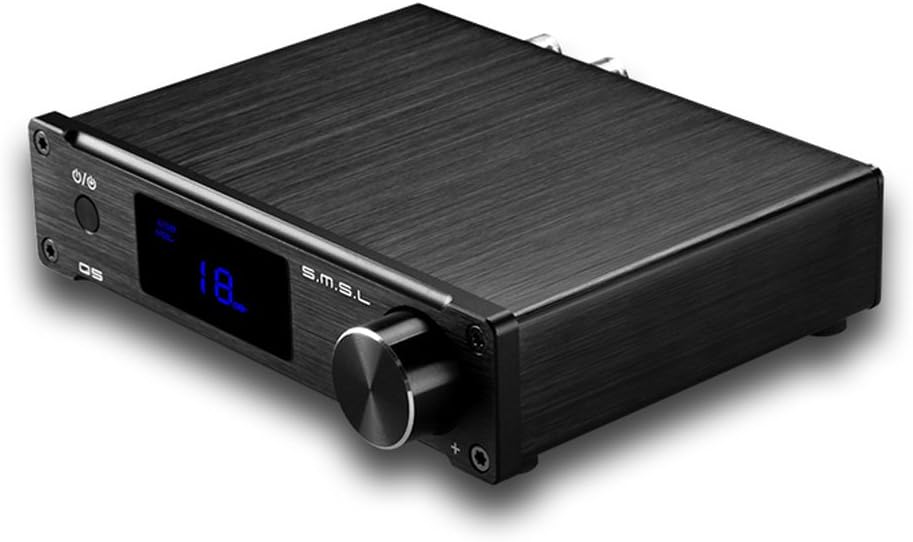
Front view of the S.M.S.L Q5 Pro Digital Amplifier, showcasing its compact design and control knob.
2. Product Overview
2.1 Key Features
- Pure digital amplification technology, supporting optical fiber, coaxial, computer USB, and analog inputs.
- Features patented Easy Start technology for precise power supply control, enhancing system reliability.
- Meets high-definition Blu-ray and HD DVD audio interface standards with sampling rates from 44.1-192KHz.
2.2 Package Contents
Verify that all items are present in the package:
- 1x S.M.S.L Q5 Pro Amplifier Unit
- 1x USB Cable
- 1x User Manual (this document)
- 1x Power Adapter
- 1x Remote Control

The S.M.S.L Q5 Pro amplifier unit, power adapter, and other accessories as packaged.
3. Setup
3.1 Connecting Power
- Connect the power adapter to the DC 19V input port on the rear panel of the Q5 Pro amplifier.
- Plug the power adapter into a suitable wall outlet.

The included power adapter for the S.M.S.L Q5 Pro amplifier.
3.2 Connecting Speakers
Connect your passive speakers to the speaker terminals on the rear panel. Ensure correct polarity (red to red, black to black) for optimal sound quality.
3.3 Connecting Input Sources
The Q5 Pro supports multiple input types:
- Optical Input: Connect an optical cable from your source device (e.g., TV, CD player) to the OPTICAL input.
- Coaxial Input: Connect a coaxial cable from your source device to the COAXIAL input.
- USB Input: Connect the provided USB cable from your computer (Windows, Mac OS X compatible) to the USB input.
- Analog Input (AUX): Connect a 3.5mm audio cable from your analog source to the AUX input.
3.4 Subwoofer Output
For enhanced bass, connect a powered subwoofer to the SW OUTPUT using an RCA cable.
Rear panel of the S.M.S.L Q5 Pro, showing all input and output connections.
4. Operating Instructions
4.1 Power On/Off
Press the power button on the front panel or the remote control to turn the amplifier on or off.
4.2 Input Selection
Use the input selector button on the front panel or the remote control to cycle through the available input sources (Optical, Coaxial, USB, AUX).
4.3 Volume Control
Rotate the large knob on the front panel or use the volume up/down buttons on the remote control to adjust the volume level.
4.4 Tone Control (Bass/Treble)
Press the volume knob on the front panel to access tone control settings. The LCD screen will display 'Bass' or 'Treble'. Rotate the knob to adjust the levels. These settings can also be adjusted via the remote control.
4.5 Remote Control
The included remote control provides convenient access to all amplifier functions, including power, input selection, volume, and tone controls. Ensure the remote has 2 AAA batteries installed.
5. Maintenance
- Keep the amplifier in a dry, well-ventilated area, away from direct sunlight, heat sources, and moisture.
- Clean the unit with a soft, dry cloth. Do not use liquid cleaners or solvents.
- Ensure proper airflow around the unit to prevent overheating.
- Avoid placing heavy objects on top of the amplifier.
6. Troubleshooting
- No Sound:
- Check all cable connections (power, input, speakers).
- Ensure the correct input source is selected.
- Verify that the volume is not set to minimum or muted.
- Confirm that the source device is playing audio.
- Remote Control Not Working:
- Check if the batteries (2 AAA) are correctly inserted and not depleted.
- Ensure there are no obstructions between the remote and the amplifier's IR receiver.
- Distorted Sound:
- Reduce the volume level.
- Check speaker connections for loose wires or incorrect polarity.
- Ensure the audio source is not overdriving the input.
- If using USB, ensure your computer's audio settings are configured correctly.
- Unit Gets Warm:
It is normal for the amplifier to generate some heat during operation. Ensure adequate ventilation around the unit to prevent excessive heat buildup.
7. Specifications
| Input | Optical, Coaxial, Analog (AUX), Computer USB |
| Output | 2-channel (Stereo), Subwoofer Out |
| Sampling Rate (Optical/Coaxial) | 44.1-192KHz |
| Sampling Rate (Computer USB) | 44.1-96KHz |
| Bit Depth | 16-24bit |
| Frequency Response | 20Hz-22KHz |
| Impedance Adaptation | 4-8 Ohm |
| Maximum Output Power (4 Ohm) | 45W + 45W |
| Maximum Output Power (8 Ohm) | 25W + 25W |
| Dynamic Range | 102dB |
| SNR | 81dB |
| USB Audio Specification | 16-24 bit/44.1KHz-96KHz |
| USB Compatibility | Windows, Mac OS X |
| Power Consumption (Maximum) | 102W |
| Dimensions (excluding bulge) | 137 x 103 x 33mm (5.4 x 4.1 x 1.3 inches) |
| Net Weight | 1.1 Kg (2.1 pounds) |
| Batteries for Remote | 2 AAA batteries required |
8. Warranty and Support
For warranty information, technical support, or service inquiries, please refer to the warranty card included with your product or contact your retailer or the manufacturer directly. Keep your purchase receipt as proof of purchase.


