
1. Important Safety Instructions
Please read all instructions carefully before using this heater. Failure to follow these instructions may result in fire, electric shock, injury, or property damage. Keep this manual for future reference.
- Always plug the heater directly into a wall outlet. Never use with an extension cord or relocatable power tap.
- Do not operate any heater with a damaged cord or plug, or after the heater malfunctions or has been dropped or damaged in any manner.
- Keep combustible materials, such as furniture, pillows, bedding, papers, clothes, and curtains at least 1 meter (3 feet) from the front of the heater and keep them away from the sides and rear.
- Extreme caution is necessary when any heater is used by or near children or invalids and whenever the heater is left operating unattended.
- Do not use outdoors. This heater is intended for indoor use only.
- To disconnect the heater, turn controls to OFF, then remove the plug from the outlet.
- Do not insert or allow foreign objects to enter any ventilation or exhaust opening as this may cause an electric shock or fire, or damage the heater.
- To prevent a possible fire, do not block air intakes or exhaust in any manner. Do not use on soft surfaces, like a bed, where openings may become blocked.
- This heater has a tip-over safety feature. If the heater tips over, it will automatically shut off.
2. Product Overview
The Simfer S.2560.WTB is a tower-type carbon heater designed for efficient indoor heating. It features a powerful 2500W output with multiple heat settings and a remote control for convenient operation.

Figure 2.1: Front view of the Simfer S.2560.WTB Tower Carbon Heater. This image displays the tall, slender design of the heater with its glowing carbon heating element visible through the front grille, and a control panel at the base.
Key Features:
- 2500 W Total Power Output
- 4 Heat Settings: 625W, 1250W, 1875W, 2500W
- Durable Carbon Heating Element for over 10,000 Hours of Use
- Integrated Tip-Over Safety Feature for automatic shut-off
- Remote Control for convenient operation
- Thermostatic Control for maintaining desired room temperature
3. Setup
3.1 Unpacking
Carefully remove the heater from its packaging. Retain the packaging for off-season storage. Check for any damage during transit. If any damage is observed, do not operate the heater and contact customer support.
3.2 Assembly
The Simfer S.2560.WTB heater typically comes pre-assembled or requires minimal assembly, such as attaching the base. Follow the specific instructions provided in the box for any required assembly steps. Ensure all screws are tightened securely if assembly is needed.
3.3 Placement
Place the heater on a firm, level surface. Ensure there is at least 1 meter (3 feet) of clear space around the heater from walls, furniture, and other objects to allow for proper air circulation and to prevent fire hazards. Do not place the heater directly below a power outlet.

Figure 3.1: Example of proper heater placement in a room. The image shows the tower heater positioned on the floor in a living room, away from furniture and curtains, illustrating safe operating distance.
4. Operating Instructions
4.1 Powering On/Off
- Plug the heater into a suitable 100V AC electrical outlet.
- Press the Power button on the control panel or the remote control to turn the heater ON. The heater will typically start at a default heat setting.
- To turn OFF, press the Power button again.
4.2 Adjusting Heat Settings
The heater offers 4 heat settings: 625W, 1250W, 1875W, and 2500W.
- Use the 'Mode' or 'Heat Setting' button on the control panel or remote control to cycle through the available power levels.
- Select the desired heat output based on your comfort needs.
4.3 Using the Remote Control
The remote control allows for convenient adjustment of settings from a distance.
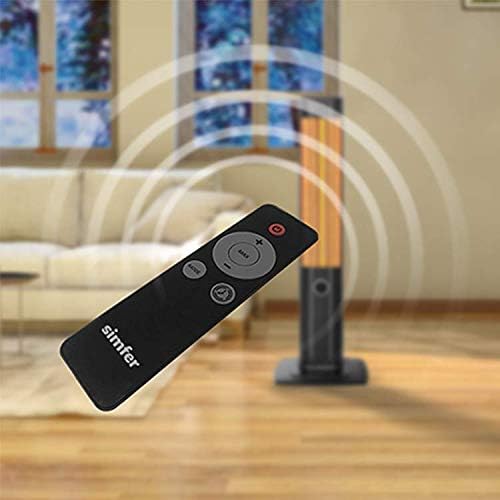
Figure 4.1: The Simfer S.2560.WTB heater shown with its remote control. The remote typically includes buttons for power, heat settings, and possibly a timer or oscillation function.
- Ensure batteries are correctly installed in the remote control.
- Point the remote control towards the heater's receiver.
- Use the respective buttons on the remote for Power ON/OFF, adjusting heat levels, and any other available functions like oscillation or timer (if applicable to your model).
4.4 Thermostatic Control
The built-in thermostat allows you to set a desired room temperature. The heater will automatically turn on and off to maintain this temperature, optimizing energy consumption.
- Refer to your specific model's remote or control panel for thermostat adjustment buttons (e.g., '+' and '-' buttons for temperature).
- Set the desired temperature, and the heater will regulate its operation accordingly.
5. Maintenance
5.1 Cleaning
- Always unplug the heater and allow it to cool completely before cleaning.
- Use a soft, damp cloth to wipe the exterior surfaces of the heater. Do not use abrasive cleaners or solvents.
- Do not immerse the heater in water or allow water to drip into the interior of the heater.
- Periodically clean the air intake and exhaust grilles with a vacuum cleaner attachment to remove dust and lint.
5.2 Storage
When not in use, store the heater in a cool, dry location. It is recommended to store it in its original packaging to protect it from dust and damage.
6. Troubleshooting
| Problem | Possible Cause | Solution |
|---|---|---|
| Heater does not turn on. |
|
|
| Heater produces no heat or insufficient heat. |
|
|
| Remote control not working. |
|
|
7. Specifications
- Brand: Simfer
- Model Number: S.2560.WTB
- Power Output: 2500 W
- Heat Settings: 4 (625W, 1250W, 1875W, 2500W)
- Heating Element: Carbon
- Voltage: 100V
- Form Factor: Tower
- Power Source: Corded Electric
- Mounting Type: Floor Mount
- Product Dimensions: Approximately 20 x 15 x 20 cm (7.9 x 5.9 x 7.9 inches)
- Product Weight: Approximately 3 kg (6.6 lbs)
- Safety Features: Tip-Over Protection
8. Warranty and Support
For warranty information and customer support, please refer to the warranty card included with your product or visit the official Simfer website. Keep your purchase receipt as proof of purchase for any warranty claims.
If you encounter issues not covered in the troubleshooting section, please contact Simfer customer service for assistance.